You spent three hours in that restaurant. You repositioned the hero dish seventeen times. You waited for the chef to plate the garnish exactly right, then fired off a burst of shots the moment the light caught the steam. The final images are stunning. Your client is thrilled.
And then you packed up and left, taking all of that story with you.
Behind-the-scenes food photography video is one of the most underused assets in a commercial photographer's toolkit. Restaurant clients post on Instagram daily. They need content constantly. A 60-second Reel showing your process — the setup, the dishes coming out of the kitchen, the final shots appearing on screen — is marketing gold for them, and a portfolio differentiator for you.
The problem has always been capturing that process without a second crew member. That changes when you pair Ray-Ban Meta glasses with your iPhone 15 Pro shooting macro, and sync them automatically using POV Syncer.
Why Food Photography Behind the Scenes Video Matters Now
Instagram's algorithm heavily favours Reels. TikTok built its entire identity on process content. Restaurant owners know this — they just cannot produce it themselves while running a kitchen.
When you walk in with a POV setup that captures your entire shoot as first-person video, and walk out with a deliverable that shows the polished final photos appearing inside that footage, you are offering something competitors cannot easily replicate. You are selling the story, not just the stills.
More practically: behind-the-scenes content answers the question every potential client has before they hire you. How does this photographer actually work? Do they take control of the space? Are they efficient? Do they handle pressure? A two-minute POV walkthrough answers all of it without you saying a word in a proposal email.
Get the settings right the first time
Download the free POV Photographer's Cheat Sheet — camera settings, EXIF tips, and export presets for Ray-Ban Meta, GoPro, DJI, and Insta360 on one printable page.
Free PDF, no spam. Unsubscribe anytime.
The Setup: Ray-Ban Meta + iPhone 15 Pro Macro
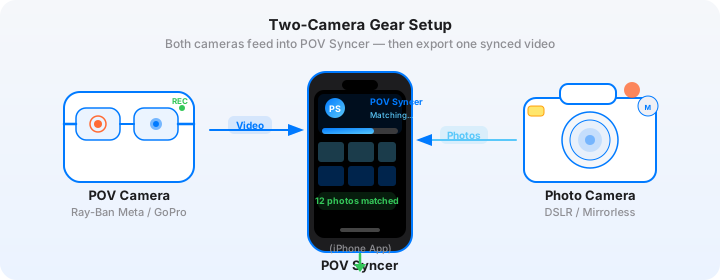
The Ray-Ban Meta glasses are the right tool for restaurant work for one specific reason: they are invisible. You wear them all shoot long. No one on the kitchen floor pays attention to them. Compare that to mounting a GoPro on your head — chefs notice it, restaurant managers get self-conscious, and everyone performs slightly differently on camera.
The glasses capture 1080p video at up to 30fps, which is exactly right for social content. Their wide-angle lens gives a genuine eye-level perspective of your shooting process — you see the table, the dishes, your hands adjusting a reflector, the camera going up to your eye. It is the authentic behind-the-scenes look that no gimbal rig can fake.
Ray-Ban Meta Settings for Restaurant Environments
Restaurant lighting is mixed and dim. That is the enemy of both video and autofocus. Here is what works reliably:
- Resolution: 1080p at 30fps — gives you enough latitude for TikTok and Instagram Reels without generating enormous files
- Video length: Record in chunks rather than one continuous take — easier to manage in POV Syncer's timeline editor
- Connectivity: Keep the Meta app connected on your phone so EXIF and timestamp data stays synced
- Battery: A fully charged pair gives around 30 minutes of continuous recording — plan your shoot around this
The glasses write EXIF timestamp data to each video segment automatically. This is the data that POV Syncer reads to match your still photos to the exact moment in the footage.
iPhone 15 Pro Macro for Hero Dish Shots
The iPhone 15 Pro's macro mode (minimum focus distance of 2cm via the 13mm Ultra Wide lens) is genuinely useful for food detail shots. A bead of sauce, the texture of a crust, the cross-section of a sliced tart — these close-focus images tell a story the full dish cannot.
For indoor restaurant shooting, here are the iPhone settings that produce consistent results:
- Format: HEIF High Efficiency — excellent quality, smaller files, full EXIF timestamp preservation
- Exposure: Lock exposure manually using the sun icon slider in the Camera app; restaurant light changes second to second when servers walk through
- White balance: Use the ProRAW format (available on 15 Pro) if you want maximum editing latitude — POV Syncer reads ProRAW EXIF timestamps cleanly
- ISO: Try to stay under ISO 1600 for food shots; macro depth of field is shallow, so let aperture do the work before pushing ISO
- Stabilisation: Use a small tabletop tripod or lean your elbows on the table — camera shake is more visible at macro distances
The key thing both devices need to agree on: timezone. Before you walk into the restaurant, verify that your iPhone and your Ray-Ban Meta are set to the same timezone and that the time is accurate. POV Syncer's EXIF matching is precise to the second — a one-minute drift between devices means your photos land in the wrong part of the video.
How POV Syncer Brings Your Food Photography Behind the Scenes Workflow Together
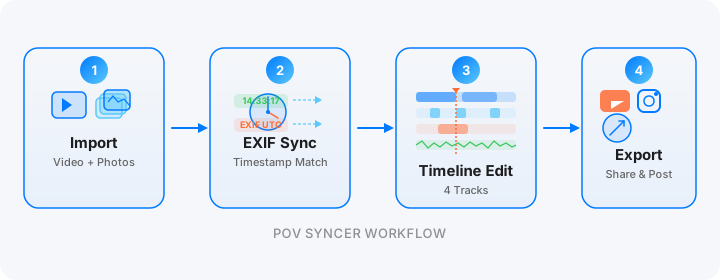
Here is the end-to-end process after you wrap the shoot.
Step 1: Transfer your footage. Copy the Ray-Ban Meta video segments to your iPhone via the Meta View app. Your iPhone photos are already in the Camera Roll.
Step 2: Import into POV Syncer. Open POV Syncer and create a new project. Import your Meta video as the base POV footage, then import your iPhone photos from the same session. The app reads the EXIF timestamp embedded in each photo and calculates exactly where in the video timeline it was taken.
Step 3: Review the auto-matched timeline. POV Syncer places each dish photo at the frame-accurate position where you fired the shutter. You will see the photos overlaid on a 4-track timeline: video base, photo overlays, titles, and voice. Scrub through and confirm the placement looks right.
Step 4: Style the photo overlays. For restaurant work, clean presentation matters. Choose from 10 background styles and 15 premium fonts to match the restaurant's brand aesthetic. A fine dining client needs a different typographic treatment than a casual brunch spot. This is where the Pro tier earns its keep.
Step 5: Add AI narration or ambient audio. POV Syncer's AI voice narration lets you add a brief voiceover describing your approach — "For the hero dish, I shot at f/2.8, ISO 800, using a single LED panel at 45 degrees" — without recording anything on set. Alternatively, import the ambient sound from the restaurant itself for an atmospheric result.
Step 6: Export for Instagram Reels and TikTok. Use the portrait 9:16 export preset. POV Syncer crops and formats the output correctly for vertical playback. Export takes under a minute on an iPhone 15 Pro.
The total editing time from import to export, for a 60-90 second social clip, is typically 10-15 minutes once you are familiar with the workflow. Download POV Syncer free and run through it with your next shoot.
Natural Lighting Tips for Restaurant POV Video
Natural light is the food photographer's first choice, but restaurants are not always cooperative. Window seats are ideal for lunchtime shoots. Evening dinner shoots require a different approach.
Working with Restaurant Practicals
Practical lights — the candles, pendant lights, and table lamps that give a restaurant its atmosphere — are low colour temperature, typically around 2700K. Your iPhone handles this fine in ProRAW. The Ray-Ban Meta footage will shift warm in these conditions, which actually helps the behind-the-scenes look feel intimate rather than clinical.
What you want to avoid is mixed colour temperature: daylight from the window on one side, tungsten practicals on the other, and the blue-green cast of a commercial kitchen fluorescent somewhere in the background. When shooting BTS video, position yourself so the camera on your glasses reads predominantly one light source.
Small Modifiers, Big Difference
A single 8-inch circular LED panel (the kind that folds flat in your bag) transforms indoor food photography without intimidating kitchen staff. Set it to 5600K to match daylight, or 3200K to match the room, depending on your background. This gives the Meta glasses' wide-angle lens enough light to record clean, low-noise footage without the grainy compression that kills social media reach.
Tips for Unobtrusiveness in Restaurant Environments
This is the strongest argument for the Ray-Ban Meta as a BTS camera in food photography. You are not pointing a phone at the chef. You are not asking anyone to look at the camera. You are simply working, and the glasses document it from your perspective.
Practical unobtrusive tactics that work well:
- Tell the restaurant manager you are filming for your own portfolio — most are happy once they know it is not for a review
- Keep recording continuous during the set and hero dish phases; stop during conversations or payment
- Record a short walk from the entrance to the table to open the video with establishing context
- When a server brings the dish, keep your eyes on the food — the glasses capture this naturally as a reveal moment that works brilliantly in Reels
Building a Behind-the-Scenes Package for Restaurant Clients
The commercial opportunity here is significant. You can offer a behind-the-scenes content package as an upsell on every food photography booking. The additional gear cost is zero — you already own the glasses and the iPhone. The additional editing time, using POV Syncer, is 15-20 minutes per clip.
A typical package might include:
- One 60-second Instagram Reel showing the full shoot process
- One 30-second TikTok cut focused on the hero dish reveal
- Three to five still photo exports with captions the restaurant can use directly
Price this package at whatever makes sense for your market — but the production workflow is fast enough that even a modest upsell adds meaningful revenue per booking without significantly affecting your day.
What the Finished Video Looks Like
Here is what a typical output looks like when you run a restaurant food photography session through POV Syncer:
The video opens in portrait format at 1080x1920. You see the restaurant entrance from eye level — the Meta glasses giving a warm, natural walking-in perspective. The ambient sound of the dining room plays underneath. As you approach the table and begin setting up your shot, a text title fades in: the restaurant name, in whatever font matches their brand identity.
Then, as you fire your first burst of shots at the plated starter, the actual photos appear. Not cut-away shots. Not stock. The exact images you just took, matched frame-precisely to the moment the shutter fired, overlaid in a clean presentation with a brief caption. This happens for each course you photograph.
The final eight seconds holds on your best hero dish image with a clean, bold title card. Export in 9:16 portrait, ready to upload directly to Instagram Reels or TikTok.
The result is a piece of content that restaurant clients genuinely value — and that makes your portfolio significantly more compelling than a static PDF of your best work.
Start building your behind-the-scenes workflow
Download POV Syncer free and sync your first restaurant shoot in minutes.
Download on App Store — FreeThe Workflow in Summary
Food photography behind the scenes video used to require a second shooter or a dedicated videographer. With Ray-Ban Meta glasses handling the POV capture and iPhone 15 Pro handling the macro detail stills, you have a complete two-device rig that fits in a jacket pocket and costs nothing beyond what most commercial photographers already own.
POV Syncer closes the final gap: automatically matching your still photos to the exact moments they appeared in your POV footage, and giving you a styled, formatted, export-ready social video without complex timeline editing or post-production software.
Your clients are posting seven days a week. Give them content that shows the world what it looks like to work with you. That is a pitch that writes itself.
Explore all POV Syncer features or read about the sports photography workflow for a different behind-the-scenes angle.