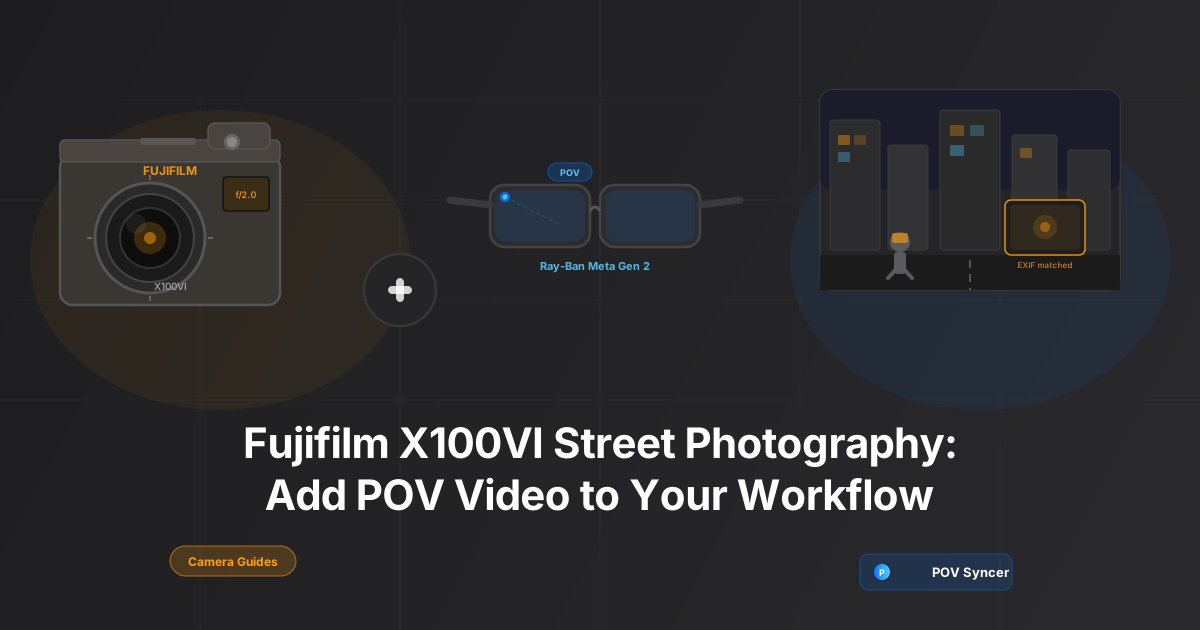
The X100VI Already Has Everything Except Moving Footage
Think about your last street photography session. You were out for two hours. The X100VI produced maybe 40 frames worth keeping, 8 that are genuinely strong, and 2 that stop you in your tracks every time you look at them. But none of that footage tells people what it was like to walk those streets with the camera in your hand.
The cafes you passed. The light at 7am that lasted about four minutes before it changed completely. The way you saw the shot before you raised the camera — the 15-second read of the scene, waiting for someone to step into the right position. None of that is in the JPEGs.
Street photographers who add a POV camera to their kit report a consistent change in how their audience engages with their work. The stills become more meaningful because viewers understand the context in which they were made. The video shows the process; the photo proves the eye. Together they tell a story that neither can tell alone.
The challenge has always been the edit. You come home with X100VI JPEGs and a separate video file, and connecting them in Premiere or Final Cut means hours of manual work — scrubbing through footage, hunting for the moment each photo was taken, dragging clips to a timeline, adding text, syncing audio. Most photographers try it once, decide the editing time isn't worth it, and go back to posting stills only.
POV Syncer removes that barrier entirely. It reads the EXIF timestamp baked into every X100VI JPEG and places each photo at the exact moment it was taken in your POV footage — automatically, in under 60 seconds. The editing grind disappears. The storytelling stays.
Get the free POV Photography Cheat Sheet
Optimal settings for X100VI + Ray-Ban Meta, GoPro, DJI, and Insta360. Time sync steps, EXIF tips, and export presets — all on one printable page. Join 1,000+ photographers getting weekly tips.
Free PDF, no spam. Unsubscribe anytime.
The Setup: Fujifilm X100VI and Ray-Ban Meta Gen 2
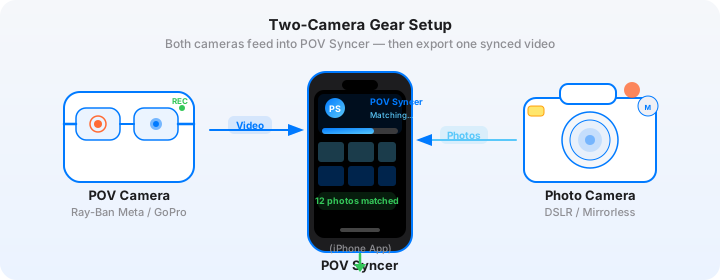
The pairing that works best for X100VI street photography is the Ray-Ban Meta Gen 2. Here is why this combination makes sense over alternatives like a GoPro chest mount or a DJI Action camera.
Why Ray-Ban Meta Gen 2 for Street Photography
Street photography is about being inconspicuous. You are trying to capture candid moments, which means anything that draws attention to your presence as a photographer changes the scene you are trying to photograph. A GoPro on your chest or forehead announces itself immediately. A pair of sunglasses does not.
The Ray-Ban Meta Gen 2 records at 1080p/30fps or 1080p/60fps from a camera embedded in the frame of standard-looking glasses. To everyone around you, you are wearing sunglasses. The POV footage you capture has a natural, first-person quality — the same perspective your own eyes had in the moments before you raised the X100VI.
Key specs for street use:
- 1080p/30fps (default) or 1080p/60fps for smoother footage when you are walking quickly
- 12MP photo mode via voice command or button, though you will primarily use the X100VI for stills
- Up to 30 minutes continuous video per charge — enough for a focused street session
- Built-in directional microphone array for capturing ambient street sound naturally
- Import via Meta View app to iPhone — straightforward transfer with timestamps preserved
Fujifilm X100VI: The Street Photographer's Camera
The Fujifilm X100VI is a 40.2MP APS-C camera with a fixed 23mm f/2.0 lens (35mm equivalent). For street photography, fixed-lens cameras force you to commit to a focal length, which sharpens your instincts for composition and distance over time. The 35mm equivalent is wide enough to include context but tight enough for subject-focused frames — the classic street photography focal length.
Settings that work for street use with this POV sync workflow:
- Film simulation: Classic Chrome for subdued, film-like color; Acros for black and white; Eterna Cinema for a flatter, more cinematic look when you want the video and photos to complement each other tonally
- Aperture: f/5.6–f/8 during daylight for zone-focus shooting — set your focus to 3m and everything from 2–6m is acceptably sharp
- ISO: Auto ISO up to 6400 — the X100VI BSI sensor handles this extremely well, producing clean files at sensitivities that would have been unusable a generation ago
- Shutter: 1/500s minimum to freeze motion in bright conditions
- File format: JPEG Fine + RAW — use JPEGs as your import source in POV Syncer (faster processing, identical EXIF data)
Most importantly: set the UTC offset in the camera menu to match your current timezone before every trip. This single setting determines the accuracy of automatic EXIF matching in POV Syncer. It takes 20 seconds and the difference in sync quality is significant.
The Pain of Manual Editing — and Why Most Photographers Give Up
Before we get into the POV Syncer workflow, I want to be specific about what the alternative actually involves — because if you have tried this manually, you will know exactly what I am describing, and if you haven't, you need to understand what you are avoiding.
What Manual Editing Actually Looks Like
You come home from a two-hour street session. You have 94 X100VI JPEGs and 45 minutes of Ray-Ban Meta footage split across three clips. You open Final Cut Pro or Premiere. You import everything. You start scrubbing the footage looking for the moment you took photo number one. You find a timestamp in the metadata — 09:14:32. You scrub to 9 minutes 32 seconds into the clip. You place the photo. You add a title. You move to photo two.
By the time you have matched 20 photos to their correct positions in the footage, you have been at your desk for 90 minutes. You still have 74 photos to go. The editing grind stretches to 3 hours for what should be a 10-minute finished video. You look at the footage from your next session sitting on the SD card and decide you will get to it next weekend. You never do.
This is the pattern that kills the street photography vlog before it starts. Not lack of material, not lack of ability — hours of manual editing that eat into time you would rather spend shooting.
The Solution: Automatic EXIF Sync with POV Syncer
POV Syncer reads the DateTimeOriginal EXIF field from every X100VI JPEG and cross-references it against the timestamp of your Ray-Ban Meta footage. Every photo is placed at the exact second it was taken. No scrubbing. No manual placement. What took 3 hours of tedious timeline placement now takes under 60 seconds.
The Four-Step X100VI POV Workflow
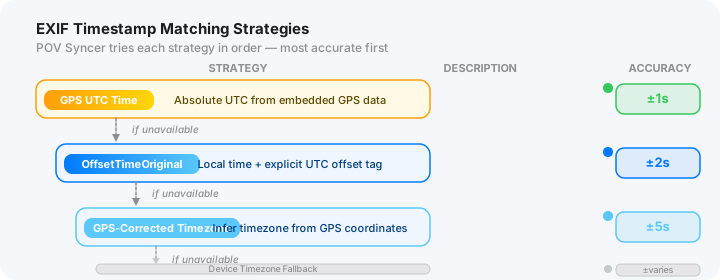
Here is exactly how the workflow runs in POV Syncer for this camera combination.
Step 1 — Import. Transfer your Ray-Ban Meta footage to your iPhone via the Meta View app. Copy your X100VI JPEGs using a USB-C SD card reader. Open POV Syncer, create a new project, and select the Ray-Ban Meta MP4. Then batch-select all your X100VI JPEGs. The app accepts multiple photo formats including JPEG, HEIF, and RAW-derived files.
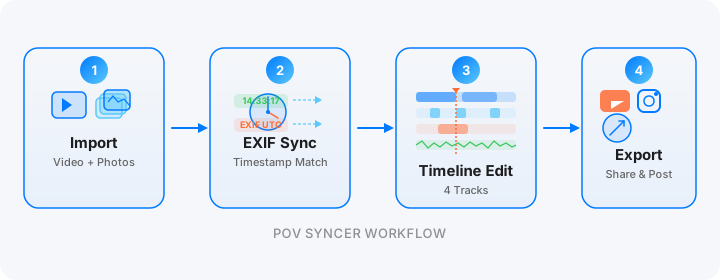
Step 2 — Automatic EXIF match. Tap the sync button. POV Syncer reads the EXIF DateTimeOriginal from each JPEG and matches it to the corresponding position in your footage. For the Ray-Ban Meta Gen 2, the app uses the file creation timestamp from the footage metadata. As long as your X100VI's UTC offset is correctly set, matching accuracy is typically within 1–2 seconds — precise enough that every photo appears exactly where it belongs in the narrative.
Step 3 — Timeline review and edit. POV Syncer's 4-track timeline shows your footage on the main track, with photos, titles, voice narration, and effects on separate tracks. Review the auto-matched placements. Trim the video to the sections you want to keep. Add location titles using the Titles track — choose from 15 premium fonts in POV Syncer Pro. Adjust the display duration of individual photos if needed (the default is 3 seconds, which works well for street content).
Step 4 — Export. Choose your export format. For Instagram Reels, the 9:16 vertical preset crops the footage and repositions photo overlays for the vertical frame. For YouTube, use the 16:9 preset at 1080p or 4K depending on your footage quality. Export takes 1–3 minutes depending on project length.
Create your first POV video in 60 seconds
Import your X100VI JPEGs and Ray-Ban Meta footage. POV Syncer matches every photo to the exact moment it was taken — automatically. Your first project is free.
Download POV Syncer FreeFree first project. Pro: $9.99/month or $99.99/year.
X100VI + Ray-Ban Meta: Tips for Better Street POV Videos
Time Sync Is Everything
The entire value of automatic EXIF matching depends on both cameras agreeing on what time it is. The Ray-Ban Meta Gen 2 syncs its clock automatically via the Meta View app when connected to your phone — so as long as your phone shows the correct local time, the Ray-Ban footage timestamp is accurate.
The X100VI requires a manual UTC offset update whenever you change timezone, or if you notice the camera's clock has drifted. The procedure is: Menu → Setup → Date/Time Setting → check the time against your phone, and update the UTC offset in the same menu if needed. This is a 30-second task that directly determines how accurate your automatic matching will be.
If you are ever unsure whether both cameras are synced, take a quick test shot of a clock or your phone screen. Import both the photo and a few seconds of footage showing the same moment. The EXIF timestamp on the photo and the timecode at that point in the video should match to within a second or two.
Film Simulation and the Video Aesthetic
One of the visual pleasures of the X100VI + Ray-Ban Meta combination is the contrast between the footage and the still photos. Ray-Ban Meta footage has a natural, slightly warm, somewhat wide characteristic — it looks like documentary footage, which it essentially is. Your X100VI Classic Chrome JPEGs look nothing like that. The muted greens, restrained reds, and film-like grain produce images with a completely different visual language.
When a Classic Chrome photo appears as an overlay in your POV video, the contrast is immediate and intentional. It signals to the viewer that this photo represents a different kind of seeing than the continuous footage — a deliberate decision, a moment worth stopping for. Lean into this contrast rather than trying to match the two cameras' color profiles.
For street work in particular, Acros (Fujifilm's black-and-white simulation) creates an even stronger visual separation — black-and-white stills appearing over colour footage have an almost cinematic quality that works extremely well for short-form content on Instagram Reels and TikTok.
What to Say in Your POV Video
The Ray-Ban Meta microphones pick up everything around you — the ambient sound of the street, passing conversations, traffic, music from open shopfronts. This ambient audio is one of the most compelling aspects of the format because it places the viewer in the scene in a way that no amount of color grading can replicate.
You can also use POV Syncer's AI-powered narration feature to add a voice-over track. For street photography content, the most effective narration approach is talking through your photographic decisions: what you saw in the scene before you raised the camera, why you waited for a particular moment, what was happening off-frame that influenced the shot. This kind of inside-the-process commentary is the content that photography audiences find genuinely valuable — it teaches something while showing the work.
Session Length and Battery Planning
The Ray-Ban Meta Gen 2 gives you approximately 30 minutes of continuous video recording per charge. For a 2-hour street session, you will need to charge between clips or carry the Ray-Ban case, which doubles as a charging dock — the case provides 3–4 additional charges, giving you enough capacity for a full day.
The X100VI's NP-W235 battery lasts well for street use — roughly 400–500 shots per charge. Carry one spare and you will not run out.
A practical session structure: wear the Ray-Ban Meta for 25-minute blocks, removing them during transit or while eating. You will capture the parts of the session that matter — the actual streets, the light, the searching — without filling your iPhone with hours of footage you will never use. Four or five 25-minute clips from a 2-hour session gives you the raw material for a 3–5 minute finished video that feels dense with content.
Structuring Your Street POV for Social Media
For Instagram Reels (up to 90 seconds), the most effective structure is:
- Hook shot: 5–8 seconds of compelling footage to open — ideally a strong location or interesting street moment
- First photo overlay: appear within the first 15 seconds so viewers understand the format immediately
- Rhythm of 3–5 photos: space your X100VI photo overlays throughout the clip so there is always something arriving
- End on a strong photo: hold the final image for 3–4 seconds, then cut to black
For YouTube Shorts (up to 60 seconds) or TikTok, the same structure works with tighter timing. For a YouTube long-form video, you have room to breathe — let sections of footage run for 30–40 seconds between photo appearances, and use AI narration to connect the moments into a proper narrative. See our guide on using action camera footage for YouTube Shorts for export settings and pacing tips.
Want settings cheat sheets for 20+ camera combos?
X100VI + Ray-Ban Meta, X100VI + GoPro Hero 13, Ricoh GR IIIx + DJI Action 5 Pro, Leica Q3 + Insta360 GO 3S, and more. Join 1,000+ photographers getting weekly POV tips and camera-specific guides.
Free guides, no spam. Unsubscribe anytime.
What a Finished X100VI Street POV Video Looks Like
Picture a 4-minute YouTube video from a Sunday morning in a city market. The Ray-Ban Meta footage opens cold: the sound of the street before the image settles, your footsteps on wet pavement, a stall owner arranging produce in the early grey light. No intro card, no music — just the scene.
At 22 seconds, the first X100VI photo appears. Classic Chrome. A woman in a red coat reading a newspaper at a coffee stall, completely unaware of the camera. The contrast with the video is immediate — where the footage is ambient and documentary, the photo is precise, composed, complete. It holds for 3 seconds. Then back to footage.
This rhythm continues throughout. The Ray-Ban Meta footage is the connective tissue — it shows the walk, the looking, the time between shots. The X100VI photos are the punctuation marks — each one a moment of clarity. AI narration adds two or three observations about the light, the scene, the decision-making behind specific frames.
Viewers watch to the end because the format creates anticipation: you know another photo is coming. When it arrives, you already understand where it was taken and what the photographer was thinking. The context transforms the still from a good photo into a compelling one.
This is what 3 hours of manual editing used to produce. With POV Syncer, the automatic EXIF sync happens in seconds. The creative work — choosing which clips to use, which photos to feature, what to say in the narration — takes as long as you want it to take. The grind disappears. The artistry stays.
X100VI + Ray-Ban Meta Settings Quick Reference
Ray-Ban Meta Gen 2
- Resolution: 1080p/30fps for standard street sessions; 1080p/60fps for faster-paced environments
- Audio: Default microphone settings — the onboard mics handle street ambient sound well without adjustment
- Recording mode: Continuous video (not photo mode) — start recording when you leave home and stop when you return
- Transfer: Meta View app to iPhone — check that file timestamps are preserved during import (they are by default)
- Battery: Use the charging case between clips — 25-minute recording blocks with 5-minute breaks aligns well with the case charge capacity
Fujifilm X100VI
- File format: JPEG Fine + RAW — import JPEGs into POV Syncer
- Film simulation: Classic Chrome for street color; Acros for black and white with strong visual separation from the footage
- Aperture: f/5.6–f/8 for zone focus; f/2.0–f/2.8 for subject-isolation shots
- Shutter: 1/500s minimum in daylight; use Auto ISO to maintain this
- ISO: Auto, max 6400 for daytime; max 12800 in low light (the BSI sensor handles it)
- UTC offset: Check and update in camera menu whenever you change timezone or notice clock drift
- Silent shutter: Enable electronic shutter for noise-sensitive environments — important for not alerting subjects
Conclusion: The X100VI Was Already Your Street Camera. Now It Tells the Whole Story.
The Fujifilm X100VI is one of the best street photography cameras made. Its images speak for themselves. But the story of how those images came to exist — the streets you walked, the moments you waited for, the light that only lasted four minutes — has always been invisible. Adding Ray-Ban Meta Gen 2 to your kit captures that story. POV Syncer connects the two in seconds, not hours.
One POV camera. One street camera. Thirty seconds of setup. A finished video that shows your audience not just what you saw, but how you saw it.
Start Your First X100VI POV Video Today
POV Syncer is free to download. Your first project — one video clip, one batch of X100VI JPEGs, automatic EXIF matching — is completely free. No credit card required.
Download POV Syncer FreeOr get the free cheat sheet for X100VI + 19 other camera combos:
Free PDF. No spam. Unsubscribe anytime.
Related Guides
- Ray-Ban Meta Gen 2 + Fujifilm X100VI: The Ultimate Street Photography Setup
- Ray-Ban Meta Street Photography: POV Video That Shows Your Process
- Street Photography POV Video: Show How You Got the Shot
- Ricoh GR III Street Photography: Adding POV Video to a Compact Workflow
- EXIF Timestamps Explained: How POV Syncer Matches Photos to Video
- GoPro Hero 13 + Fujifilm X100VI: The Travel Creator's Setup
- POV Syncer Pro — All Features and Pricing