Double Discreet: Insta360 GO 3S + Ricoh GR IIIx Stealth Street Kit
It is Saturday morning, 7:45 a.m. The market on Bermondsey Street is just waking up. You are wearing a plain grey jacket, a 35-gram camera clipped invisibly to your collar, and a camera in your pocket so small it could pass for a thick wallet. Nobody around you knows you are shooting. The fruit vendor does not know. The man reading a newspaper at the corner does not know. The pair of elderly women arguing over a bag of onions absolutely do not know — and because they do not know, what you are about to capture is real.
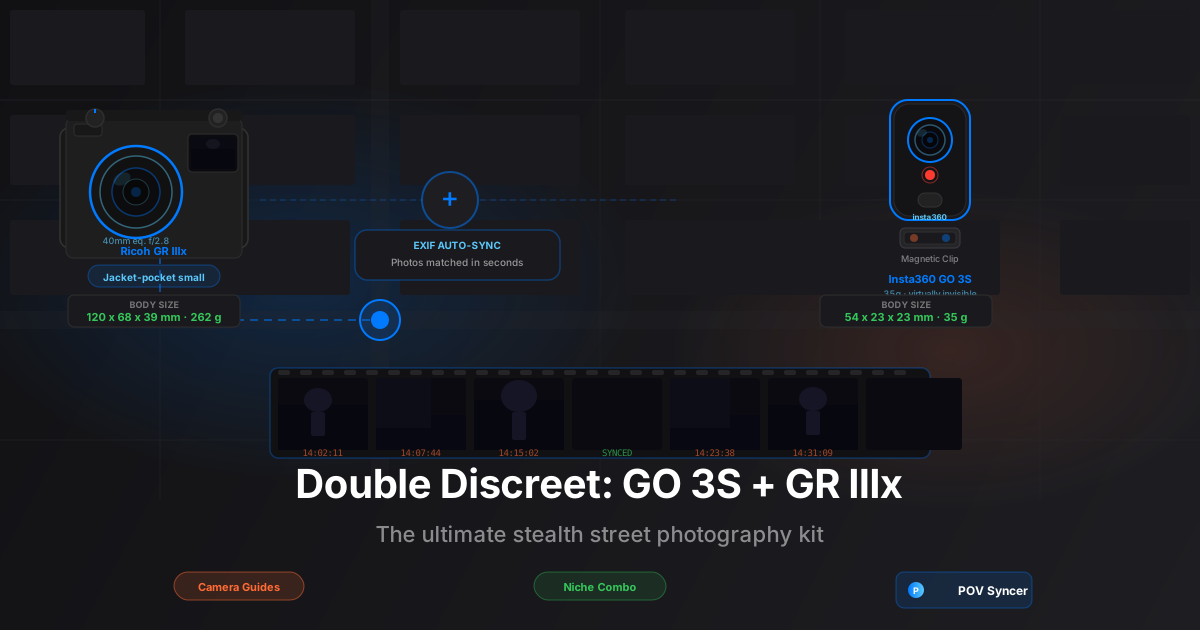
That is the promise of the Insta360 GO 3S and the Ricoh GR IIIx. At 35 grams, the GO 3S is the lightest POV camera you can buy by a significant margin — lighter than most keychains. The GR IIIx, with its 40mm-equivalent f/2.8 lens and body measuring 120 x 68 x 39 mm, is the street photographer's pocket camera of choice for a reason. Together they are the most discreet, most portable, most genuinely invisible POV street photography kit it is currently possible to assemble.
The catch — and there has always been a catch with this kind of setup — used to be the edit. You would come home with two hours of GO 3S footage and 200 RAW files from the GR IIIx, and spend the next three to four hours scrubbing through footage, manually placing photos on a timeline, trying to remember which frame matched which moment. The editing grind was real, and it killed the flow.
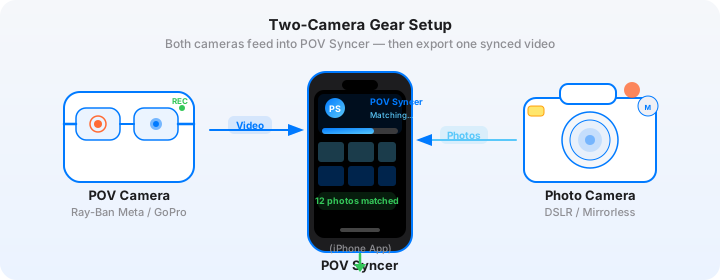
POV Syncer removes that problem entirely. Import the footage and photos, and the app reads the EXIF timestamps from your GR IIIx files and the video metadata from the GO 3S, then places every photo at precisely the right moment on the timeline — automatically, in seconds. The two hours of invisible shooting collapses into a finished video in under ten minutes.
Get the free POV Photography Cheat Sheet
Optimal settings for Insta360 GO 3S, Ricoh GR IIIx, and 20+ other camera combos — all on one printable reference card. Join 1,000+ photographers getting weekly tips.
Free PDF, no spam. Unsubscribe anytime.
Why Discretion Is a Technical Advantage, Not Just an Aesthetic Preference
Experienced street photographers will tell you that the best street pictures are made when nobody in the frame is performing for the camera. The moment a subject notices a lens pointed at them, their behavior shifts — subtly or obviously, but always irreversibly. The candid quality that makes great street photography is gone. You are left with a portrait that nobody asked to sit for.
This is why gear size matters not just for portability but for the fundamental quality of what you are trying to make. A photographer with a full-frame DSLR and a 24-70mm zoom is announcing their presence across the street. A photographer with a GR IIIx is almost invisible. A photographer whose POV camera is a clip on their collar is completely invisible.
The GO 3S takes this logic to its extreme. The camera module itself is 54 x 23 x 23 mm — roughly the size of a fat USB drive. The magnetic clip mount means it sits flat against fabric with nothing protruding that would suggest a recording device. At street level, in motion, among crowds, it is undetectable. This is not a marketing claim; it is a physical fact of the object's dimensions.
The 40mm Argument for the GR IIIx Over the GR III
The original GR III shoots at 28mm equivalent, the classic "snap" street focal length. The GR IIIx crops that same sensor to produce a 40mm equivalent — and for street photography combined with POV video, 40mm is a persuasive choice. It is close enough to the eye's natural field of view that photos pulled from the GR IIIx will feel spatially coherent with the GO 3S's wider field of view. The subject in your still frame and the subject in your POV footage will occupy similar psychological space.
The 40mm equivalent also works beautifully for slightly compressed street scenes — a figure against a wall of graffiti, a pair of hands exchanging money at a market stall, a face caught in a shaft of light between buildings. It gives you a degree of background separation at f/2.8 that the 28mm cannot, without requiring you to get so close that you surrender the discretion you have been carefully maintaining.
Setting Up the GO 3S for Street Photography
The GO 3S is operated primarily through the Insta360 app on your phone, though the camera module itself has a single button for basic start/stop. For street work, the right approach is to set your preferences once in the app and then leave the phone in your bag. You want to be present in the street, not looking at a screen.
Resolution and Frame Rate
For street photography process videos, shoot at 2.7K at 30fps. The 2.7K resolution gives you enough detail to crop and reframe in post if needed, and the 30fps produces footage with the slightly naturalistic motion cadence that suits documentary street content. The GO 3S can shoot up to 4K30 or 2.7K60, but the extra resolution and frame rate cost battery life and storage without a meaningful improvement to the content.
If you are shooting primarily for Instagram Reels and TikTok, consider the 1080p60 setting instead. The 60fps gives you the option to slow-motion key moments — the crowd parting, the decisive fraction of a second before a shot — which is a content format that performs well on short-form video platforms.
Mounting Options for Street Shooting
The magnetic clip that ships with the GO 3S is the correct mounting choice for street photography. It gives you an eye-level perspective that matches what a natural first-person POV looks and feels like. The alternatives — chest mount, hat mount, bag strap — all produce footage that feels detached or artificial when paired with still photography. Collar or upper chest is the sweet spot.
Specific placement matters. Position the clip as close to the center of your chest as possible, with the lens facing forward and very slightly upward. Too low and you capture more pavement than faces; too high toward your chin and the footage looks unnatural. A few test clips before a serious session will dial this in. Once you have the placement right, mark it with a small piece of tape on your jacket lining so you can repeat it precisely on every outing.
GO 3S Settings Reference
| Setting | Recommended Value | Why |
|---|---|---|
| Resolution | 2.7K 30fps | Documentary feel, 90-min battery at this mode |
| Color profile | Vivid or Standard | No flat/log profile on GO 3S; Standard is cleanest |
| Stabilization | FlowState ON | Essential for walking footage — eliminates bounce entirely |
| Wind reduction | ON | Outdoor ambient audio is cleaner with this enabled |
| Auto-start | OFF | Manual start keeps footage intentional |
| Power-off time | 3 minutes idle | Preserves battery during long waits |
Setting Up the Ricoh GR IIIx for Street Shooting
The GR IIIx is a camera that rewards simplicity. The zone-focus street photography tradition — set focus to roughly two to three meters, shoot from the hip or at eye level without raising to the viewfinder, accept that depth of field at f/8 covers everything from one meter to infinity — works brilliantly with the GR IIIx's fast, snappy control layout.
The Snap Focus Technique
The GR IIIx has a dedicated Snap Focus mode that sets the lens to a fixed hyperfocal distance at the press of a button. In Snap mode at f/8, everything from approximately one meter to the horizon is in focus — no autofocus required, no shutter lag, near-instantaneous capture. For the kind of close-quarters urban work where the GO 3S footage will show you nearly running into the subject you just shot, Snap Focus is the only correct technique.
Set your Snap Focus distance to 2.5 meters. Combine with f/8, ISO Auto (200-6400, minimum shutter 1/250s in bright conditions, 1/125s indoors), and you will get sharp captures in virtually every street scenario without touching the focus ring.
GR IIIx Settings Reference
| Setting | Recommended Value | Why |
|---|---|---|
| Mode | Aperture Priority (Av) | Lock aperture, let shutter compensate for light |
| Aperture | f/8 (street), f/2.8 (portraits) | f/8 = zone focus coverage; f/2.8 = selective character work |
| ISO | Auto ISO 200-6400 | GR IIIx sensor is very clean to ISO 3200 |
| Min shutter | 1/250s | Freezes motion on quick-moving subjects |
| Focus mode | Snap Focus at 2.5m | Zero lag, perfect for unplanned moments |
| Image stabilization | ON (Shake Reduction) | Crucial at 1/60-1/125s in low light |
| File format | JPEG Fine + DNG | JPEG for POV Syncer import; DNG for archival printing |
| Image control | Standard or Positive Film | Positive Film gives warm, contrasty street JPEGs |
The Clock Sync Step You Cannot Skip
The GR IIIx does not connect to GPS or network time. Its internal clock drifts, and drift of even five to ten seconds will be visible as a mismatch between the GO 3S footage and the moment photos appear. Before every session, open your phone's Clock app, confirm the time to the second, and then update the GR IIIx clock under Menu > Setup > Date/Time to match exactly.
This takes thirty seconds and is the single most important step in the entire workflow. Get the clock right and POV Syncer's automatic EXIF sync will place every photo at the precise frame it was captured. Get the clock wrong and you will be manually adjusting offsets in the edit.
Download POV Syncer Free — Create your first POV video in 60 secondsThe Manual Editing Pain This Setup Used to Create
Before apps like POV Syncer existed, the GO 3S and GR IIIx combination was simultaneously the most appealing and most frustrating street photography setup you could run. The appeal was obvious — tiny, invisible, capable of remarkable work. The frustration was everything that came after the session ended.
Import the GO 3S footage to your computer and you are looking at one or more long video files. Import the GR IIIx DNGs and you are looking at hundreds of still images. Now you have to synchronize them. In Premiere Pro or Final Cut Pro, that means scrubbing through footage, identifying the moment of each shutter fire by looking for subtle camera movement or listening for the GR IIIx's soft click on the audio track, then manually dragging each photo to the correct timecode position on the timeline.
For a two-hour street session with two hundred shots, that process takes three to four hours of tedious timeline placement. The editing grind is not a small inconvenience — it is longer than the session itself. Most photographers who tried this workflow abandoned it within a few weeks, not because the output was not good, but because the hours of manual editing were simply unsustainable.
The POV Syncer Workflow: From Session to Finished Video
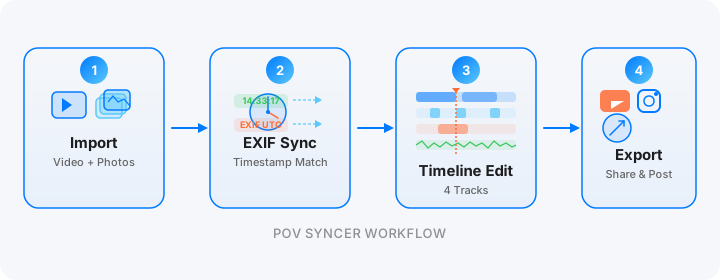
POV Syncer replaces the entire manual process with automatic EXIF sync. Here is the complete workflow from end of session to exported video.
Step 1: Transfer Footage and Photos to Your iPhone
The GO 3S pairs with your iPhone over Wi-Fi through the Insta360 app. At the end of a session, open the app and transfer the clips you want to use — you do not need to transfer everything, just the sections you intend to include in the video. Transfer at original quality; the app will handle compression on export.
For GR IIIx photos, use a Lightning or USB-C card reader to import directly from the SD card to your iPhone's Photos library, or sync via the Ricoh Image Sync app if you prefer wireless transfer. Import JPEG Fine files (not DNG) for use in POV Syncer — the app reads EXIF from JPEG files and does not require RAW format.
Step 2: Import and Automatic EXIF Match
Open POV Syncer and create a new project. Import the GO 3S video clips as your base footage. Then import the GR IIIx JPEGs from your Photos library. The moment you tap "Sync," POV Syncer's EXIF matching engine reads the DateTimeOriginal and OffsetTimeOriginal fields from each JPEG, compares them to the video's start timestamp, and calculates the exact frame position for each photo. The entire sync runs in seconds — even for a 200-photo session.
What took hours of manual scrubbing in Premiere is done automatically in under 60 seconds. You will see every photo appear as a marker on the video timeline at its precise position. The match accuracy is typically within one to two seconds, which is imperceptible in the finished video.
Step 3: Edit the Timeline
With photos auto-placed on the timeline, you can now edit the video around them rather than trying to match photos to footage. Trim the video to keep only the most interesting passages — the moments where something is clearly happening in the frame, where the GO 3S footage shows you engaging with the scene you were about to photograph.
Use POV Syncer's title cards to add location and time context at the opening. The 15 premium fonts include clean, editorial-weight typefaces that work well for street photography content — choose something that suggests print journalism or documentary film rather than vlogger templates. A single location title at the start and perhaps one text card over your strongest image is usually all you need.
Step 4: Add AI Narration or Ambient Audio
The GO 3S captures clean ambient audio through its built-in microphone. Street sound — footsteps, passing traffic, fragments of conversation, the soft mechanical snap of the GR IIIx — is part of the content. Do not bury it entirely with music or narration.
If you want to add spoken context, POV Syncer's AI narration feature lets you type a short script and choose from a range of premium voices. For street photography content, a thoughtful, measured voice works better than an energetic presenter style. Keep the narration brief — 50 to 80 words over a two-minute video is usually the right ratio. The footage and the images should carry most of the weight.
Want settings cheat sheets for 20+ camera combos?
The GO 3S and GR IIIx are one of 20+ camera combinations covered in our free weekly tips email. Get optimal settings, EXIF troubleshooting guides, and export presets for every major POV and street camera setup.
Free, weekly. Unsubscribe anytime.
The Finished Video: What It Actually Looks Like
The GO 3S and GR IIIx combination produces a specific kind of POV street video that is unlike anything else in the genre. Because both cameras are so small and so unobtrusive, the footage has a genuine documentary quality — not the high-drama action-camera energy of a GoPro chest mount, not the slightly theatrical quality of Ray-Ban Meta glasses that subjects sometimes notice and react to. The GO 3S footage looks like what you actually see when you walk through a market or down a side street. It is unremarkably, authentically human-scale.
The GR IIIx stills that punctuate this footage are typically precise, compressed, 40mm images with a slightly elevated perspective on the scenes the GO 3S was showing you a moment earlier. The visual rhythm — wide ambient footage, then a tighter, sharper still — creates a viewing experience that feels genuinely educational. Audiences understand instinctively how the still was made because they just watched the photographer make it.
Ideal Use Cases and Export Formats
This combination and workflow is particularly effective for the following content formats:
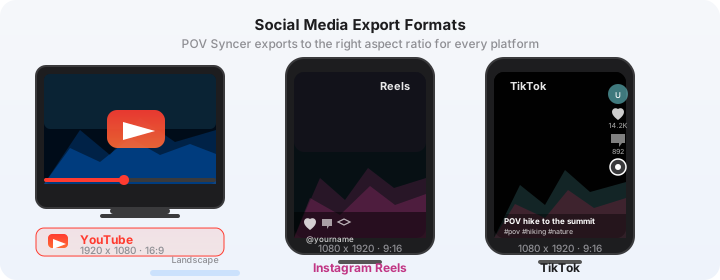
- Instagram Reels (90 seconds, 9:16): Select one or two of your strongest GR IIIx shots and build 90 seconds of context footage around them. The vertical crop of the GO 3S's footage works naturally for Reels. Export at 1080x1920 from POV Syncer's export panel.
- YouTube shorts (60 seconds, 9:16): A single decisive-moment still with 45-60 seconds of context footage. Fast, digestible, and highly shareable to the street photography audience on YouTube.
- YouTube long-form (10-15 minutes, 16:9): A full session walk with 10-20 photos, light narration, and a reflective title card near the end. This format builds serious audience loyalty among photographers who want to learn process.
- Portfolio process videos (2-3 minutes): Companion content for a specific image you are posting to your portfolio. The video shows how the image was made; the image shows what the video was working toward. Cross-posted to Instagram, Behance, and your own site.
Advanced Tips for the GO 3S and GR IIIx Combination
Shooting Multiple Sessions Without Re-syncing Clocks
If you shoot multiple sessions in a single day — morning market, afternoon streets, evening golden hour — you only need to sync the GR IIIx clock once at the start of the day, provided you keep both cameras running on the same location's timezone. Do not change the phone's timezone mid-day or you will introduce an offset that POV Syncer will need to correct in post. Keep time zones consistent and the sync will work perfectly across all sessions from a single day.
Low-Light Performance
The GR IIIx performs remarkably well at ISO 3200, which in practical terms means it handles most low-light street scenarios without significant noise. The GO 3S's low-light performance is more limited — at f/2.4 maximum aperture and a small sensor, the footage becomes noticeably noisy above ISO equivalent 800 in very dark conditions. The practical implication is that early morning and evening golden hour are the sweet spots for this kit; deep night photography is better served by a camera with a larger sensor and a faster lens on the POV rig.
For low-light street work with this pairing, shoot in the hour after sunset rather than full darkness. The GO 3S handles mixed artificial and residual natural light reasonably well; it is pure darkness that exceeds its capability. The GR IIIx, by contrast, will keep delivering excellent stills in difficult light. The slight mismatch in low-light performance between the two cameras is the only meaningful limitation of this otherwise remarkably capable pairing.
Battery and Storage Planning
The GO 3S module provides approximately 70-90 minutes of recording at 2.7K30 with FlowState stabilization enabled. The charging case adds two to three full recharges, giving you three to four hours of total recording time from a compact, pocket-sized case. For a full-day street session, carry the charging case and plan to stop for a coffee refill mid-session while the module recharges.
The GR IIIx battery is similarly modest — around 200-250 shots per charge. Carry a spare, which at their size adds almost nothing to the weight of your kit. A fast USB-C charger for the GO 3S module and a spare NP-95 battery for the GR IIIx adds perhaps 80 grams to your jacket pockets. The entire kit — both cameras, both spares, everything — sits comfortably in a light jacket without a bag.
The Bagless Street Kit
This is the genuine breakthrough of the GO 3S and GR IIIx combination: you can shoot a complete POV street session with no bag at all. The GR IIIx goes in one jacket pocket. The GO 3S charging case goes in the other. The camera module clips to your collar. Your phone, wallet, and keys take care of the rest. No camera bag. No strap over the shoulder. No equipment that reads as "photographer" to the people you are approaching.
For documentary street work in crowded or politically sensitive locations — protests, religious events, markets in countries where photography can attract unwanted attention — this level of discretion is not just aesthetically preferable. It is functionally important. The ability to be present without announcing yourself as a recording device is the foundation of the genre, and no other POV-plus-stills combination achieves it at this level.
Why This Is the Definitive Stealth Street Photography Kit
There are other ways to build a discreet street kit. Ray-Ban Meta glasses are excellent and increasingly adopted. A GoPro Hero 13 in a low-profile chest mount is less intrusive than it used to be. Insta360's Ace Pro 2 on a magnetic clip is a larger but more capable alternative to the GO 3S. But none of these combinations achieve the combination of true invisibility on both the POV camera and the stills camera simultaneously.
The GO 3S is the only POV camera that disappears onto the body completely. The GR IIIx is the only serious street camera that disappears into a pocket completely. Together they are the only combination that lets you walk through any environment, in any company, without a single physical signal that you are recording anything at all. That is not a marginal improvement over other setups. It is a categorically different relationship between photographer and subject.
Combined with POV Syncer's automatic EXIF sync — which removes what was previously hours of manual editing grind — this kit is now not just the most discreet street setup possible but the most practical and sustainable one. You come home from a session, import two sets of files, and have a finished video in the time it takes to make a cup of coffee.
Conclusion: Invisible Kit, Effortless Edit
The Insta360 GO 3S and Ricoh GR IIIx are individually the most discreet cameras in their respective categories. Paired together, they produce a street photography workflow that is genuinely invisible at the shooting stage and, with POV Syncer, almost instant at the editing stage. What used to take three to four hours of tedious timeline work now happens automatically in seconds — freeing you to spend your time making the work instead of editing it. For serious street photographers who care about authentic, candid documentation, this is the kit that gets out of the way and lets the photography happen.
Ready to turn your stealth sessions into compelling POV video?
Download POV Syncer free and sync your GO 3S footage with GR IIIx photos automatically. Your first video in under 60 seconds — no manual editing required.
Download POV Syncer FreeOr join 1,000+ photographers getting weekly tips:
Free PDF, no spam. Unsubscribe anytime.