Night Shift POV: Street Photography After Midnight
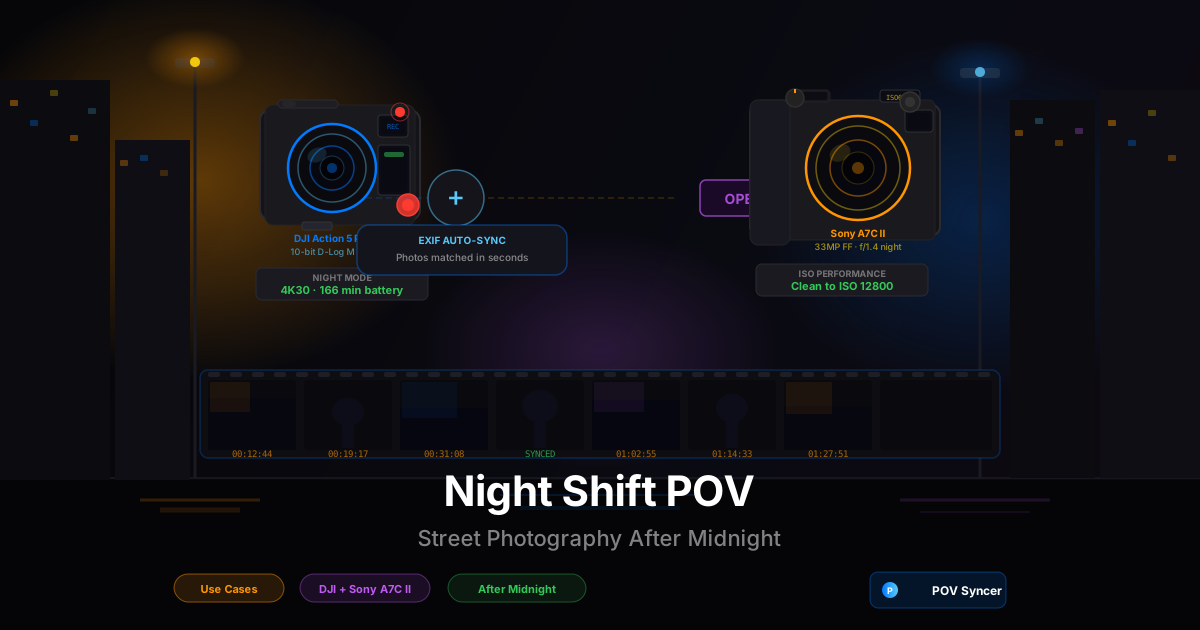
It is 12:40 a.m. You are standing under a single sodium streetlight on a rain-slicked pavement somewhere in the middle of the city. The last bar crowd dispersed forty minutes ago. A taxi idles at the corner. Somewhere down the block, a neon sign buzzes — red letters, one of them flickering — and the light it throws against the wet concrete is exactly the kind of thing you came out here to photograph. The Sony A7C II is around your neck, 35mm f/1.8 mounted, ISO already climbing toward 6400. The DJI Action 5 Pro is on your chest mount, rolling in Night mode, its 1/1.3-inch sensor quietly pulling light out of the dark.
Nobody prepared you for how good midnight street photography feels. The city empties out and turns into a stage — beautiful and slightly threatening in equal measure, shadows doing the compositional work that crowds do in daylight. The people still out at this hour are more interesting for being out at this hour. The light is harsh and theatrical and unrepeatable. It is, in almost every way, a better visual environment than the one you left behind at noon.
The problem used to come when you got home at 2 a.m., buzzing from the session, and sat down to edit. Two hours of DJI footage. Eighty-something ARW files from the Sony. Premiere Pro open on the monitor. And the next three to four hours of your life committed to scrubbing through footage frame by frame, manually placing every single photo on the timeline, trying to match the moment of each shutter fire to the correct second of video. By the time you finished the edit, you were too exhausted to even watch it back properly.
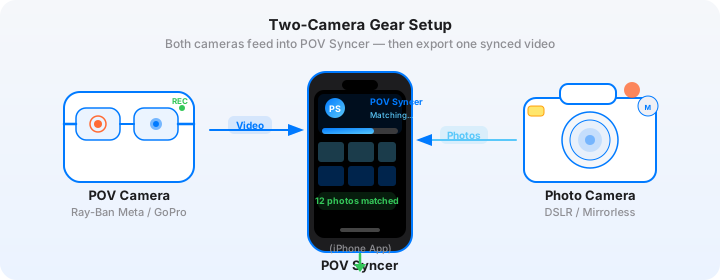
That editing grind is what killed most photographers' after-dark POV workflow before it really started. The shooting was worth it. The edit was not. POV Syncer changes that equation entirely — automatic EXIF sync matches every Sony still to its exact moment in the DJI footage in seconds, not hours. You can be in bed by 3 a.m. with a finished video and your alarm set for a reasonable morning.
Get the free POV Photography Cheat Sheet
Night-specific settings for DJI Action 5 Pro, Sony A7C II, and 20+ other camera combos — including low-light ISO guides, night mode configurations, and EXIF sync tips. Join 1,000+ photographers getting weekly tips.
Free PDF, no spam. Unsubscribe anytime.
Why Night Is a Different Genre
Daytime street photography is fundamentally about people and moments — the decisive fraction of a second, the coincidence of bodies and geometry, the human comedy of public space. Night street photography keeps all of that and adds a visual layer that daylight cannot provide: light as subject.
After midnight, every light source in the city becomes a character. The sodium orange of old street lamps casts deep amber shadows. LED shop signs cut hard lines of colour against dark facades. A single fluorescent tube inside an all-night convenience store creates a rectangle of clinical white in an otherwise black street. These are not just conditions to manage. They are the material of the work.
Why the DJI Action 5 Pro Is the Right Night POV Camera
Most action cameras struggle in low light. Their small sensors clip highlights brutally, crush shadows to noise, and produce footage that looks usable only in the middle exposure range. After dark, those cameras produce footage that works against you rather than for you.
The DJI Action 5 Pro is different in a specific and meaningful way. Its 1/1.3-inch sensor is larger than any direct competitor — roughly 40% more surface area than the GoPro Hero 13's 1/1.9-inch sensor. That physical difference translates directly to light-gathering capability. In DJI's Night mode, the Action 5 Pro can produce usable footage at light levels that would be practically unworkable on any other action camera. It is not perfect — it is still a 1/1.3-inch sensor, not a full-frame mirrorless — but it is genuinely good enough to match the visual environment that night street photography creates.
The DJI's RockSteady 4.0 stabilization is also essential in the dark. Night shooting on the Sony A7C II means working with slower shutter speeds, which in the action camera translates to a brighter sensor but also means that even minor camera shake becomes visible in the footage. RockSteady handles the walking-pace movement of street shooting cleanly, even when the sensor is running at its limits.
Why the Sony A7C II Is the Right Night Street Camera
The Sony A7C II's 33MP full-frame BSI CMOS sensor is one of the cleanest high-ISO performers currently available in a compact mirrorless body. At ISO 6400, the output is genuinely clean — fine, film-like grain rather than chunky luminance noise. At ISO 12800, it is still usable with modern noise reduction. At ISO 25600, you are in artistic territory rather than technical failure territory, which on some cameras at that setting would simply be unusable.
The A7C II's 759 phase-detect AF points cover 94% of the sensor, and the Eye AF system tracks subjects reliably in low light conditions that would defeat most cameras' autofocus entirely. For night street work where you are often shooting quickly at subjects who are backlit or partially obscured by shadow, that AF reliability is not a luxury — it is what makes the shots possible.
The compact body — 124 x 71 x 63 mm, 514 grams with battery — means it does not read as a professional camera at a glance in low-light situations. Pair it with a small prime (the 35mm f/1.8 at 280 grams is the obvious choice) and you have a full-frame kit that handles exactly like a compact without the compromises.
Night-Specific Camera Settings
Daytime street settings will not work after dark. The exposure triangle behaves differently when your primary constraint is light starvation rather than light management. Here is what actually works for each camera in genuine low-light conditions.
DJI Action 5 Pro Settings for Night Street Shooting
The first decision is whether to use DJI's dedicated Night mode or to manually configure D-Log M for color grading in post. For most night street work, Night mode is the correct choice. It applies multi-frame noise reduction internally, adjusting exposure and frame blending to produce cleaner footage than manual configuration can achieve at the same light level. The trade-off is that Night mode footage has less grading latitude than D-Log M — but the cleaner baseline image usually matters more than the additional dynamic range at true night exposure levels.
| Setting | Night Recommendation | Why |
|---|---|---|
| Mode | Night mode (or Manual, Auto ISO) | Night mode applies DJI's multi-frame NR; cleanest output under 5 lux |
| Resolution | 4K 24fps or 1080p 30fps | Lower frame rate means longer exposure per frame; 24fps is more cinematic for night content |
| Stabilization | RockSteady ON | Essential — any camera shake at slow exposure is amplified in low light |
| Color profile | DJI Standard or Normal | Skip D-Log M in Night mode; the NR and Standard color science work better together |
| ISO limit | Auto, max 6400 | Above ISO 6400 the DJI footage becomes visually coarse; let the shutter compensate instead |
| Wind noise | ON | Night environments often amplify wind against the microphone; reduction helps clean the ambient audio |
| Low-light auto-exposure | Slow shutter (1/24s at 24fps) | At minimum frame rate, the sensor integrates more light per frame — brighter, cleaner output |
Sony A7C II Night Street Settings
The Sony A7C II wants to be shot wide open at night. The logic is simple: more light on the sensor means lower ISO, which means cleaner output, which means photographs that hold up at larger sizes and reward closer examination. For a lens like the 35mm f/1.8 FE, wide-open shooting in the f/1.8–f/2.8 range with auto ISO set to 100–12800 is a powerful combination. You get sharpness, shallow depth of field that separates subjects from murky backgrounds, and ISO values that keep noise below the point of artistic concern.
| Setting | Night Recommendation | Why |
|---|---|---|
| Mode | Aperture Priority (Av) | Lock aperture, let shutter float with light level changes |
| Aperture | f/1.8–f/2.8 | Wide open maximises light; f/2.8 gives slightly better sharpness corner-to-corner |
| ISO | Auto ISO 100–12800 | A7C II is clean to 6400; 12800 usable with NR; above that is artistic territory |
| Min shutter speed | 1/60s (static), 1/125s (moving subjects) | 1/60s captures static scenes sharply; faster for pedestrians in motion |
| AF mode | Wide Zone with Eye AF | Eye AF reliably finds subjects even in partial shadow; Wide Zone covers more of the scene |
| IBIS | ON, Active | Sensor-shift stabilization allows handheld shooting at 1/30–1/60s for static scenes |
| Picture Profile | PP2 (Standard) or PP11 (S-Cinetone) | Standard for punchy night JPEGs; S-Cinetone for tonal consistency with the DJI footage |
| File format | JPEG Fine + ARW | JPEG for POV Syncer import; ARW for archival RAW processing of strong frames |
The Clock Sync You Must Do Before Every Session
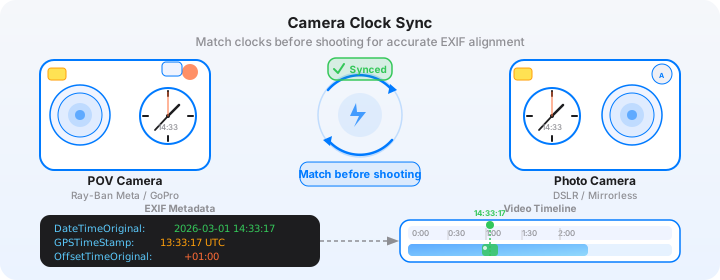
Night photography adds a specific complication to the EXIF sync workflow: both cameras have been sitting uncharged since your last session, and their internal clocks may have drifted. The DJI Action 5 Pro syncs its clock automatically via GPS when it acquires a satellite signal — which it typically does within 30 seconds of being powered on outdoors. The Sony A7C II does not have GPS natively, and its clock drifts slowly but measurably over weeks without a sync.
Before every night session, use the Sony Imaging Edge Mobile app on your iPhone to sync the A7C II's clock to network time. This takes about ten seconds over Bluetooth. Do it while the DJI is acquiring its GPS lock — by the time the DJI is ready to record, both cameras are within one second of each other, and the automatic EXIF sync in POV Syncer will work exactly as expected.
Miss this step and you will find yourself manually adjusting time offsets in the edit — a frustrating extra task when you get home at 2 a.m. and just want a finished video.
Download POV Syncer Free — Create your first POV video in 60 secondsThe Manual Editing Grind That Night Sessions Create
Here is the brutal arithmetic of the manual night photography editing workflow. You shoot for two hours — midnight to 2 a.m. That generates roughly 90 minutes of DJI Action 5 Pro footage across three or four clips and perhaps 80 to 120 Sony stills. Back at your desk, in Premiere Pro or Final Cut, the edit goes like this.
Import the DJI clips. Scrub through each one, hunting for the subtle moments — the slight camera jolt as the Sony shutter fires, the fraction of a second where your shoulder dips as you raise the camera. In daylight footage this is tedious. In night footage, where the video is darker, noiser, and harder to read frame-by-frame, it takes genuinely longer. You are squinting at a low-contrast image trying to identify whether that small movement on frame 873 corresponds to the photo of the wet taxi or the photo of the woman in the red coat outside the bar.
Then you do it for every single photo. For an 80-shot session, that means 80 iterations of scrubbing, identifying, dragging, placing, adjusting. A conservative estimate is three minutes per photo for a careful edit. That is four hours for a two-hour night session. The editing grind is not proportional to the session — it scales with the number of shots, not the length of the walk. And on a good night, you shoot more, not less.
Most photographers who try this workflow once or twice quietly abandon it. Not because the output is not worth it — it absolutely is — but because spending four hours editing every time you go out at night is simply not sustainable alongside a regular life. The sessions stop. The footage sits on a hard drive. The photos go nowhere.
The POV Syncer Night Workflow: Automatic EXIF Sync in Seconds
POV Syncer solves the matching problem at its root by reading the EXIF timestamp baked into every Sony JPEG at the moment of capture. The DateTimeOriginal field records the exact second the shutter fired. The OffsetTimeOriginal field records the timezone offset so the timestamp can be reconciled with UTC. The DJI Action 5 Pro writes its video start time referenced to GPS UTC. POV Syncer's four-strategy matching cascade reads all of this automatically and places every photo at the precise frame in the video where the shot was taken.
Step 1: Transfer Media to Your iPhone
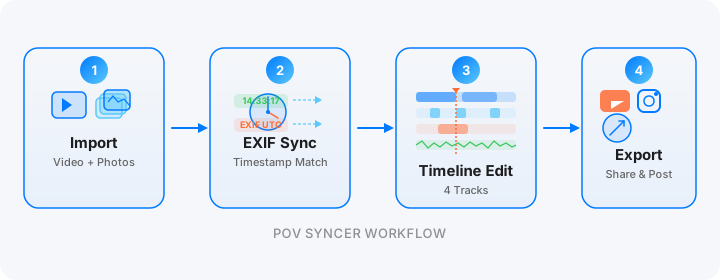
When you get home from a night session, transfer the DJI footage to your iPhone via the DJI Mimo app over Wi-Fi, or via a USB-C card reader if you prefer a wired transfer. For night sessions where you shot in Night mode, the DJI files will be noticeably larger than standard footage — the multi-frame processing creates slightly bigger files. A 90-minute session at 4K Night mode will typically occupy 10–14 GB.
Transfer the Sony JPEG files via the Imaging Edge Mobile app wirelessly, or via a Lightning-to-SD card reader. Import only the JPEG Fine files into POV Syncer — not the ARW files. The ARW files are for archival RAW processing; the JPEGs contain the full EXIF block that POV Syncer reads for matching, and they import faster. The sync is based on timestamps, not file size.
Step 2: Import and Auto-Match
Open POV Syncer and create a new project. Import your DJI night clips as the base footage. Then import your Sony JPEG batch from the session. Tap Sync. The matching engine reads DateTimeOriginal and OffsetTimeOriginal from every JPEG, compares each timestamp against the DJI video's GPS-referenced UTC start time, and calculates the exact frame position for every photo. For an 80-shot session, this runs in well under 60 seconds.
The result: every Sony still appears as a marker at its precise position on the video timeline. What took hours of manual scrubbing in Premiere is done automatically in seconds. The accuracy is typically within one to two seconds, which is visually imperceptible in the finished video.
Step 3: Shape the Night Timeline
With photos auto-placed on the timeline, your edit starts from a position of strength rather than effort. You are not trying to reconstruct the chronology of the session — the app already knows it. You are making creative decisions about what to keep and how to pace it.
For night street content, a few editing principles apply differently than they do for daytime work. Slower pacing works in your favor: a photo of a rain-wet street under neon deserves five or six seconds on screen, not two. The viewer needs time to read the depth of the image — the reflections, the layers of light, the figure in the mid-ground. Rushing night photography content in the edit is the most common mistake I see in POV street videos.
Use POV Syncer's title cards deliberately for night sessions. A simple "01:17 a.m." caption over an establishing shot sets an immediate mood. Location and time together — "Shoreditch, East London — 12:44 a.m." — gives the viewer context that makes the footage feel intentional rather than incidental. The 15 premium fonts include several that suit the moody, late-night editorial register: a clean geometric sans-serif in white, or a slightly condensed serif in warm off-white, both work well over dark night footage.
Step 4: Audio and Narration for Night Sessions
Night audio is one of the underrated pleasures of after-dark street shooting. The DJI Action 5 Pro's microphone captures it beautifully: distant sirens, the muffled bass from a club three blocks away, rain on pavement, the particular echoing quality of footsteps in an empty street. This ambient audio is part of the content. Do not bury it with a music track.
If you want to add narration, POV Syncer's AI-powered narration feature lets you write a script and choose from a range of voices. For night street photography content, a measured, slightly cinematic voice works better than an energetic presenter style. Keep the script short and observational — 60 to 100 words over a two-minute night video is about right. The footage and the stills should carry the weight; the narration adds context and perspective, not explanation.
Want settings cheat sheets for 20+ camera combos?
Night settings for DJI Action 5 Pro, Sony A7C II, Fujifilm X100VI, Ricoh GR IIIx, and 18+ other camera combinations — all covered in our free weekly tips email. EXIF troubleshooting, export presets, and low-light workflow guides included.
Free, weekly. Unsubscribe anytime.
Night-Specific Tips for the DJI and Sony Combination
Dealing with the Dynamic Range Gap Between Cameras
The most visible technical challenge in night POV video is the dynamic range gap between the DJI Action 5 Pro footage and the Sony A7C II stills. The Sony, shooting RAW-derived JPEG at ISO 3200 with careful exposure, produces images with rich shadow detail and controlled highlights. The DJI, even in Night mode, will clip highlights more aggressively and crush shadows below a certain threshold. The two sources can look visually inconsistent when placed side by side in the edit.
The practical workaround is to export the DJI footage with a slight contrast and brightness boost before importing to POV Syncer, using the DJI Mimo app's basic editing tools. Bring the DJI footage closer to the Sony's tonal range — lift the shadows slightly, pull the highlights down by about fifteen percent — and the two sources will sit together more comfortably in the final video. This is not a perfect solution, but it is a significant improvement over presenting the footage ungraded.
When to Embrace the Visual Contrast
Counterintuitively, the dynamic range gap between the DJI footage and Sony stills can work for you rather than against you, if you lean into it deliberately. The DJI footage's grittier, higher-contrast look is a coherent aesthetic for night street work — it reads as raw, documentary, unpolished in a way that feels appropriate to the genre. The Sony stills punctuating that footage with their richer, cleaner rendering create a deliberate visual rhythm: rough ambient video, then a precise editorial still, then rough video again. The contrast becomes a feature rather than a flaw when it is consistent and intentional.
The photographers whose night POV content works best are generally those who have made a conscious decision about which approach they are taking — consistent graded look, or deliberate two-texture approach — and committed to it across the whole video rather than trying to fix the gap partially and ending up with something incoherent.
Crossing Midnight: The EXIF Timestamp Edge Case
If your session spans midnight — starting at 11 p.m. and ending at 1 a.m., for instance — there is one specific edge case to be aware of. Some older Sony firmware versions wrote DateTimeOriginal in a format that could create ambiguity around the date rollover at 00:00. The A7C II's firmware from version 2.0 onward handles this correctly and writes unambiguous timestamps through midnight. If you have not updated your A7C II firmware recently, do so before a midnight session — it takes about five minutes and removes the issue entirely.
POV Syncer's EXIF matching cascade handles the midnight rollover automatically in all cases, reading the full date-time string including date component. But having up-to-date Sony firmware means the timestamps are unambiguous from the source, which is always better than relying on downstream correction.
Battery Management for Late-Night Sessions
Cold temperatures at night — common in European and North American cities from autumn through spring — affect battery life on both cameras more significantly than manufacturers' spec sheets suggest. The DJI Action 5 Pro's rated 166 minutes of recording drops to roughly 100–120 minutes in temperatures around 5°C (41°F). The Sony A7C II's rated 740 shots per charge drops to around 500–550 in similar conditions.
For a midnight session, carry one fully charged DJI battery and at least one spare Sony NP-FZ100 battery. Keep spare batteries in an inner jacket pocket close to your body — body heat slows their cold-induced capacity loss significantly. Start the session with both cameras at 100% and plan your route around a midpoint where you can swap the DJI battery if needed. A two-hour night walk typically uses one full DJI battery and about 70–80% of one Sony battery.
Night-Specific Composition for POV Video
Night POV video composition is different from daytime in one key respect: the DJI's wide-angle lens, which in daylight provides helpful environmental context around the Sony still you are about to take, often provides unhelpfully dark and ambiguous context at night. The ambient footage between shots can look dark and incoherent unless you are intentional about keeping the DJI pointed at the most visually interesting available light source.
Walk toward the light, not across it. Position yourself so that street lamps, neon signs, and lit windows are in front of you rather than to the side. The DJI footage will show you moving through pools of light and dark — which is cinematic and evocative — rather than showing undifferentiated murk. Your Sony shots will be positioned at the moments you stepped into a light source, which is exactly when the interesting street photographs present themselves.
What the Finished Night Video Looks Like
The best midnight street photography POV videos have a specific quality that daytime videos cannot replicate. The DJI footage has weight and atmosphere — the slight grain of the Night mode processing, the way sodium light pools on wet pavement, the deep blacks between light sources. The Sony stills that punctuate it are precise, sharp, and full of the detail that the wide-angle video eye cannot resolve. Together they create a viewing experience that feels genuinely immersive in the subject matter: you are out at midnight with this person, in this light, making these photographs.
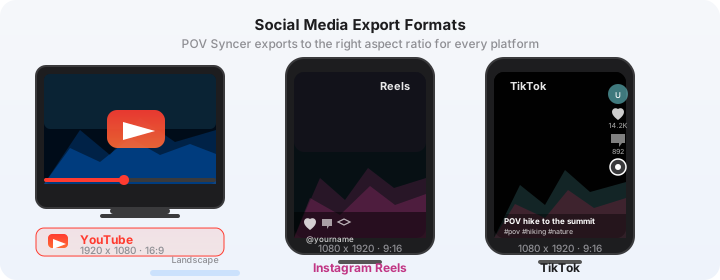
For export, night content performs well at slightly higher contrast than daytime footage. Use POV Syncer's export at 1080p for Instagram Reels (9:16 vertical) or 4K 16:9 for YouTube. The vertical format works particularly well for night POV content because the city's vertical geometry — buildings, lamp posts, neon signs — fills the 9:16 frame naturally. A 90-second Instagram Reel with two or three strong Sony stills, minimal narration, and the city's ambient audio intact is a very strong content format for photographers with an engaged following.
Comparing Manual vs. POV Syncer Editing for a Night Session
To make the time difference concrete: here is what a typical 90-minute midnight session generates and what editing each approach requires.
| Approach | Time to Finished Video | What It Involves |
|---|---|---|
| Manual in Premiere / Final Cut | 3–4 hours | Import, scrub footage, manually identify shutter moments, drag each photo to timeline, adjust each placement, render |
| POV Syncer automatic EXIF sync | Under 10 minutes | Import footage and JPEGs, tap Sync, review placements, add titles and narration, export |
The night photography workflow that previously required you to stay awake until 6 a.m. editing now ends at 3 a.m. with a finished video and a full night of sleep ahead. That is not a marginal improvement — it is the difference between a sustainable creative practice and one that burns out within a month.
Conclusion: The City at Night Is Worth the Effort
Night street photography with POV video is one of the most compelling things you can make as a photographer who wants to share their process. The visual environment after midnight is distinctive, atmospheric, and genuinely beautiful in ways that daylight cannot replicate. The DJI Action 5 Pro and Sony A7C II are the best current combination for capturing it — the DJI's Night mode produces usable ambient footage in conditions that defeat every competing action camera, and the Sony A7C II's full-frame sensor produces stills that reward the effort of being out at that hour.
What used to make this workflow unsustainable was the editing grind: three to four hours of manual timeline placement after every session. POV Syncer's automatic EXIF sync removes that barrier entirely — your Sony's timestamps match automatically to the DJI footage in seconds, not hours. You come home, import two sets of files, and have a finished video before the city outside your window starts to wake up.
Ready to turn your midnight sessions into finished POV videos?
Download POV Syncer free and sync your DJI Action 5 Pro night footage with Sony A7C II photos automatically. Your first video in under 60 seconds — no manual editing, no 4 a.m. Premiere sessions required.
Download POV Syncer FreeOr join 1,000+ photographers getting weekly tips:
Free PDF, no spam. Unsubscribe anytime.