Real Estate Photography POV Video: Win More Listings on Social
You photograph five to ten properties a week. Each shoot produces 40 to 80 edited stills that go straight to the agent, straight to the listing, and straight off your radar. You never see the images again after delivery.
Meanwhile, the agents using those images are the ones building social media audiences. They are posting your photography — sometimes without a credit — and generating the engagement that turns into new client relationships. You are doing the skilled work. They are getting the visibility.
There is a straightforward way to change this dynamic: produce a short walkthrough video for every property you shoot, tag the agent, and post it before they do. When the agent reshares your video to their own audience, your name goes with it. Their followers — buyers, sellers, and other agents — discover you through a piece of content that demonstrates exactly what you do and how well you do it.
Real estate photography video content on social media is a proven lead generation format. It builds agent relationships, differentiates you from photographers who deliver stills only, and creates a compounding archive of property content that brings inbound enquiries over time. The barrier has always been production time. With POV Syncer, DJI Action 5 Pro footage, and Sony A7C II stills, you can produce a finished property walkthrough video in under 15 minutes — on location, before you get back in the car.
Why Video Content Builds Agent Relationships
Real estate agents have a straightforward motivation: they want content that makes their listings look exceptional and content that makes themselves look professional. Still photography satisfies the first need. A well-produced walkthrough video satisfies both.
When you deliver a video that the agent can post to their Instagram, their YouTube channel, and their property listing simultaneously, you become something different from every other photographer they have worked with. You are not just a photographer. You are a content partner. That relationship is stickier, more exclusive, and commands higher rates.
The video also serves you directly. Property walkthrough content performs well organically on Instagram Reels and YouTube because it is genuinely useful content — prospective buyers watch it, interior design audiences watch it, and other real estate professionals watch it. Your name attached to a well-shot walkthrough in a desirable area builds profile in the local market without any paid promotion.
The Camera Setup: DJI Action 5 Pro + Sony A7C II
This combination is built for interior work. The DJI Action 5 Pro handles the wide walkthrough footage; the Sony A7C II handles the detail work and the hero shots. Together, they cover every aspect of a property in a single visit without any additional setup time.
DJI Action 5 Pro: Settings for Interior Walkthrough
The Action 5 Pro's 1/1.3-inch sensor and f/2.8 aperture perform well in the mixed lighting conditions that define real estate photography — large windows creating bright patches against darker interior zones, artificial warm lighting versus cool daylight. These are the settings that work best for property walkthroughs:
Resolution: 4K at 30fps. The higher resolution gives you flexibility in the POV Syncer crop step, and 30fps plays naturally without the hyper-real look of 60fps. Interior walkthroughs are meant to feel considered, not dynamic.
Stabilisation: RockSteady 3.0 On. Walking through a property with a handheld action camera produces significant shake; RockSteady eliminates it without the field-of-view crop of horizon levelling. The footage looks like a considered walkthrough rather than a bumpy point-of-view recording.
White balance: This is the most important setting for real estate. Set a manual white balance rather than using Auto. Auto white balance shifts between rooms as the lighting changes, creating inconsistent colour temperature across the walkthrough. Set to 5500K as a starting point and adjust based on the dominant light source at the property. Matching the Action 5 Pro's white balance to your Sony A7C II's white balance is what makes the stills look integrated with the video rather than jarring.
GPS: On. Provides timestamp accuracy for EXIF sync and embeds location data useful for geotagged social posts.
Sony A7C II: Settings for Interior Stills
The A7C II's 33MP full-frame sensor with excellent high-ISO performance makes it ideal for interior photography, where you frequently need to balance window views with interior illumination. These settings give you technically strong files with accurate EXIF data for sync:
White balance: Match the setting you used on the DJI Action 5 Pro. If you shot the walkthrough at 5500K, set the A7C II to 5500K as well. When the stills appear in the video overlay, mismatched colour temperature is immediately obvious to viewers. Consistency here looks professional; inconsistency looks like a mistake.
Aperture: f/8 for wide room shots, f/5.6 for detail shots. Real estate stills require front-to-back sharpness in wide compositions; f/8 provides that at virtually any focal length. For feature details — a fireplace surround, kitchen hardware, a view — f/5.6 gives you selective focus with enough context to read clearly.
Date/Time: GPS-corrected via Location Information settings, exactly as described in the sports photography guide. The A7C II's internal clock must match the DJI Action 5 Pro's clock for EXIF sync to place stills at the correct frames in the walkthrough footage.
Format: JPEG Fine. For real estate social content, processed JPEGs are the deliverable. Shoot RAW+JPEG if you are also delivering a full set of edited images to the agent, and point POV Syncer at the JPEG files for the video workflow.
Get the settings right the first time
Download the free POV Photographer's Cheat Sheet — camera settings, EXIF tips, and export presets for Ray-Ban Meta, GoPro, DJI, and Insta360 on one printable page.
Free PDF, no spam. Unsubscribe anytime.
The On-Location Workflow
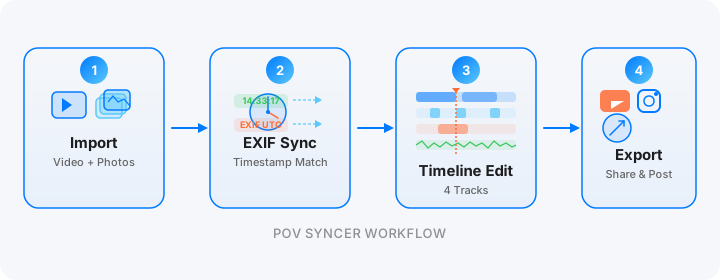
The goal is to complete the video on location and post before you reach your next property. Here is the sequence.
During the Shoot: Walkthrough First
Start with the DJI Action 5 Pro walkthrough before setting up lights or adjusting anything. Walk through the property at a natural pace — entrance, main living space, kitchen, key bedrooms, outside if applicable. Keep each room pass to 20 to 30 seconds. You are not producing a detailed virtual tour; you are establishing the spatial flow of the property for social content. Total walkthrough time: 3 to 5 minutes of footage.
Then set up your Sony A7C II and shoot the property properly — wide establishing shots, medium detail shots, hero frames of the best features. This is the work you always do. The only addition is that you are shooting JPEG alongside RAW if you are not already.
Post-Shoot: Import to POV Syncer
Transfer the DJI Action 5 Pro footage via the DJI Mimo app's camera roll export, or directly from a card reader. Import the Sony JPEGs. Open POV Syncer, create a new project, add the walkthrough video and 15 to 20 of your best property stills.
POV Syncer reads the GPS UTC timestamp from the DJI video and the DateTimeOriginal field from each Sony JPEG. Because you shot the walkthrough continuously and the stills came immediately after, the timestamps naturally distribute across the walkthrough footage at the correct moments. The app places each still at the frame corresponding to when it was taken — your kitchen shots appear when you are in the kitchen portion of the walkthrough, your bedroom shots when you are in the bedroom.
This automatic placement creates a narrative that no manually edited walkthrough can fully replicate. The video already knows where each image belongs, because the cameras recorded it in real time.
Building the Property Walkthrough Video
A property walkthrough video for social media has a different structure from a sports or street photography BTS video. Viewers are not watching for drama; they are watching to evaluate a space. The format should be calm, deliberate, and informative.
Recommended structure for a 60-to-90-second property Reel:
Open with the exterior or the entrance hall — establish where we are. Add a text overlay with the property address or a general descriptor ("4 Bedroom Georgian Terrace, Islington"). Move through the main living spaces at a measured pace. When the Sony A7C II stills appear at their EXIF-matched positions, increase the display duration to 3 to 4 seconds — long enough for viewers to read the image as a polished real estate photograph rather than just a video frame.
Close on the best hero shot — the view, the kitchen, the garden — held for 4 to 5 seconds. The POV Syncer shutter sound at each photo arrival gives the video a professional editorial quality that signals these are deliberately chosen images, not video screenshots.
White Balance Matching in the Edit
If the colour temperature between your DJI Action 5 Pro footage and Sony A7C II stills looks mismatched in the POV Syncer preview, it is because the white balance settings diverged during the shoot. You cannot correct the DJI video white balance in POV Syncer, but you can process the Sony JPEGs through your standard editing workflow to match the video temperature before importing. JPEG white balance adjustments in Lightroom or Capture One take about 60 seconds across a batch of synced images.
For future shoots: set both cameras to the same manual Kelvin value before you start, and the matching step is unnecessary.
Try POV Syncer free on the App StoreContent That Agents Actually Reshare
Not all property video content gets reshared. There are specific characteristics that make agents enthusiastic about sharing your video rather than just saving it for their own records.
Make the Agent Look Good, Not Just the Property
Add a text title that includes the agency name or agent's handle. "Photography by [Your Name] for [Agent Handle]" is a simple addition that transforms the video from a property showcase into a collaborative piece of content. The agent now has a direct incentive to reshare it: their name is in the video, and the video makes them look like they work with professional photographers who produce premium content.
Post to Instagram Before the Listing Goes Live
The highest engagement window for property content is the period between "coming soon" and "officially listed." If your walkthrough Reel goes live a day before the listing appears on the portal, agents get early buyer enquiries from their social audience, and you get engagement from people who have not seen the images in the listing context yet. Talk to the agents you work with about timing; many will appreciate the strategic value of this sequence.
Use YouTube for Long-Term Search Value
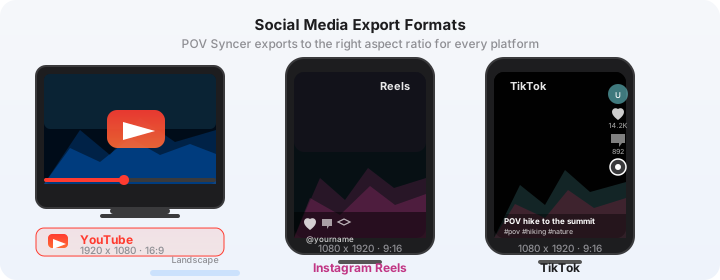
Export a 16:9 version of the walkthrough for YouTube. Property videos indexed by Google appear in search results for queries like "3 bedroom flat [area]" and "[property type] for sale [city]." This is an audience that is actively in buying mode. Your video, properly titled and described, can generate enquiries for the agent months after the listing has closed — from future clients searching for similar properties in the same area.
Scaling Across 5 to 10 Properties Per Week
At five properties per week, the POV Syncer workflow adds roughly 60 minutes to your weekly schedule — about 12 minutes per property. That investment produces five pieces of platform-native social content that collectively reach a property-interested audience on Instagram, TikTok, and YouTube simultaneously.
The compounding effect is significant. After 12 weeks of consistent posting, you have 60 pieces of location-tagged property content in your archive. New agents searching for photographers in your area discover that archive. Buyers recognise the quality of the properties you shoot. Your profile as a premium real estate photographer builds without any paid advertising.
The photographers who are winning new agent relationships in competitive markets are not necessarily the ones with the best gear or the sharpest stills. They are the ones providing a complete content service — stills plus video plus social-ready exports — at a price point that fits within a listing's marketing budget. POV Syncer makes that service achievable at volume.
Getting Started
The DJI Action 5 Pro costs $399. If one additional property booking comes from your social content in the first month, it has paid for itself. The Sony A7C II you likely already have. POV Syncer is free to download with a full first project included.
Run the workflow on your next property shoot. Walk the property with the Action 5 Pro. Shoot the stills with the A7C II. Import both into POV Syncer. Have a finished walkthrough video ready before you start the drive to your next property.
Add video to every property shoot — automatically
Download POV Syncer free. Your DJI footage and Sony stills sync by EXIF timestamp. Finished walkthrough video in under 15 minutes, on location.
Download POV Syncer Free