Wedding Photography POV Video: Grow Your Bookings on Instagram
You shoot 40 weddings a year. Each one generates 800 to 1,200 edited images, 40 to 60 hours of post-production, and exactly zero video content for your Instagram — because by the time the gallery is delivered, you are already two weeks into the next one.
Meanwhile, you are watching photographers with half your skill level rack up enquiry DMs every week because they are posting behind-the-scenes Reels. The content is not technically impressive. It is just honest. It shows the work: walking the aisle, composing in difficult light, getting down on the floor for the ring shot.
Wedding photography behind-the-scenes video is the highest-converting content format in the industry right now. Prospective clients do not just want to see your portfolio — they want to know what it feels like to have you at their wedding. POV video answers that question directly. And with POV Syncer, you can produce it on the same day as the wedding, without touching a desktop editor.
Why Wedding Photographers Are Losing Bookings Without Video
Instagram's algorithm has been explicit about this for the past two years: Reels get three to five times the reach of static posts, regardless of your follower count. If you are posting only photos, a significant portion of your potential audience never sees your work.
More importantly, the enquiry quality from Reels is different. A client who has watched a 60-second video of you working a ceremony — navigating tight spaces, reading light, shooting discreetly — arrives in your DMs with a level of trust that a grid post cannot build. They have watched you work. They know your style is not an accident.
The problem has always been production time. Shooting a wedding is exhausting. The last thing you want to do on Sunday is open a video editor. But that is where POV Syncer changes the equation: the editing step that used to take hours now takes under ten minutes, because the software reads the EXIF timestamps from your Canon R6 III stills and places them automatically into your Ray-Ban Meta footage.
The Camera Combination: Ray-Ban Meta + Canon R6 III
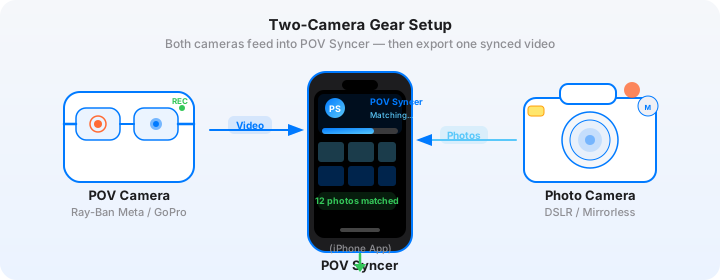
This pairing works because each camera does something the other cannot.
The Ray-Ban Meta glasses give you hands-free, eye-level POV video that is invisible at a wedding. Guests do not register the camera. The officiant does not notice. You move through the space naturally, and the footage reflects that — it is the closest thing to a first-person perspective of the ceremony that exists in consumer technology. The 12MP ultrawide records up to 1080p video, and the built-in microphone captures ceremony audio with enough quality to use in the final edit.
The Canon R6 Mark III gives you the actual deliverable images: full-frame stills with dual pixel autofocus, up to 40fps continuous shooting with the electronic shutter, and EXIF timestamps accurate to the millisecond. Every image carries a DateTimeOriginal field that records the precise moment the shutter fired.
In POV Syncer, that timestamp data is what places each Canon still at exactly the right frame in the Ray-Ban Meta video. You are not scrubbing manually. You are not eyeballing. The sync is automatic.
Ray-Ban Meta Settings for Ceremony Coverage
Set the glasses to 1080p at 30fps before the ceremony starts. This gives you roughly 60 minutes of continuous recording on a full charge — enough for most ceremonies. If the service is long, start recording when the couple enters; you do not need the full pre-ceremony setup.
The fixed aperture lens on the Ray-Ban Meta handles indoor church light reasonably well, but it will underexpose in very dark venues. The footage is still usable for behind-the-scenes content; the slightly grainy, documentary look often works in this context. If the venue has very low lighting, test a short clip during the rehearsal dinner to check exposure.
Sync the glasses clock to your phone before leaving the house. In the Meta View app, the glasses adopt your iPhone's clock automatically when they pair. This is the clock sync step that makes EXIF matching accurate.
Canon R6 III Settings for EXIF Accuracy
Your Canon's internal clock must match your Meta glasses clock. The simplest approach: set the Canon to sync time automatically via GPS (Menu > Setup > GPS > Auto time correction: Enable). This corrects the clock to atomic time accuracy every time it acquires a satellite fix — no manual setting needed.
Shoot in JPEG Large Fine or HEIF for behind-the-scenes content. RAW files carry full EXIF data and work perfectly in POV Syncer, but the file sizes are larger and the import step takes longer. If you are shooting RAW for delivery anyway, just point POV Syncer at your JPEG selects rather than the full RAW batch.
Get the settings right the first time
Download the free POV Photographer's Cheat Sheet — camera settings, EXIF tips, and export presets for Ray-Ban Meta, GoPro, DJI, and Insta360 on one printable page.
Free PDF, no spam. Unsubscribe anytime.
Shooting the Ceremony Discreetly
The biggest hesitation wedding photographers have about POV video is the ceremony itself. You are already navigating restrictions — many officiants limit movement, some ban cameras from the altar altogether. Adding a recording device to your glasses sounds like it could complicate things.
In practice, it is the opposite. The Ray-Ban Meta glasses look like regular eyewear. The camera is not visible from ten feet away. Guests and officiants interact with you exactly as they normally would. You get genuine, unguarded moments because nobody is performing for a camera they cannot see.
What to Shoot for the Best BTS Content
Not all of the ceremony footage will make it into your Reel. You are looking for two or three specific types of moments:
The approach. Walking down the aisle from the back before the ceremony begins, framing up your first position. This shows prospective clients the physical negotiation of the space — where you stand, how you move.
The live composition. The footage while you are actually shooting — the moment you raise the Canon R6 III to your eye, compose, fire, and lower the camera. The glasses capture your physical POV. The Canon captures the result. When these two clips are synced in POV Syncer, the effect is powerful: viewers see the photographer's-eye view of the scene, then the photo that came from it, in perfect sequence.
The reaction. Immediately after an emotional moment — first kiss, ring exchange, guests laughing — your natural response as the photographer is visible in the way the footage moves. This unscripted footage is more compelling than anything staged could be.
The POV Syncer Workflow: Wedding Edition
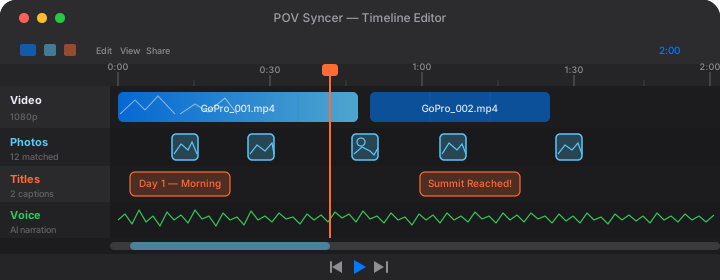
You do not need to wait until you get home. This workflow runs entirely on your iPhone, and most photographers complete it during the reception while the couple are doing their first dance.
Step 1: Transfer and Select
Transfer the Ray-Ban Meta footage to your iPhone via Bluetooth or the Meta View app's camera roll export. Select 20 to 30 of your favourite ceremony stills from the Canon — your gut-check selects, not the final delivered set. You are not editing for the client here; you are selecting for story.
Step 2: Import to POV Syncer
Open POV Syncer and create a new project. Import the Meta video file and the Canon JPEG selects. The app reads the DateTimeOriginal field from every photo and places it on the video timeline automatically. A 30-photo import against a 45-minute video takes about 20 seconds to process.
The timeline shows thumbnail markers at each photo's position. At this point, you can already see the shape of the story: there is the processional, the vows, the ring exchange. The photos distribute themselves naturally across the narrative arc of the ceremony.
Step 3: Trim to 60 Seconds
Instagram Reels perform best at 30 to 90 seconds. For wedding BTS content, 60 seconds is the sweet spot — long enough to tell a story, short enough to hold attention without music to carry it.
Use POV Syncer's trim handles to select the best 60 seconds of ceremony footage. This is usually the processional plus the vows, or the vows plus the first kiss. The photo markers help you identify which section of footage has the most interesting stills attached.
Step 4: Add a Title and Finish
Add a simple text title at the opening — the venue name, or just "Ceremony" in a clean serif font. POV Syncer includes 15 fonts; for wedding content, the editorial serif options read as elegant without being fussy.
If you want to add AI narration, keep it brief: "This is what it looks like to photograph a ceremony from inside the moment." Thirty words maximum. Let the footage and the photos carry the emotion; the narration just sets context.
Step 5: Export and Post
Export at 9:16 for Instagram Reels. POV Syncer crops the Ray-Ban Meta's 16:9 footage intelligently, keeping the composition centred. The output is 1080x1920 at 30fps, ready to upload directly.
Post during the reception, or immediately after you leave the venue. The post-wedding engagement window is real: people who were at the wedding — guests, the couple's family — are checking Instagram that evening. Your Reel appears in their feed at exactly the right moment.
Try POV Syncer free on the App StoreThe BTS Content That Actually Drives Enquiry DMs
Not all behind-the-scenes content converts equally. After looking at what performs for photographers in this format, there are a few consistent patterns worth knowing.
Show the Problem, Then the Solution
The highest-performing wedding photography BTS Reels show a constraint — backlight, a tight space, a difficult angle — and then reveal the resulting image. The viewer's brain completes the loop: "That looked impossible, but the photo is beautiful." That is the insight that makes them want to book you.
In POV Syncer, you do this by selecting footage of the difficult moment as your clip, then ensuring the corresponding Canon still appears at exactly the right moment. The EXIF sync handles the placement; you just need to choose the right 60 seconds of footage.
Use the Shutter Sound
POV Syncer adds a mechanical shutter click each time a photo appears in the video. This is a small detail with significant effect. The click signals a deliberate choice — it says "right here, this was the moment." Viewers respond to that signal unconsciously. It is what separates photo-in-video content from a slideshow.
Post Consistently, Not Occasionally
One Reel per wedding, minimum. Forty weddings a year means forty pieces of high-quality, platform-native content. That compounds. The algorithm rewards consistent posting with sustained reach, and your archive of ceremony content becomes a portfolio that works for you around the clock.
TikTok and YouTube Shorts
The same 9:16 export from POV Syncer posts directly to TikTok and YouTube Shorts with no re-encoding. TikTok's wedding photography audience skews younger — it is the couple's friends and future brides-to-be in the 22 to 32 demographic. YouTube Shorts feeds into Google search, which means your BTS videos can appear for queries like "wedding photographer [city]" alongside your website.
Cross-posting the same video to all three platforms takes about three minutes. The reach multiplies significantly for no additional production effort.
What This Looks Like at Scale
Consider the math. If you post one Reel per wedding, and each Reel generates two to three genuine enquiry DMs from people who watched you work — that is 80 to 120 warm leads per year from content that took ten minutes each to produce. Even if your conversion rate from enquiry to booking is 20%, that is 16 to 24 additional bookings per year from BTS video alone.
That is not a projection — that is the outcome wedding photographers are reporting when they commit to this format consistently. The content builds on itself. Each Reel introduces your work to a new audience. The algorithm rewards consistency. The enquiries accumulate.
Getting Started Today
POV Syncer is free to download. The free tier gives you one complete project — import your wedding footage, sync your Canon stills, export to 9:16, and see the result before you spend a penny. If it works for you (and it will), Pro unlocks unlimited projects, all 15 fonts, 10 background styles, AI narration at $9.99 per month or $99.99 per year.
You already have the Canon R6 III. The Ray-Ban Meta glasses are $299 — less than the cost of a second shooter for a single wedding. If they generate one additional booking, they have paid for themselves twice over.
Post your first wedding BTS Reel this weekend
Download POV Syncer free, import your ceremony footage, and have a finished Reel ready before you leave the venue.
Download POV Syncer Free