Ray-Ban Meta Street Photography: POV Video That Shows Your Process
The photograph on your Instagram feed tells one story. The story behind that photograph — why you stopped, what you saw in the scene before you raised the camera, the five frames that did not work before the one that did — is usually invisible. For street photographers, that invisible process is often more interesting than the image itself.
Ray-Ban Meta smart glasses change the equation. Wear them during a shooting session and you capture continuous first-person footage of your process: the walk through the neighborhood, the moment you registered a scene, the pause before you raised your Fujifilm X100VI, the look back at what you captured on the rear screen. The glasses see what you see, at the moment you see it, without disrupting the naturalness of the encounter that makes street photography possible.
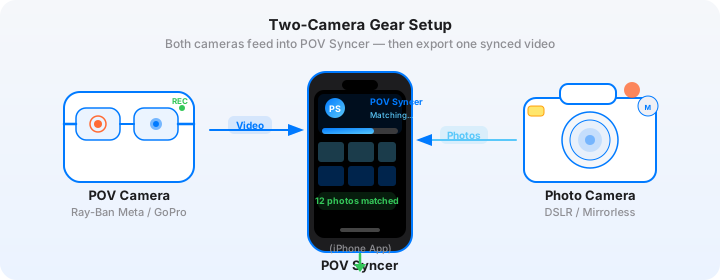
Combined with the stills you are shooting on the X100VI — and brought together by POV Syncer's EXIF-based sync — that raw process footage becomes something genuinely compelling: a video essay that shows your audience exactly how you work. This is the Ray-Ban Meta street photography workflow that serious photographers are starting to use.
The Creative Case for Process Documentation
Street photography has a massive audience of aspiring practitioners who want to understand how great photographers see. They study the final images obsessively but have almost no access to the decision-making that produces them. What was the light doing? How far were you from the subject? How long did you wait? Did you know the shot was good when you took it, or only when you reviewed it later?
A POV video that shows your session — with your Fujifilm stills appearing at exactly the moments you shot them — answers all of those questions without you having to stage anything or operate a camera pointed at yourself. The glasses are invisible to the subjects around you. The footage is documentary in the truest sense: it simply records what happened.
This kind of content performs exceptionally well on both Instagram (as long-form Reels) and YouTube, where the photography audience is hungry for process content that goes beyond "here is how to set up your camera." It also positions you as a teacher and practitioner simultaneously, which is a much more durable audience relationship than pure portfolio posting.
Why Ray-Ban Meta and Fujifilm X100VI Are a Natural Pair
The Fujifilm X100VI is one of the most capable street photography cameras ever made. The fixed 23mm f/2 lens (35mm equivalent) is the classic street focal length. The built-in ND filter means you can shoot wide open even in bright daylight. The in-body image stabilization on the X100VI is the first IBIS in the X100 series — genuinely useful for handheld work in low light. And the camera is small enough and quiet enough that it does not announce itself the way a DSLR does.
The Ray-Ban Meta glasses are equally unobtrusive. They look like regular glasses. Nobody watching you walk down the street knows you are recording video. That invisibility is the key to authentic street footage — you are not directing a scene or making subjects self-conscious by pointing hardware at them. You are just walking and looking, the same way you always do.
The EXIF timestamp on every X100VI RAW file is written at the moment of shutter actuation, accurate to the second. POV Syncer reads that timestamp, compares it to the video's start time and frame rate, and calculates exactly which frame the shutter fired. The result is a perfect alignment between the moment of capture and the POV footage surrounding it.
Camera Settings for the Street Process Workflow
Ray-Ban Meta: Capture Your Walk, Not Just Your Shots
For street photography process documentation, the footage between the shots is as important as the footage at the moment of capture. You want smooth, watchable video of walking, observing, and waiting — not just the decisive seconds around a shutter fire.
Set the glasses to 1080p at 30fps. The 30fps gives the footage a slightly documentary quality that suits the genre; 60fps can feel too smooth and "video" for street photography content. Battery life at 1080p30 is around 60 minutes, which covers a solid shooting session without needing to swap to the charging case.
The Meta View app's default color processing is warm and slightly saturated — a deliberate Instagram-friendly look. For more neutral, film-like footage, there is no flat profile on the glasses, but you can correct the white balance in post if you are exporting to YouTube and have time to color grade. For Instagram Reels, the default color science is perfectly serviceable.
Fujifilm X100VI: Shoot for Both the Print and the Video
When your stills are going to appear in a video, you need to think about how they will read at video resolution on a phone screen. The good news is that the X100VI's JPEG output — particularly with the Classic Chrome or Eterna Cinema film simulations — looks extraordinary on screens. The color palette is cinematic without any post-processing.
- Film simulation: Classic Chrome for street work with strong contrast and shadows; Eterna Cinema for a more muted, editorial feel
- Aperture: f/5.6-f/8 for zone-focused street work (pre-focus to 3-5 meters, accept depth of field); f/2-f/2.8 for selective focus portraits
- ISO: Auto ISO 200-6400, minimum shutter 1/125s (enough to freeze most street movement)
- Format: JPEG Fine + RAW. The JPEG is what you import to POV Syncer for the video; the RAW is your archival file for print
- Date/Time: Set the X100VI clock from your iPhone time before each session (camera > wrench menu > Date/Time setting)
Get the settings right the first time
Download the free POV Photographer's Cheat Sheet — camera settings, EXIF tips, and export presets for Ray-Ban Meta, GoPro, DJI, and Insta360 on one printable page.
Free PDF, no spam. Unsubscribe anytime.
Syncing EXIF Timestamps Across Camera Brands
The key technical challenge in this workflow is that you are syncing across two completely different camera systems — Meta's proprietary video format and Fujifilm's RAF/JPEG files. They write EXIF data differently. They may interpret timezone offsets differently. And unless you actively manage it, their clocks may be seconds or minutes apart.
Setting the X100VI Clock
The Fujifilm X100VI does not have GPS or network time sync. Its clock relies entirely on your manual setting. This is the most important setup step in the entire workflow.
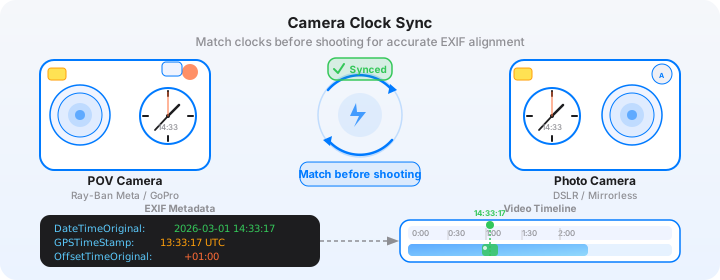
Before every session, open your iPhone's Clock app and note the current time to the second. Then go into the X100VI's setup menu (wrench icon > Date/Time setting) and set the camera's clock to match exactly. Do this every session — camera clocks drift, and even 10 seconds of drift will be visible as a slight offset between your shot and the moment it appears in the glasses footage.
POV Syncer's four-strategy EXIF matching system handles timezone offsets, GPS UTC corrections, and device clock fallbacks automatically. But it cannot correct for a clock that was set incorrectly at the source. Get the Fujifilm clock right and the sync will be accurate to within one or two seconds, which is imperceptible in the finished video.
How POV Syncer Handles Cross-Brand EXIF
Fujifilm JPEG files write a full EXIF block including DateTimeOriginal, OffsetTimeOriginal, and in some cases GPSDateStamp and GPSTimeStamp if you have a GPS unit or phone connected. POV Syncer reads all of these fields and applies its priority-order matching: GPS UTC timestamp first (most accurate), then OffsetTimeOriginal with timezone correction, then device timezone fallback.
In practice, for a Fujifilm X100VI that does not have GPS, POV Syncer uses the DateTimeOriginal and OffsetTimeOriginal fields together to correctly resolve the timezone and place each photo accurately on the glasses video timeline. The app handles Fujifilm, Sony, Canon, Nikon, and most other major camera brands' EXIF formats without any configuration needed from you.
Building the Narrative in POV Syncer's Timeline Editor
Street photography process videos have a different edit logic than action content. The goal is not energy and pace — it is revelation and reflection. The edit should feel like walking with the photographer and understanding their mind, not like a highlight reel.
Structure Your Video as a Walk
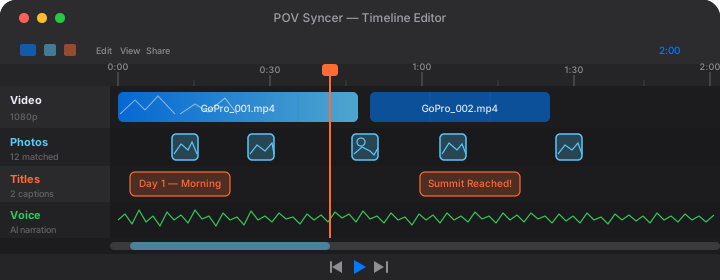
The strongest structure for a street process video mirrors the actual session: arrival (establishing the neighborhood and the light), hunting (the wandering footage with occasional shots), discovery (the moments where something clicks — visually represented by a photo appearing), and reflection (the end of the session, possibly with the best shots reviewed). POV Syncer's 4-track timeline gives you the tools to build this structure deliberately.
Start by trimming the video to the most compelling 10-15 minutes of footage. Not every minute of a street session is interesting to watch — the transitions and pauses between interesting scenes can be shortened or cut. Use the trim handles on the video track to remove dead time without losing the photos that are matched to the footage.
Using Titles for Context, Not Decoration
The 15 fonts in POV Syncer Pro include editorial and serif options that suit the street photography aesthetic. A simple location/time overlay at the opening — set in a clean, elegant typeface against a frosted glass background — establishes the session immediately. A second title card after the best photo, showing the camera settings or a brief reflection on what you saw, adds the kind of context that turns a portfolio post into a teaching moment.
Resist the temptation to add titles to every photo. One or two well-placed text cards do more work than a title at every shot.
AI Narration as an Artist Statement
The Voice track in POV Syncer is where street photography process videos really differentiate themselves. Instead of music over footage, you can add your own narration — what you were thinking during the session, how you approach a specific type of scene, why you made the framing choices you did.
Type a short script — 50-100 words is usually right for a 10-15 minute video — and choose one of POV Syncer's premium AI voices. A voice with a measured, thoughtful quality works well for documentary street content. Preview two or three voices with your specific script before committing. The narration renders in seconds.
If you prefer to record your own voice, the Voice track supports direct recording from your phone's microphone. Your own voice adds authenticity that AI cannot fully replicate, though the quality depends on your recording environment.
Export Considerations for Instagram and YouTube
Instagram Reels: The 9:16 Street Photography Edit
For Instagram Reels, export in 9:16 at 1080x1920. The vertical crop of the Ray-Ban Meta's 16:9 footage tends to work well for street photography because it naturally tightens the frame around the vertical elements of urban environments — building faces, pedestrian figures, door frames and archways. What looks like a limitation becomes an aesthetic asset.
Keep Reels to 90 seconds or under for maximum algorithm reach. This means selecting the single most compelling 90-second passage from your session, not trying to include everything. One strong scene is always better than three mediocre ones.
YouTube Long-Form: The Full Process Video
For YouTube, you have room to breathe. A 10-15 minute street photography process video can hold a photography audience's attention if the footage and narration are strong. Export at 16:9 for YouTube's standard aspect ratio. The full resolution Ray-Ban Meta footage holds up at 1080p on desktop screens.
YouTube long-form content also benefits from chapters — time-stamped sections in the video description that let viewers jump to specific parts. Structure your video with clear acts (Arrival / The Hunt / The Shots / Review) and add chapter timestamps in the description to improve session retention.
Making the Most of the Ray-Ban Meta and X100VI Combination
Shoot More, Not Less
On a street session intended for process documentation, fire more frames than you normally would. The X100VI's shutter is quiet and the camera handles high-volume shooting gracefully. More shots means more moments where the video transitions to a still, and more choices in the edit. You can always delete; you cannot recreate a moment you chose not to shoot.
Do Not Edit While Walking
The temptation on the X100VI is to check the rear screen after every shot. For process video, this is counterproductive — the glasses capture you looking down at the camera rather than continuing to observe the scene. Shoot, lower the camera, keep moving. Review the shots at the end of the session, not during it. The footage from the glasses will be much more interesting as a result.
Let Silence Work
The ambient audio from the Ray-Ban Meta microphones is part of what makes this format compelling — city sounds, the soft click of the X100VI shutter, snippets of conversation. Do not cover all of it with narration or music. Let the audio breathe. The contrast between ambient street sound and a quiet narration voice creates a meditative quality that suits the genre.
The Finished Video
A well-assembled Ray-Ban Meta and Fujifilm X100VI process video is unlike almost anything else in the photography content space. The footage is genuinely immersive — you are seeing a photographer's literal point of view, not a staged "behind the scenes" segment. The stills appear with precise timing, each one arriving at exactly the moment it was captured, making the match between intention and result immediately readable.
For photographers building an audience, this format is an exceptionally efficient way to demonstrate competence. You do not need to explain your technique in the abstract; the video shows it happening in real time, with the actual results immediately visible. It is the most authentic form of teaching available to a photographer with a camera and a phone.
POV Syncer Pro unlocks the full set of tools — AI narration, 15 fonts, 10 background styles — for $9.99 per month or $99.99 per year. The free tier gives you enough to see what the workflow feels like before upgrading. Either way, the first video takes about 10 minutes to produce once the footage is on your phone.
Show the world how you see
Download POV Syncer free and turn your Ray-Ban Meta street footage and X100VI stills into a compelling process video.
Download POV Syncer Free