Ricoh GR III Street Photography: Add POV Video to Your Stills
The GR has always been about the decisive moment. About absolute minimum gear between you and the image. Adding POV video doesn't change that — it documents it. Here's how.
For the Ricoh GR Community
If you shoot a Ricoh GR III or GR IIIx, you already understand something that a lot of photographers don't: that constraints produce creativity. The fixed lens. The small body. The deliberate lack of optical viewfinder. These aren't limitations to work around — they're design decisions that force a different relationship with the image-making process.
The Ricoh GR III shoots at 24mm equivalent (28mm on the GR IIIx). It fits in a jacket pocket. It fires in under 0.4 seconds from sleep mode. It produces JPEG files with a rendering character — particularly in the high-contrast black and white modes — that has made it the standard-bearer for a specific kind of street photography aesthetic for the better part of a decade.
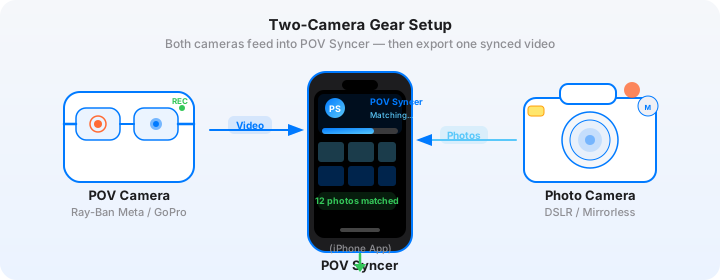
The question this post addresses is simple: what happens when you pair that precise, disciplined, minimum-gear approach to street photography with the continuous wide-angle documentation of a POV camera? And how does POV Syncer connect the two?
The answer is a workflow that preserves everything that makes shooting a GR feel right, while adding a layer of process documentation that opens up content formats — YouTube Shorts, Instagram Reels, longer documentary pieces — that a GR alone can't produce.
Why GR Shooters Should Add POV Video
The GR community is one of the most engaged in photography. GR shooters share their work, discuss their approach, and care about the craft of street photography in a way that generates an audience hungry for process content. How you saw the shot. Where you were standing. What the street looked like a second before the decisive moment.
Your still images can show the result. POV video shows the context. The gap between those two things is the story that your audience wants to hear.
GR photographs also have a specific aesthetic quality that transfers unusually well to the synced video format. The high-contrast rendering, the grain (especially in the GR III's in-camera film simulations), the 28mm or 40mm field of view — these create still images that have a cinematic, documentary character. When a GR photograph surfaces from POV footage in POV Syncer, it doesn't feel decorative. It feels like evidence.
The Complementary Perspectives Argument
The GR IIIx's 40mm equivalent lens is particularly interesting in combination with a wide-angle POV camera. The GR IIIx compresses the scene compared to the POV camera's 155-degree field of view. When a GR IIIx photograph appears over Ray-Ban Meta or Insta360 footage, the contrast in field of view is dramatic: the viewer has just seen the full width of the street, and the photograph shows them a precise slice of it. That compression — from wide to tight — is a visual statement about what photography is. Choosing, from everything there is to see, what matters.
Get the settings right the first time
Download the free POV Photographer's Cheat Sheet — camera settings, EXIF tips, and export presets for Ray-Ban Meta, GoPro, DJI, and Insta360 on one printable page.
Free PDF, no spam. Unsubscribe anytime.
The Ideal POV Camera Pairings for the GR III
Ray-Ban Meta: The Invisible POV
For street photography work, Ray-Ban Meta smart glasses are the closest thing to an invisible POV camera that exists. They look like normal glasses. No chest harness. No handlebar mount. No visible hardware. On the street, where being noticed often means losing the shot, that invisibility is worth more than any technical specification.
The Ray-Ban Meta shoots video at 1080p with a fixed focal length equivalent to roughly 23mm — slightly wider than the GR III's 28mm equivalent. The footage is honest rather than beautiful: the dynamic range is limited, low-light performance is modest, and the fixed focus means that close foreground elements can be soft. But for documentary street shooting, honest is usually what you want.
The practical match with the GR III is excellent. Both cameras are pockeable. Both are operated without raising anything to your eye. The shooting stance for a GR — camera held at waist or chest height, snapped rather than aimed — is exactly the same stance that keeps the Ray-Ban Meta footage smooth and natural. You don't need to change how you move or how you work to accommodate the video.
Battery life is the key limitation: approximately 30-60 minutes of continuous video on Ray-Ban Meta. For a focused 45-minute street session this is fine. For longer explorations, plan your route in segments and charge the glasses during natural breaks — a cafe stop, a lunch break.
Insta360 X4: When You Want More
For photographers who want longer battery life, better low-light performance, and the option to reframe footage in post, the Insta360 X4 is the strongest alternative to Ray-Ban Meta in this setup. Mounted on a chest rig or clipped to a bag strap, it captures 360-degree footage that you can reframe to any angle in post — meaning you can shoot the 360 version continuously and then select the front-facing, rear-facing, or any other perspective when editing in POV Syncer.
The Insta360 X4 battery runs to approximately 135 minutes of continuous 4K recording — more than double the Ray-Ban Meta. It handles mixed light better, and its stabilisation is excellent. The trade-off is visibility: it's clearly a camera in a way that Ray-Ban Meta is not. On some streets in some cities this matters; in others it's a non-issue.
Set the Insta360 X4 to 4K/30fps 360 mode for maximum flexibility. In POV Syncer, use the standard front-facing reframe for most of your footage, but consider using the rear-facing perspective for sections where you want to show the street environment you were moving away from — a visual technique that creates interesting narrative counterpoint to the GR photographs you were taking looking forward.
Snap Focus in a Video Context
The GR III's snap focus system is one of the most discussed features in the GR community. You set a focus distance — 1m, 1.5m, 2m, 2.5m, 3m, 5m, or infinity — and the camera snaps to that distance instantly when you half-press the shutter. Combined with a small enough aperture for adequate depth of field, this means you can raise the camera and fire in a fraction of a second with no autofocus hunting.
In the context of synced POV video, snap focus becomes more visually significant. When a GR photograph appears in the video at the exact moment it was taken, the viewer can see in the POV footage what kind of split-second decision produced the image. There's no visible hesitation, no searching. You're walking, something happens, you raise the camera and fire. The POV footage captures that snap — the physical gesture of street photography as it actually happens — and the GR photograph shows what emerged from it.
Recommended Snap Focus Settings for Video Sync Work
These settings produce the sharpest results across a range of street shooting distances while keeping the EXIF timestamp accuracy that POV Syncer depends on.
GR III (28mm equivalent): Snap focus at 2m, aperture f/5.6. Depth of field covers approximately 1.2m to 5m at this setting. ISO Auto with a ceiling of 6400. Shutter speed minimum 1/250s. Shoot JPEG in high-contrast black and white (High Contrast BW image control) plus RAW simultaneously. The JPEG contains the EXIF data POV Syncer reads; the RAW gives you full post-processing options.
GR IIIx (40mm equivalent): Snap focus at 2.5m, aperture f/8. The longer focal length narrows depth of field, so a smaller aperture maintains sharpness across a useful range. Same ISO and shutter settings as the GR III. For the GR IIIx's image control, the standard Black and White setting often produces more nuanced tonal rendering than the High Contrast version — experiment with both across a few sessions to find your preference.
High-Contrast B&W Film Simulation and Video
One of the most interesting creative decisions in this workflow is how to handle the tonal relationship between the GR's black and white output and the colour POV camera footage.
The default approach — black and white still over colour video — creates a sharp visual contrast that works in your favour. The viewer is watching colour footage of the street, and then a high-contrast B&W image surfaces. The monochrome immediately reads as "photograph" rather than "video frame." It signals deliberate capture, artistic intent, the decisive moment rather than continuous documentation. The contrast between the two formats reinforces exactly the distinction you're trying to make.
The Case for Desaturating Your POV Footage
Some GR shooters prefer a different approach: desaturating the POV footage in post to match the B&W aesthetic of the GR images. This produces a more unified visual experience — everything is tonal, the transition between footage and photograph is smoother, and the whole video feels more cohesive.
The trade-off is that you lose the visual signal that distinguishes photographs from footage. In the colour-over-B&W approach, the audience knows instantly that a photograph has appeared. In the desaturated approach, the photograph has to announce itself through framing and composition alone.
Which approach is right depends on your content type. For YouTube documentary work where you have narration explaining the context, desaturated footage creates a moody, cohesive feel. For Instagram Shorts and TikTok where the viewer has less context and you need the photograph to register immediately, the colour/B&W contrast is more effective.
Building a Visual Narrative with the GR
The GR's fixed focal length imposes a discipline on visual narrative that's worth leaning into when building a synced video. Because every shot is at the same field of view, sequences of GR photographs have a natural visual consistency that makes them work well in series. You can build a narrative not just through the content of the images but through their relationship to each other — repeating geometries, variations on a theme, a visual argument built across 10 or 15 images.
Shooting with the Video Edit in Mind
Street photography is traditionally reactive — you respond to what's in front of you rather than planning each shot. But when you know you're building a synced video, some light advance thinking about narrative arc pays off.
Think in sequences rather than individual images. If you're shooting a market, aim for images that work as a sequence: a wide scene-setting image early on, mid-range images of specific activities, tight detail shots, and one strong human portrait that anchors the section. In POV Syncer's timeline, these will appear across the span of your time in the market, creating a natural sub-narrative within the larger video.
Think about transitions between locations. When you move from one area to another — when the POV footage shows you walking from the market into a side street — consider whether you have images from both that create a visual bridge. The GR's consistent rendering helps here: even across very different environments, GR photographs have a continuity of character that makes transitions feel deliberate rather than arbitrary.
Sync Your GR III Photos to POV Video — FreeThe Complete Workflow in POV Syncer
Step 1: Prepare Your Media
After a shoot, you'll have Ray-Ban Meta or Insta360 video files and GR III JPEG (or JPEG + RAW) files. Import both sets to your iPhone before opening POV Syncer — the GR JPEGs transfer via the Ricoh GR III wireless app or via SD card reader, and the POV footage transfers via the relevant camera companion app.
Step 2: Import and Auto-Match
Create a new project in POV Syncer, import your POV footage as the base video, and import your GR JPEG files as the photo set. POV Syncer reads the EXIF DateTimeOriginal field from each GR JPEG and matches it to the corresponding timestamp in the video. For GR III files with GPS tagging enabled (set in the GR III's GPS/wireless menu), the GPS UTC timestamp provides the most accurate sync path.
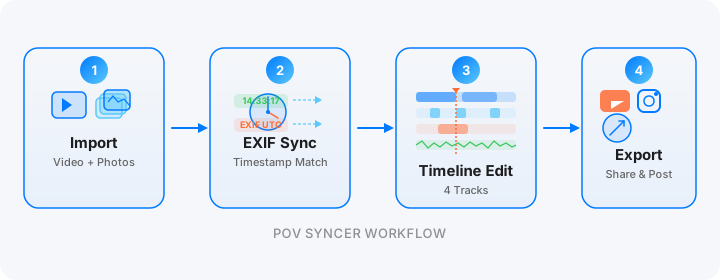
Review the auto-matched timeline. GR shooters typically produce 30-100 images in a 1-hour session, of which 8-20 will make the final video. Use the timeline to remove images you don't want to include, adjust hold times for each photograph, and check the sync accuracy — most images should appear within 1-2 seconds of where they were taken in the video.
Step 3: Edit for Narrative, Not Completeness
This is the most important creative step. Remove every image that doesn't advance the narrative or reveal something about the street photography process. A GR video with 12 strong images and thoughtful pacing beats one with 40 images every time. If you're uncertain about an image, remove it. You can always add it back, but you can't un-dilute a video that's been bloated with weak frames.
Set photo hold times based on image complexity: 2-3 seconds for clean, bold images; 4-5 seconds for complex environmental images with multiple layers of detail. The GR's high-contrast rendering often produces images that communicate quickly — trust that and don't hold them longer than they need.
Step 4: Add Narration and Style
For YouTube Shorts and Instagram Reels, a short narration works well: one or two sentences per major image, describing what you saw or what you were thinking. For longer YouTube documentary formats, build out a more complete voiceover using POV Syncer's AI narration with a voice that matches the character of your photography — measured, observational, with appropriate pauses.
For font choice in POV Syncer, GR shooters tend toward clean, minimal options. A simple sans-serif or classic serif caption style complements the GR's high-contrast aesthetic without competing with it. Avoid decorative or script fonts — they're at odds with the documentary character of the content.
The film-grain background style in POV Syncer's 10 background options is a natural fit for GR photographs, reinforcing the film-photographic reference that the GR's rendering already suggests. Test it alongside the clean minimal option and see which feels more consistent with your photographic voice.
Step 5: Export for Your Platform
For Instagram Reels and YouTube Shorts: export 9:16 at 1080p. Keep the video under 90 seconds for Instagram maximum reach, under 60 seconds for the best Shorts performance on YouTube. A single strong image with 10-15 seconds of context footage and a one-sentence narration is a completely viable Shorts format — quality over quantity.
For YouTube long-form: export 16:9. The GR documentary format works best at 8-15 minutes — long enough to build a narrative, short enough to maintain the focused, disciplined character that GR photography embodies. Anything longer risks feeling like a walk-along rather than a documentary.
Time Sync Tips for GR III + Ray-Ban Meta or Insta360
The GR III sets its internal clock manually — there's no GPS auto-sync unless you use the GR companion app. Before every street session, open your iPhone clock (which displays seconds) and set the GR III's time to match exactly. Then open the Ray-Ban Meta app or Insta360 app and verify the POV camera's time matches your iPhone. All three should show the same time to within 1 second.
Take a reference shot: photograph your phone screen showing the current time on the GR III while the POV camera is recording. This creates an anchor point. In POV Syncer, if you see the reference photo appearing slightly off from where it should be in the video, you can apply a global time offset to correct the entire session's sync in one step.
The GR III's clock is stable — drift over a 2-hour session is typically under 2 seconds. For most street photography work, this is accurate enough for POV Syncer's auto-matching to handle without manual correction.
Creating Content That Speaks to the GR Community
The Ricoh GR community is deeply engaged on YouTube, Instagram, and photography forums. Content that speaks directly to GR shooters — using the right terminology, discussing snap focus, film simulations, and the GR's specific aesthetic — performs well with this audience even at modest channel sizes, because the community is actively searching for it.
Your synced video content doesn't need to be about the GR specifically. A video about a morning in a particular neighbourhood, with your GR images surfacing from Ray-Ban Meta footage, speaks to anyone interested in street photography. But including specific mentions of the GR III workflow, snap focus settings, and image control choices in your narration attracts the camera-specific audience that will share your content within the community.
The most successful GR content on YouTube in 2026 combines three elements: strong still images (the GR's primary output), honest process documentation (which POV video provides), and a distinct point of view expressed through narration. POV Syncer connects the first two. The third is yours to bring.
Ready to add POV video to your GR III workflow?
POV Syncer reads EXIF timestamps from your GR III JPEGs and syncs them automatically to your Ray-Ban Meta or Insta360 footage. Start free, upgrade to Pro for $9.99/month when you're ready for AI narration and unlimited projects.
Download POV Syncer Free