Selling Prints + POV: Show Collectors How the Shot Was Made
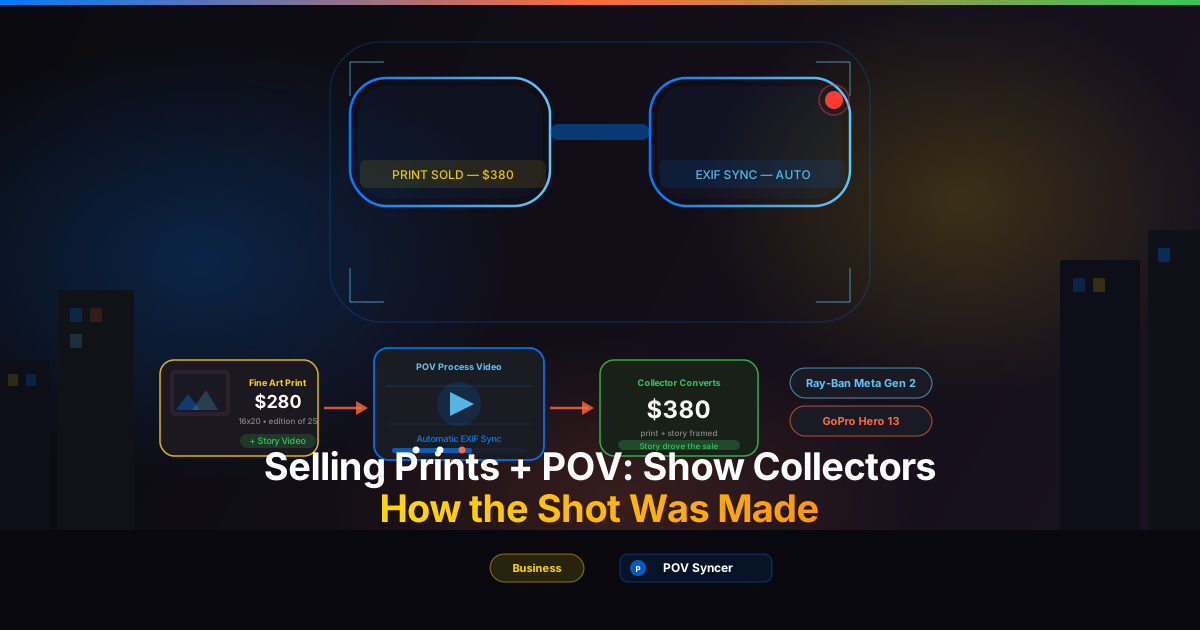
It is a Saturday afternoon and you have just sold another print from your website — a 16x20 of a woman in a doorway on a wet Lisbon street, taken with your Fujifilm X-T5 in the blue hour before the rain stopped. The buyer sends you a message along with the payment: "What made you stop there? What were you seeing when you took it?" You type back a three-sentence reply, knowing the real answer could fill an hour. The mood of the light. The sound the cobblestones make when they are soaked. The moment her silhouette aligned perfectly with the cracked plaster behind her. You felt all of that. Your buyer felt a version of it through the image. But they want the full story — and that is exactly what print collectors are willing to pay more for.
Here is a fact that most photographers who sell prints have not yet acted on: the story behind a photograph is often worth more than the photograph itself. Collectors who connect with the process — who can see how you move through a city, how you identify a moment, how the decisive fraction of a second plays out in real space and real time — become invested in a way that passive admirers of finished images rarely are. They do not just buy the print. They buy the experience of having been there with you. And in 2026, with a Ray-Ban Meta Gen 2 on your face and a Fujifilm, Leica, or Ricoh in your hand, you can give them that experience in a two-minute video that costs you almost nothing to produce.
This post is about the intersection of POV video and print sales: specifically, how showing your shooting process on video — automatically synced to your actual photographs using EXIF timestamps — creates a collector relationship that is fundamentally more durable and more lucrative than any static image gallery alone.
Get the free POV Photography Cheat Sheet
Settings, EXIF tips, and workflow shortcuts for Ray-Ban Meta, GoPro, DJI, and Insta360 paired with Fujifilm, Leica, Ricoh, Sony, and more — all on one printable page. Join 1,000+ photographers getting weekly tips.
Free PDF, no spam. Unsubscribe anytime.
Why Print Collectors Respond to Process
The contemporary photography print market has shifted considerably in the last five years. The collectors who are actively buying fine art prints today — in limited editions, at prices from $150 to several thousand dollars — are not the same audience as someone who follows you on Instagram and double-taps your work on a phone screen. They are buyers who have done research. They have considered the image against other images. They have thought about where it would live in a room and what it would mean to own it. These are deliberate, considered purchases, and the decision to commit is almost always emotional as much as aesthetic.
What triggers that emotional commitment? In interview after interview with collectors of photography prints, the answer is consistent: story. Not the image in isolation, but the circumstances around it. Who made it, how, why, what it cost in physical and creative terms to be standing in that specific place at that specific moment. The story humanises the photograph. It transforms it from a beautiful object into a piece of testimony.
The Problem with Text Alone
Most photographers who do try to share process rely on written captions or blog posts. There is nothing wrong with writing — and a well-crafted description of a photograph absolutely has value. But writing is mediated. It is the photographer's interpretation of their own experience, filtered through language, shaped retrospectively. Video of the actual moment of capture is different in kind. When a collector watches sixty seconds of your eye-level footage from Ray-Ban Meta Gen 2 glasses and sees — in real time — the precise moment you raised your Fujifilm X100VI, composed the frame, and fired the shutter, and then watches that image appear on screen as you captured it, they are no longer reading about your process. They are inside it.
That is what POV process video delivers that no other format can: the authentic, unmediated experience of being you, seeing what you saw, making the decision you made. For a collector who is considering spending $280 on a print, that video is the confirmation they need. It answers the question they cannot quite articulate but always have: "Is this real? Was there really a human being, with a specific eye, in a specific place, making a specific choice?" The answer, visible in the footage, is yes.
The Two-Camera Setup That Makes This Possible
The Wearable POV Camera: Ray-Ban Meta Gen 2
The Ray-Ban Meta Gen 2 is the most photographer-friendly POV option currently available. It records 1080p video at 30fps from a camera integrated into eyeglass frames that look entirely normal on the street. The lens position — centered between your eyes at the bridge of the nose — captures exactly what you are seeing as you see it. Pedestrians do not register it as a camera. People do not tense up or turn away. The footage you get is genuinely candid in a way that a GoPro mounted on a head strap simply cannot be.
For print sales content, this naturalness matters enormously. When collectors watch your process video, they want to believe they are seeing real decision-making, not a staged demonstration for camera. The Ray-Ban Meta footage has a quality of presence — slightly imperfect framing, ambient sound, the natural movement of a person walking — that communicates authenticity immediately.
Optimal settings for street photography process video: record at 1080p/30fps (the maximum for Gen 2), ensure the companion app has synced device time automatically to your iPhone's clock before you head out, and keep the glasses charged to at least 80 percent before a session. Battery life runs to approximately 60 minutes of continuous recording — enough for most street photography walks, but worth monitoring on longer sessions.
The Alternative: GoPro Hero 12 or 13 for Higher Production Value
If you prefer more flexibility in mounting position, or if you are shooting in conditions where the Ray-Ban Meta's field of view feels too narrow, the GoPro Hero 13 mounted to a chest rig or low-profile head mount is a compelling alternative. The Hero 13 shoots up to 4K/60fps with HyperSmooth 6.0 stabilisation — stabilisation that produces footage calm enough to feel watchable without looking artificially smoothed. For print sales content intended for a more polished collector audience, the Hero 13's image quality is noticeably superior to glasses-based options.
One practical consideration for print sales specifically: the GoPro's wider field of view and better low-light performance (down to ISO 6400 with reasonable noise) means you can shoot in conditions where your street camera is doing serious work — heavy overcast, late evening, narrow alleys — and still have usable process footage. The Ray-Ban Meta Gen 2 struggles below about EV 4. If your print portfolio skews toward moody, high-contrast low-light work, the GoPro is the more honest partner.
Your Street Camera: Match the Print Aesthetic
For print sales, the street camera you pair with your POV camera should be the same camera that produced the prints you are selling. This sounds obvious, but it is worth stating: the collectors watching your process video want to understand how the print on their wall was made. If you are selling Fujifilm X-T5 prints at 40 megapixels with the characteristic Fujifilm colour rendering, shoot your sessions with the X-T5. If your Leica Q3 prints sell at premium prices partly because of the Summilux lens rendering, make sure your process video shows that Leica in your hand.
Camera settings for the most common street photography and print workflows: Fujifilm X-T5 at Classic Chrome, ISO 400–1600, f/5.6–f/8 for zone focus, 1/250s minimum. Leica Q3 at auto-ISO 100–6400, f/2.8–f/5.6, central AF point. Ricoh GR IIIx at snap focus 2.5m, f/5.6, ISO auto up to 3200. Sony A7C II at zone AF, f/4–f/8, ISO 400–6400. Any of these cameras produce strong EXIF timestamp data that POV Syncer can use for automatic sync.
The Manual Editing Problem (and Why Most Photographers Give Up)
Here is where most photographers who try to create process video content hit a wall. You get home from a two-hour walk with forty minutes of Ray-Ban Meta footage and sixty photographs. You open Premiere Pro or Final Cut Pro. You start scrubbing through the footage, trying to find the moments where you raised the camera. You check the timecodes against your photo files. You drag the first image onto the timeline and adjust its position by a few frames. Then the next one. Then the next.
Three hours later you have a rough assembly of ten minutes of video with twelve photographs placed on a timeline. The audio needs work. The title cards need to go in. You have not added any narration yet. It is midnight. You have work tomorrow. The video gets saved as a draft and never finished — and that draft joins five other half-assembled sessions that never became content because the editing grind simply ate all the time you had available.
This is the real reason photographers with genuinely excellent print work are not producing process video. It is not lack of footage. It is not lack of good photographs. It is the tedious timeline placement, the scrubbing through footage, the hours of manual editing that make a single ten-minute video cost more in time than it could possibly return in print sales uplift. Until, that is, you remove the manual editing entirely.
Automatic EXIF Sync: The Workflow That Changes the Equation
Every photograph taken on any modern camera — Fujifilm, Leica, Ricoh, Sony, Canon, Nikon, or iPhone — stores the precise time of capture in the image's EXIF data. That timestamp, accurate to the second, is the key that POV Syncer uses to match each photograph to its exact frame in your POV video footage.
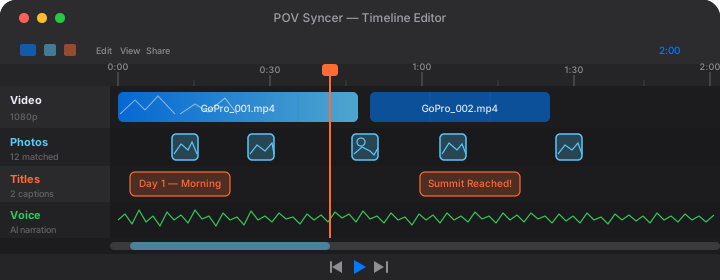
The workflow is three steps. Import your POV camera video from the camera roll. Import your session photographs. Tap sync. POV Syncer reads the EXIF timestamp of every image, finds the corresponding frame in the video, and places each photograph on the timeline at precisely the right moment. A sixty-photograph session with forty minutes of footage is matched in under sixty seconds. Not three hours. Under sixty seconds.
From there, the four-track timeline editor gives you everything needed to build a finished print process video without leaving the app. The video track carries your POV footage. The photo track carries your EXIF-matched photographs, appearing at the moment of capture with a shutter sound effect. The titles track lets you add text overlays — location names, camera settings, notes on technique — using 15 premium font options. The voice track lets you add AI-powered narration: your script, read in a natural voice, added to the edit without any recording equipment.
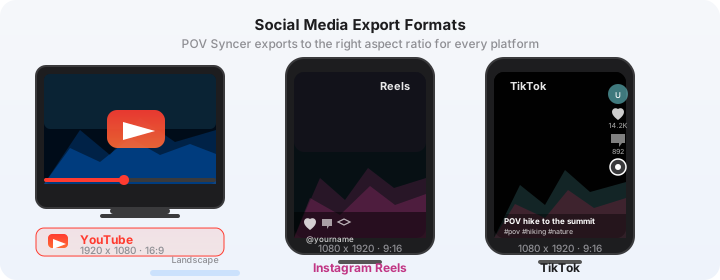
Export in whatever format your collector audience consumes: 16:9 for YouTube or your website, 9:16 for Instagram Reels and TikTok, 1:1 for Instagram feed posts. The same underlying edit, in three formats, in one tap.
Download POV Syncer Free — Create Your First Print Process Video TonightHow Process Videos Actually Drive Print Sales
The Architecture of a Collector's Decision
Understanding why process video converts collectors requires understanding how print buying decisions actually work. Unlike an impulse purchase, a fine art print sale follows a predictable emotional arc. First, the collector encounters the image — usually on Instagram, your website, or a gallery feed. They feel something: a pull, an aesthetic recognition, a connection to a mood or a place. That initial spark is necessary but not sufficient to close a sale.
The next stage is investigation. The collector looks at your other work. They read your bio. They check your prices. They think about the image again, perhaps returning to it over several days. During this investigation phase, they are unconsciously answering a series of questions: Can I trust this photographer? Is this work genuine? Will this print feel as significant in a room as it feels on a screen? Is this the kind of image I want to live with for years?
A process video answers every one of those questions more efficiently than any other format. It establishes trust by showing your actual practice. It confirms genuineness by making the moment of capture visible. It gives the print a narrative weight — a story — that makes it feel significant. And the specificity of that footage, the particular street on a particular day at a particular light, is precisely what distinguishes a fine art print from a stock image.
What to Include in a Print-Focused Process Video
A process video made specifically to support print sales is different in emphasis from a general street photography session video. Here is what to prioritise.
Open with context: the location, the time of day, the weather, what you were drawn to. A thirty-second POV walk through the neighbourhood before you make your first frame gives collectors the physical world your photographs came from. Show the approach to a scene — the moment you spotted something worth investigating — not just the capture itself. The decision to stop and raise the camera is often more revealing about your process than the shutter release.
After each key photograph appears on the timeline, include a brief title card with the camera, the settings, and a single sentence about what you were seeing. Something like: "Fujifilm X-T5 — f/8, 1/500s, ISO 800. The light lasted four minutes before cloud cover." That level of technical specificity is exactly what collectors find compelling. It confirms that real expertise and real attention went into the image.
End with the photographs themselves — your best two or three from the session, held on screen for five seconds each, without any overlay. Let the images land in their own space. If you are promoting specific prints for sale, this is the natural moment to add a title card with the edition size, dimensions, and price. Not as a hard sell — just as a factual coda to the process story you have told.
Where to Put Your Process Videos
Your website is the most important destination. If you sell prints through a dedicated print shop — Darkroom, Format, Squarespace Commerce — embed the process video directly on each print's product page. A collector who arrives at a print listing and can immediately watch the video of how that image was made is significantly more likely to convert than a collector who sees only the static image. This is not a marketing hypothesis. It is the same psychology that makes behind-the-scenes content on artisan food, clothing, and furniture websites consistently outperform image-only listings.
Instagram Reels is your discovery channel. Cut your process video to 60–90 seconds, export it in 9:16 format, and post it as a Reel with a link to the print in your bio or the product page. The Reels algorithm favours process and educational content in ways that static posts rarely benefit from. A single strong Reel showing how a notable print was made can reach many times your existing follower count.
YouTube provides the long-form home for your most significant sessions. A ten-to-fifteen minute process video of a major session — a week in Tokyo, a winter dawn series in Edinburgh, a specific project that produced several prints — belongs on YouTube where it can be found by search, watched fully, and linked in every subsequent communication with that collector. Long-form process videos on YouTube continue driving print inquiry and sales for years after they are posted.
Practical Tips for Print-Quality POV Sessions
Clock Sync Is Non-Negotiable
The entire automatic EXIF matching system in POV Syncer depends on your POV camera and your street camera having accurately synchronised clocks. The Ray-Ban Meta Gen 2 syncs its clock automatically to your iPhone time via the Meta View app — check that the app is open and the glasses are connected before you head out. The GoPro Hero 12 and 13 similarly sync to GPS time when outdoors and the time sync option is enabled in the GoPro app.
Your street camera — particularly Fujifilm, Leica, Ricoh, and Sony bodies — requires manual clock setting. Do this once every few weeks, not once and forgotten. Cameras' internal clocks drift slowly, and even a ten-second discrepancy will cause POV Syncer to place photographs slightly off their true moment in the video. A two-second tolerance is the default; for most sessions this is generous. For work requiring frame-accurate sync — close-up moments, fast-moving scenes — set your cameras' clocks at the start of every session.
Protecting Your Print-Quality Images During Export
There is an important distinction between the JPEG thumbnails you use for the process video and the full-resolution files you sell as prints. POV Syncer works with your JPEG exports or RAW-plus-JPEG pairs for the video timeline. Your original RAW files — the ones you process in Lightroom, Capture One, or Darkroom for print output — never need to be involved in the video workflow. Import medium-resolution JPEGs (the camera's built-in JPEG output is ideal) for the sync process. Your print masters stay separate and untouched.
Narration Makes the Difference
A process video without any narration is good. A process video with a calm, knowledgeable voiceover explaining what you were thinking, seeing, and deciding is significantly better. The AI narration feature in POV Syncer lets you add a professional voice track from a written script — no recording equipment, no quiet room, no retakes. Write two or three sentences per key image: what drew you to the scene, what the technical challenge was, what you were feeling in the moment. Read naturally, not formally. The result is the closest thing a collector can get to having you standing beside them, explaining your work in person.
Keep the narration honest. If the light was difficult, say so. If you almost missed the shot, say that too. Collectors are drawn to the reality of the craft — the decisions made under pressure, the moments that almost did not happen — far more than they are drawn to polished promotional language. Your process video is most powerful when it sounds like you talking to a fellow photographer, not a press release.
Want settings cheat sheets for 20+ camera combos?
Join 1,000+ photographers getting weekly tips — including free cheat sheets for every major POV and street camera combination. Ray-Ban Meta, GoPro, DJI, and Insta360 paired with Fujifilm, Leica, Ricoh, Sony, Canon, Nikon, and more.
Free PDF, no spam. Unsubscribe anytime.
Building a Print Sales Ecosystem Around Process Video
The "Session to Sale" Email Sequence
The photographers seeing the strongest results from process video are not just posting to social channels and hoping collectors find their print shop. They are using process videos as the anchor of a deliberate collector communication sequence. Here is the structure that works.
After a notable session, produce your process video using POV Syncer — the automatic EXIF sync means this takes minutes, not hours, on the same evening you shot the work. Post the video to Instagram Reels and YouTube. Then send an email to your collector list with a direct link to the video and a short paragraph contextualising the session: where you were, why, what you found. Below that paragraph, present two or three prints from the session with pricing and edition information. The video does the emotional work; the email closes the sale.
Collectors who receive this kind of communication regularly — a process video and a curated print selection, three or four times per year — develop a relationship with your work that is qualitatively different from a social media following. They are not casual admirers. They are invested in where you go next, what you find, how the work develops. That investment is the foundation of sustained print sales over time.
Limited Editions and Scarcity: Let the Story Do the Work
Fine art prints command premium prices partly through limited editions — a defined number of prints sold from a single image, creating scarcity. The conventional wisdom is that edition size signals value: an edition of 10 is more valuable than an edition of 50. That is true, but the story around the edition matters at least as much as its size.
A process video that shows the conditions under which a photograph was made — an early morning session in rain, a specific light that appeared for ninety seconds before cloud cover eliminated it, a moment of human interaction that could never be precisely repeated — is the most convincing possible argument for why a print from that session is genuinely irreplaceable. The edition number tells collectors that the print is scarce. The process video tells them why the moment was scarce. Those two things together are considerably more persuasive than either alone.
Collector Q&A Videos: Process as Ongoing Conversation
Once you have established a regular process video presence, a natural next step is the collector Q&A format. Invite your mailing list or social followers to submit questions about specific prints or sessions. Film a response using your Ray-Ban Meta or GoPro — walking through the neighbourhood where the image was made, or showing the print itself in your hands — and answer each question in that environment. The result is a hybrid of process video and documentary that is uniquely compelling for serious collectors.
This format requires almost no production infrastructure. One camera, natural light, a quiet enough environment for the audio to be usable. If you want to add a polished voice track, POV Syncer's AI narration can handle that. The output is the kind of direct, personal access that collectors of contemporary work actively seek and rarely receive from photographers working at a distance.
The Time Savings That Make This Sustainable
The case for using process video to sell prints is compelling. The barrier has always been time. Producing a polished process video through manual editing — scrubbing footage in Premiere Pro or Final Cut, placing sixty photographs one by one on a timeline, adjusting each by a few frames, adding title cards and narration — takes three to four hours per session. At that pace, producing enough regular content to maintain a collector relationship is simply not realistic alongside the actual practice of photography.
Automatic EXIF sync in POV Syncer removes that barrier entirely. The timeline builds itself in under sixty seconds. The four-track editor lets you add titles, narration, and refine the cut without leaving your iPhone. Export is one tap. The total production time for a typical ten-minute process video — from raw footage import to export-ready file — is fifteen to twenty minutes. That is a session you can turn around the same evening you shot it, before the emotional immediacy of the experience has faded.
At two sessions per week, that is eight process videos per month that you can actually produce and post, rather than eight sessions worth of footage sitting in a hard drive waiting for a four-hour editing block that never comes. The economics of collector engagement change completely when the content creation cost drops from hours to minutes. See the full feature set and pricing comparison to understand what the free tier covers and when Pro pays for itself in time saved.
For more on the wider landscape of monetising your POV street photography content, see How to Monetise Your POV Street Photography Videos. For the technique side of building compelling process content, Street Photography POV Video: Show How You Got the Shot covers the full session workflow. And if you are new to the POV format and wondering which camera to start with, Best POV Cameras for Street Photography 2026 breaks down every current option.
Start turning your print sessions into collector content tonight
Download POV Syncer free and produce your first print process video in under twenty minutes — automatic EXIF sync, four-track editor, AI narration, no desktop editor required.
Free app, no credit card. Pro from $9.99/month. Unsubscribe anytime.