Spring Street Photography: POV Videos of Cherry Blossom Season
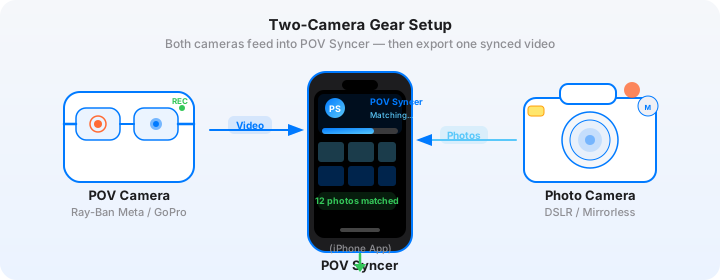
Cherry blossom season arrives fast and leaves faster. You get maybe ten days — two weeks on a good year — before the petals drop and the window closes entirely until next spring. I have been shooting sakura streets for the past four years and every single time I underestimate how quickly the window passes. One afternoon of clear skies, a couple of hours under the canopy on a quiet residential street, my Fujifilm X100VI in one hand and Ray-Ban Meta Gen 2 glasses on my face, recording every step.
I come home with 290 photos and 55 minutes of footage. Pink-tinted light, soft defocused blossoms in the foreground, people walking through a scene that looks genuinely magical for about two weeks per year. Then, in the past, I would spend an entire evening trying to turn that into a video. Scrubbing through footage in Premiere looking for the frame that matched each shot. Three hours minimum for a 10-minute walk video. The editing grind is exactly the thing that killed my motivation to make these posts consistently.
This year was different. POV Syncer's automatic EXIF sync matched all 290 frames to my footage in under 60 seconds. I was on the couch with the edit done before I had finished my first coffee at home. That is the spring street photography workflow I want to walk through here — gear, settings, and how to turn a sakura photo walk into finished video content in record time.
Why Cherry Blossom Season Is Unmissable for Street Photography
The obvious answer is visual: cherry blossoms transform ordinary streets into something extraordinary. A suburban road you have walked a hundred times suddenly has a soft pink canopy overhead, petals drifting across the footpath, light filtered through layers of flowers. Even mundane subjects — a commuter checking their phone, a food cart vendor, a couple on a bench — take on a different quality when they are placed inside that environment.
The less obvious answer is behavioural: blossom season changes how people use streets. Parks fill up. Families spread picnic sheets under trees. Friends gather under canopies for hanami, the Japanese tradition of flower viewing, that has spread well beyond Japan. People slow down and look up. The pace of a city changes for those two weeks, and that change is exactly the kind of social energy that street photography runs on. You are not just photographing trees — you are photographing people encountering something beautiful together.
For POV video, this environment is extraordinarily rich. The Ray-Ban Meta Gen 2 footage captures the walk from your eye level, moving through tunnels of blossoms, framing the light, showing the context of every single shot you take. When that footage syncs precisely to your X100VI stills, viewers understand not just the photograph but the whole scene around it — the sounds, the movement, the colour of the light at that exact moment.
The Gear: Ray-Ban Meta Gen 2 and Fujifilm X100VI for Spring Shooting
Ray-Ban Meta Gen 2 in Soft Spring Light
The Ray-Ban Meta Gen 2 glasses are quietly perfect for cherry blossom street photography. The form factor matters: you look like someone out for a spring walk, not a photographer on assignment. Under a blossom canopy, where people are relaxed, enjoying themselves, not watching for cameras, this naturalistic approach produces footage and photographs that feel genuinely candid.
For a cherry blossom shoot, set the glasses to 1080p at 30fps. The 30fps gives the footage a grounded, documentary quality that suits the genre — 60fps tends to look too smooth and produced for this kind of quiet, observational work. At 1080p30, battery life is around 60 minutes of continuous recording. The charging case gives you two or three full charges for an all-day session, which is important during peak blossom season when you want to cover morning light and the late afternoon golden hour in one outing.
Spring light is softer than summer or autumn light — overcast days during blossom season diffuse the harshness out of midday and create even, flattering illumination across the whole scene. The glasses' automatic exposure handles this beautifully. Leave the Meta View app's default colour processing in place and the footage takes on exactly the warm, slightly desaturated tone that suits the season — there is no colour grading work to do on the video side at all.
Fujifilm X100VI Settings for Soft-Light Cherry Blossom Shooting
The Fujifilm X100VI is my first choice for this kind of shooting, and the fixed 23mm f/2 lens (35mm equivalent) becomes a genuine strength in the blossom season environment. At f/2 or f/2.8, the bokeh renders out-of-focus blossoms as soft pink discs in the background and foreground — an effect that requires dedicated portrait glass on most other cameras but comes naturally with the X100VI's lens at close-ish working distances.
Here are the specific settings I run on the X100VI during cherry blossom sessions. These are tuned for soft, diffuse spring light with pink tones in the environment.
| Setting | Value | Why |
|---|---|---|
| Film Simulation | Eterna Cinema or Classic Neg | Eterna desaturates slightly and lifts shadows — perfect for the pastel palette of spring. Classic Neg adds muted contrast with retained pink tones. |
| Aperture | f/2–f/2.8 (blossom bokeh) / f/5.6–f/8 (zone focus street) | f/2 turns out-of-focus blossoms into soft pink bokeh discs. f/5.6–f/8 zone focus for quick reactive street work in crowds. |
| ISO | Auto ISO 160–3200 | Spring overcast light is generous — a lower ceiling keeps grain minimal in the delicate pastel tones. |
| Minimum shutter | 1/250s | Freezes motion in busy park environments. Petals blowing in wind need at least 1/500s if you want them sharp. |
| White Balance | Auto or Daylight | Daylight WB preserves the warm, golden cast of late afternoon spring light that Auto can sometimes neutralise. |
| Format | JPEG Fine + RAF | JPEG imports directly into POV Syncer for EXIF matching; RAF is your archival and editing file. |
| Highlight Tone | -1 or -2 | Blossom petals are bright — a slight negative highlight tone prevents the whites from clipping to pure white. |
The one pre-shoot step you must not skip is syncing the X100VI's clock to your iPhone before you start recording. The camera has no GPS or network time sync and its internal clock drifts. Before every blossom session, open the Clock app on your iPhone, check the exact seconds display, and match it precisely in the X100VI's setup menu under Date/Time. This is the foundation of automatic EXIF sync — without an accurate clock, POV Syncer cannot place your photos at the right moment in your footage.
Get the free POV Photography Cheat Sheet
Optimal Ray-Ban Meta Gen 2 and Fujifilm X100VI settings for spring shooting — including cherry blossom and soft-light presets, clock sync steps, and export presets for Instagram and YouTube. One printable page, free.
Free PDF, no spam. Unsubscribe anytime.
The Manual Editing Pain — and Why It Wastes Cherry Blossom Season
Before I get into the POV Syncer workflow, I want to be honest about what manual editing actually looked like for me in previous years — because the time cost directly impacts how much content you can make during the roughly ten-day window that blossom season gives you.
After a two-hour morning walk, I would come home with 200 to 300 JPEG frames and 40 to 60 minutes of glasses footage. Loading both into Premiere, I would start at the beginning of the timeline and scrub frame by frame, looking for the moment corresponding to each photo's EXIF timestamp. A photo taken at 09:47:23 means finding that precise moment in a 50-minute timeline — by hand, one frame at a time, across every single shot. For a 250-frame session, that is three hours of tedious timeline placement minimum before touching colour, titles, narration, or export.
Most years I managed one or two edited blossom videos across the whole season. Not because I did not shoot — I shot every good morning — but because the editing grind meant only a fraction of the material ever made it into finished content. Entire sessions with genuinely beautiful light stayed on a hard drive. The ten-day window closed before I had processed day three.
Hours of manual editing killed the momentum of blossom season content. POV Syncer removes that bottleneck entirely.
The POV Syncer Workflow: Sakura Session in 60 Seconds
Here is how the workflow runs after a cherry blossom street session this year. I am back home from a two-hour morning walk under the trees. The footage is on my iPhone from the Meta View app's automatic Wi-Fi sync. The JPEGs are transferred over Fujifilm XApp. I open POV Syncer and here is what happens next.
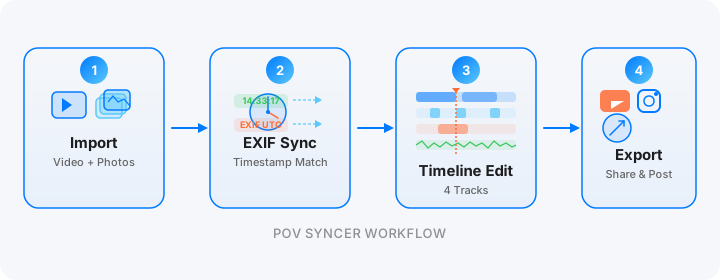
Step 1: Import Your Footage and Photos
Select the glasses video clip from your Photos library inside POV Syncer. Then import your JPEG folder from the morning's shoot. POV Syncer reads everything directly from your iPhone's Photos library — there is no external transfer step. For a 60-minute glasses clip and 300 JPEGs, this import takes about 20 seconds.
Step 2: Automatic EXIF Matching
This is the step that eliminates hours of manual work. POV Syncer reads the DateTimeOriginal and OffsetTimeOriginal fields embedded in every JPEG by your X100VI, calculates the offset from the video clip's start time, and places each photo at the exact frame it was captured. For a 300-photo spring walk, this automatic EXIF sync takes two to three seconds. What took hours of scrubbing through footage now happens automatically in record time.
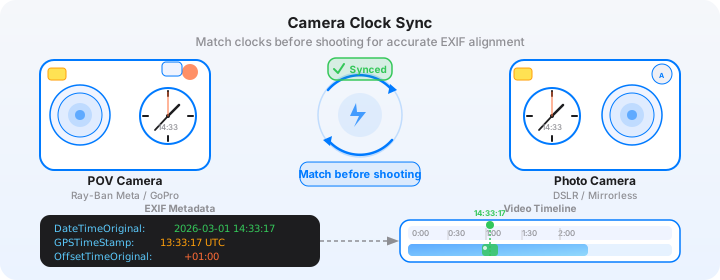
The matching tolerance is configurable in settings. For spring blossom shooting, where the light changes quickly and you may be shooting fast, I set a two-second tolerance window. Photos that fall outside the video's time range — shots taken before you pressed record or after you stopped — are flagged separately so you can review them without losing any frames from the session.
Download POV Syncer Free — Create Your First Blossom POV VideoStep 3: Timeline Editing and Titles
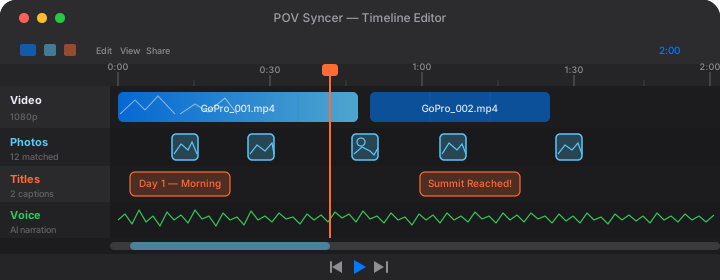
POV Syncer's 4-track timeline gives you video, photos, titles, and narration on separate tracks. For a spring blossom video, the title track is where I add quiet, minimal text — a location name and date at the opening, then one or two simple labels mid-video. Something like "Shinjuku Gyoen, 07:45" or "Meguro River, Early April" in a clean, light typeface. The 15 premium fonts in POV Syncer Pro include several options that suit the soft, contemplative aesthetic of a blossom walk — avoid anything heavy or decorative. Let the visuals carry the weight; the text is just orientation.
The timing of photos on the timeline is already handled automatically by the EXIF matching. Each still appears at precisely the moment it was taken. What the timeline editor gives you on top of that is control over hold duration — how long each photo stays on screen before cutting back to the glasses footage. For spring blossom content, I hold each still for about three seconds. Long enough for the image to register, short enough that the video keeps moving.
Step 4: AI Narration
The narration track is what elevates a spring blossom video from a slideshow to genuine content. I write 60 to 80 words — about four sentences — describing the location, the light, and what I was looking for when I raised the camera. Something like: "This is Meguro River at 8am on the fourth day of peak bloom. The overcast light was doing something extraordinary — completely flat and even, no harsh shadows, every petal rendered in full soft pink. I came looking for solitary figures under the trees. I found a woman with an umbrella reading on a bench and the whole morning made sense."
Choose one of POV Syncer's measured, thoughtful AI voices and let the narration render. It takes about 10 seconds. The voice sits under the ambient sound of the footage — wind through blossoms, distant footsteps, the sounds of a park in spring — rather than replacing it. The result is exactly the meditative tone that blossom content calls for.
Cherry Blossom Photography Tips: Locations and Timing
Timing Your Session Around Peak Bloom
Peak bloom — when the trees are at full flower before significant petal drop — is typically a four to five day window within the broader two-week season. In Japan, the Meteorological Corporation publishes daily sakura forecasts for every city. For cherry blossoms in London (mainly in parks like Battersea, Victoria, and Regent's Park), the Royal Parks website posts seasonal updates. In New York, the Brooklyn Botanic Garden's Cherry Blossom Festival typically peaks in late April and the garden provides live bloom status updates online.
For the best light during peak bloom, shoot early morning or the last two hours before sunset. Overcast mornings are particularly valuable — the flat light eliminates harsh shadows and the damp air after overnight rain keeps fallen petals vibrant on the path. The X100VI at Eterna simulation in flat morning light produces images that look like they have been through a careful grade with no actual grading work required.
Petal drop tip: The day after peak bloom, when petals are just beginning to fall heavily, is often the most photogenic for street work. People walk through drifts of petals on the path, the trees are still mostly full but showering, and the combination of falling petals and human subjects in motion creates extraordinary images. The X100VI at 1/500s freezes individual petals in flight — try f/2.8 at ISO 400 with a fast shutter for this effect.
Finding the Right Streets and Parks
The best cherry blossom street photography does not happen in the most famous locations. The most-photographed parks are crowded, and crowds change the nature of what you can capture — everyone is there to photograph the trees, not going about their ordinary lives. The most interesting blossom content happens on residential streets lined with sakura, in neighbourhood parks rather than tourist landmarks, along canal towpaths and river walks where locals use the blossoms as a backdrop for their daily routines rather than as a destination in themselves.
Look for streets where the tree canopy forms a tunnel overhead. With the Ray-Ban Meta glasses on, walking through that tunnel at eye level produces footage that feels genuinely immersive — viewers experience the walk from inside the tunnel of blossoms, not watching it from outside. That first-person perspective is the unique value of the POV format. No conventional vlog-to-camera setup can produce the same effect.
Working With Crowds and Soft Subjects
In crowded blossom locations, shooting at f/5.6 to f/8 with zone focus pre-set to around three metres lets you react instantly to any subject that appears in the frame. Raise the X100VI, press the shutter, move. At f/8 with the 23mm lens, depth of field from approximately 2.5 metres to infinity means almost everything in the frame is sharp without any focusing action from the camera. This is street photography's classic zone-focus approach and it works perfectly for this environment.
For quieter spots where you want to be more deliberate, use single-point AF with the AF-L button to lock focus on your subject, then recompose and shoot. The X100VI's contrast-detect AF is fast and accurate in the soft, even spring light typical of overcast blossom mornings. Either approach produces sharp shots that the EXIF timestamp records precisely for POV Syncer to match.
Want settings cheat sheets for 20+ camera combos?
Join 1,000+ photographers getting weekly tips — including seasonal guides for spring, autumn, and low-light street photography with Ray-Ban Meta and Fujifilm. Free, direct to your inbox.
No spam. Unsubscribe anytime.
Exporting Cherry Blossom POV Videos for Instagram and YouTube
Instagram Reels: The 60-Second Blossom Walk
Cherry blossom content performs exceptionally well on Instagram Reels, particularly in the last two weeks of March and the first two weeks of April when the seasonal search volume is at its highest. Export at 9:16 (1080x1920) for Reels. Keep the edit to 60 to 90 seconds maximum — the hook needs to happen in the first three seconds, which in a blossom walk is the moment your footage moves under a tree canopy and the pink light floods the frame.
Use one to three still photos in the Reel. Let each one hold for two to three seconds before returning to the glasses footage. The contrast between the moving glasses video and the stillness of each photograph is part of what makes this format work — the still photo is a pause, a moment of emphasis, before the walk continues. POV Syncer's one-tap photo matching means the timing between footage and stills is already accurate from the automatic EXIF sync. You are just selecting which moments to include.
YouTube Shorts and Long-Form: Showing the Full Walk
YouTube Shorts (60 seconds, 9:16) works well for the same blossom content as Instagram Reels, and cross-posting to both platforms during peak bloom season makes sense given how little extra effort it takes after the initial edit in POV Syncer. For YouTube long-form, a 10 to 15 minute cherry blossom photo walk video with narration and EXIF-matched stills is legitimate content for the photography audience on the platform.
For the long-form version, add chapter timestamps in the YouTube description: "0:00 Opening — Approaching the Trees / 3:30 Under the Canopy / 7:45 Petal Fall / 12:00 End of the Walk." YouTube's algorithm rewards watch time and chapters improve it by letting engaged viewers return to specific sections. The combination of POV footage, matched stills, and quiet AI narration creates exactly the meditative, educational content that the photography audience on YouTube responds to strongly.
What the Finished Video Looks Like
A finished cherry blossom POV street photography video made with this workflow is unlike most photography content that circulates during blossom season. Instagram is full of blossom photos — standalone images of canopies and petals and perfectly posed subjects. What is rare is a video that shows the actual experience of walking through that environment with a camera, making decisions in real time, capturing the ordinary moments alongside the obviously beautiful ones.
The Ray-Ban Meta Gen 2 footage carries the viewer through the walk at eye level. The EXIF-matched X100VI stills appear at the precise moment of capture, with the surrounding video context making clear what led to each frame — what you were walking toward, what caught your attention, what the light was doing, what the person was doing. That connection between intention and result is what makes the format compelling. It is a photography education delivered through a twenty-minute walk, not a tutorial.
POV Syncer Pro unlocks AI narration, 15 premium fonts, 10 background styles for $9.99 per month or $99.99 per year. The free tier gets you started immediately — your first cherry blossom video takes about 10 minutes from import to export, not the three hours of manual editing the old workflow required. See the full pricing comparison or explore the complete feature set before you download.
The Sakura Season Kit, Summarised
For anyone planning a cherry blossom photo walk with this setup, everything in one place.
- POV camera: Ray-Ban Meta Gen 2 — 1080p 30fps, ambient audio, charging case for full-day sessions
- Street camera: Fujifilm X100VI — fixed 23mm f/2, IBIS, Eterna or Classic Neg simulation for spring tones
- Key settings: f/2–f/2.8 for blossom bokeh; f/5.6–f/8 zone focus for reactive street work; ISO auto 160–3200; Highlight Tone -1 to protect petal whites
- Clock sync: Match X100VI clock to iPhone before every session — this is non-negotiable for EXIF sync accuracy
- Editing app: POV Syncer on iPhone — automatic EXIF sync, 4-track timeline, AI narration, App Store download
- Transfer: Meta View app (glasses to iPhone over Wi-Fi), Fujifilm XApp or USB-C (X100VI JPEGs to iPhone)
- Export: 9:16 1080p for Instagram Reels and YouTube Shorts; 16:9 1080p for YouTube long-form
The whole kit goes in a jacket pocket and a small bag. For blossom season, where the best hours are early morning before the parks fill up, being able to move quickly and quietly through the environment is what determines the quality of what you come home with. The lighter and less conspicuous you are, the better your footage and photographs will be.
Conclusion: Ten Days, Not Ten Videos That Never Got Edited
Cherry blossom season is ten days. Maybe twelve on a lucky year. Every hour you spend scrubbing through footage in Premiere is an hour you are not out shooting the next morning's light. The editing grind is not just a time problem — it is a momentum problem. When making the video from yesterday's session takes an entire evening, you start making compromises about whether this morning's walk is worth shooting.
POV Syncer changes that arithmetic completely. Automatic EXIF sync in under 60 seconds means you can turn around a finished blossom video between the morning session and the afternoon session. You can produce content every day of peak bloom instead of once or twice across the whole season. The raw material is extraordinary — the X100VI and Ray-Ban Meta Gen 2 produce genuinely beautiful work in the soft spring light. What POV Syncer does is make sure that work actually reaches an audience instead of staying on a hard drive while the petals fall.
Download the app, sync your first session, and post before the season closes. You have got about ten days.
Create your first cherry blossom POV video in 60 seconds
Download POV Syncer free and turn your spring footage into a finished video before peak bloom ends.
Or get the settings cheat sheet for 20+ camera combos delivered to your inbox:
Free PDF, no spam. Unsubscribe anytime.