Why "Behind the Shot" Is the Most Effective Format for Street Photographers
People who love photography do not just want to see great photographs. They want to understand how those photographs were made. What was the light like? How close were you to the subject? Did you plan the shot or react to something unexpected? How many frames did you shoot before getting the one?
Written tutorials answer some of these questions, but they cannot show the thing that matters most: what it actually looks like to be a street photographer in the moment of seeing and deciding. POV video can. And when that video is combined with the resulting photograph — placed at exactly the moment you pressed the shutter — the format becomes something genuinely instructive and compelling.
This is the behind-the-shot format: POV video of your process, with the resulting photos embedded at the precise moments they were taken. Viewers see you walking, waiting, positioning. They see the moment you raise the camera. Then the photo appears, with the same visual content the footage was pointing at, transformed by the framing and stillness that only a dedicated camera can produce.
The format works on Instagram Reels and YouTube Shorts because it has built-in forward momentum — viewers stay to see the payoff photograph. And it works for building an audience because it is educational, not just decorative. Every video teaches something about how to see.
Get the settings right the first time
Download the free POV Photographer's Cheat Sheet — camera settings, EXIF tips, and export presets for Ray-Ban Meta, GoPro, DJI, and Insta360 on one printable page.
Free PDF, no spam. Unsubscribe anytime.
Choosing Your POV Camera: Ray-Ban Meta vs. GoPro
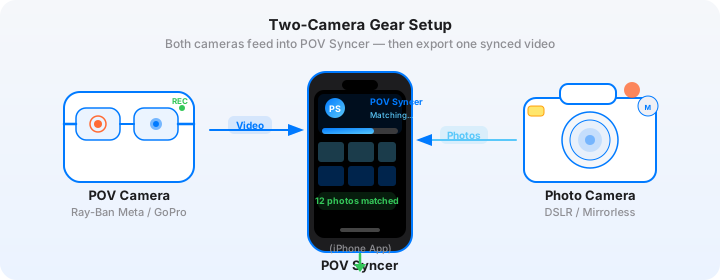
For street photography, your choice of POV camera significantly affects both the footage quality and the shooting experience. The two most popular options are Ray-Ban Meta smart glasses and a GoPro mounted on a chest or shoulder rig.
Ray-Ban Meta: The Invisible Option
Ray-Ban Meta glasses are the single best POV camera for street photography because they are invisible as a camera. When you wear them, subjects on the street do not know they are being filmed. The footage has a natural eye-level perspective that is genuinely first-person — because your eyes are at the same height as the lens.
The video quality from Ray-Ban Meta is 1080p, which is perfectly adequate for Reels and Shorts. The field of view is narrow enough to show what you are actually looking at rather than a wide-angle version of the scene. That narrow perspective also means the EXIF sync is more meaningful — when your Ricoh GR III photo appears on screen, it corresponds closely to what the glasses footage was showing at that moment.
The limitation is battery life: around 30 minutes of continuous recording per charge, though you can save video in shorter clips and the glasses passively record without looking conspicuous. For a 2 to 3 hour street session, plan on charging once during the day or carrying a small power bank.
GoPro Hero 13: The Quality Option
A GoPro Hero 13 on a chest mount or clipped to a camera strap gives you 4K/60fps footage with HyperSmooth stabilization. The wide-angle lens sees more of the scene than Ray-Ban Meta, which is useful when you want to show the environmental context around a shot. The trade-off is that a GoPro on a chest mount is visible — though most street photographers find this less intrusive than they expect, because non-photographers do not think of chest-mounted cameras as photo equipment.
For street photography behind-the-shot content, the GoPro's wider field of view works well for showing the approach to a shot — you can see the street, the potential subjects, your positioning. The Ricoh GR III photo then shows the much tighter, more intentional frame you chose within that environment.
The Ricoh GR III as Your Stills Camera
The Ricoh GR III is the street photographer's camera for reasons that align directly with the POV video format. It is small enough to shoot one-handed without breaking stride. The 28mm f/2.8 lens (GR III) or 40mm f/2.8 (GR IIIx) gives you a classic street focal length. The snap focus function — set the focus distance to 1.5m or 2m and shoot without focusing — makes it possible to capture decisive moments faster than any autofocus system.
Crucially for this workflow, the GR III saves complete EXIF data including DateTimeOriginal with UTC offset support. Set this correctly in the camera menu and your photos will sync to your POV footage with sub-second accuracy.
Shoot JPEG Fine for the fastest import and matching in POV Syncer. The GR III's JPEG output is excellent — good enough to post directly without any processing, which is useful when you are editing on your phone the same evening.
The Decisive Moment in Video
Henri Cartier-Bresson's concept of the decisive moment — the instant when form and content align in a photograph — has a parallel in the behind-the-shot video format. The decisive moment is the exact frame where you pressed the shutter. Everything before it is context. Everything after it is consequence. The photograph is the record of the split second itself.
When you use POV Syncer to place the Ricoh GR III photo at its exact EXIF timestamp in the GoPro or Ray-Ban Meta footage, you are marking the decisive moment in the video. Viewers watch the approach, then suddenly the photo appears — frozen, deliberate, precisely composed — and they understand that this was the moment. All that movement stopped for exactly this frame.
This is the format's emotional power. The video makes the photograph legible in a way that displaying the photograph alone cannot. Context and outcome, combined.
Composition and Timing: What to Think About While Shooting
The Three-Part Structure of a Behind-the-Shot Video
Every good behind-the-shot Reel or Short has three parts:
- The approach. You walking, looking, positioning. The scene before anything has happened. This establishes the environment and builds anticipation.
- The moment. You raising the GR III. The shutter sound. The photo appearing in the video — placed automatically by POV Syncer at the exact EXIF timestamp.
- The result. The photo held on screen for 2 to 3 seconds. Let viewers look at it. This is the payoff they stayed for.
For a 30 to 60 second Reel, the approach takes 15 to 25 seconds, the moment is instantaneous, and the result takes 3 to 8 seconds depending on how complex the photo is to read. The rest of the runtime is ambient footage before or after — the street continuing, people walking past, the scene settling.
Making the Approach Interesting
The approach section determines whether viewers stay for the photo reveal. For it to hold attention, something has to be developing — a potential subject coming toward you, a shadow pattern you are moving into position with, a scene that has elements but needs something to happen.
The skill of street photography, shown in this format, is the skill of reading situations in advance. Viewers see you approaching a location and can often sense — from your pace, your positioning, your angle — that something is about to happen. That anticipation is the hook.
The Shutter Sound as a Cue
If you are using the GR III's mechanical or electronic shutter with sound enabled, the click is audible in the POV video audio. This sound is a useful editing cue — it appears at exactly the moment the shutter fired, which should correspond exactly to where POV Syncer has placed the photo. If you hear the shutter sound in the footage 2 seconds before the photo appears in the timeline, you know the EXIF timestamps are off by 2 seconds and you can adjust accordingly.
How POV Syncer Handles the EXIF Sync for Street Photography
Street photography presents a specific timing challenge for EXIF matching: the moments you are shooting for are brief and often follow a period of nothing happening. Unlike travel vlogging, where you are photographing landmarks that are easy to identify in footage, a decisive moment in street photography happens in a fraction of a second.
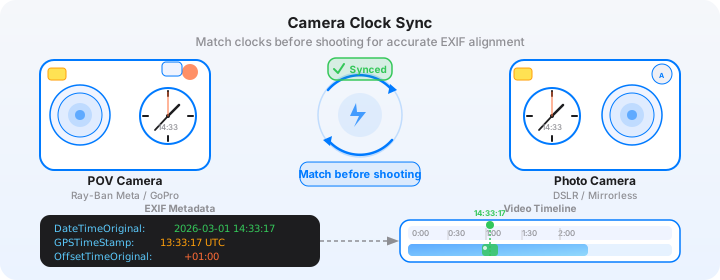
POV Syncer's matching system handles this well because it is based on absolute timestamps, not relative footage position. It does not try to detect "action" in the video — it reads the photo's EXIF DateTimeOriginal and places it at the corresponding second in the video's timeline. If you took the photo at 14:23:47, the photo appears at the footage that was recorded at 14:23:47.
Getting the Clocks Right Before You Shoot
This is the critical step for street photography specifically because the moments happen fast. A 2-second clock offset means your photo appears 2 seconds before or after you pressed the shutter in the footage. For a scene where the decisive moment lasted 1 second, that is the difference between the photo appearing at the peak of the action versus an empty frame.
Before every street session: check that your Ray-Ban Meta app or GoPro app is synced to your phone's time (they do this automatically when connected). Then check your Ricoh GR III clock against your phone. The GR III does not have GPS or network time sync, so it relies on the manual clock you set. Check it at the start of each trip and adjust it if it has drifted.
The most precise method: take a photo of your phone's lock screen showing the time. The EXIF timestamp of that photo tells you exactly what the GR III thinks the time is at that moment. Compare to the actual time. If there is a 5-second offset, you know to adjust accordingly.
Importing and Matching in POV Syncer
Open POV Syncer and create a new project. Import your POV video (Ray-Ban Meta clips export from the Meta View app; GoPro clips transfer via the GoPro app or a card reader). Import your GR III JPEGs.
POV Syncer runs four matching strategies in sequence: GPS UTC timestamp, OffsetTimeOriginal EXIF field, GPS-corrected timezone inference, and device timezone fallback. For a GR III with UTC offset set correctly, the OffsetTimeOriginal strategy typically provides the most accurate match.
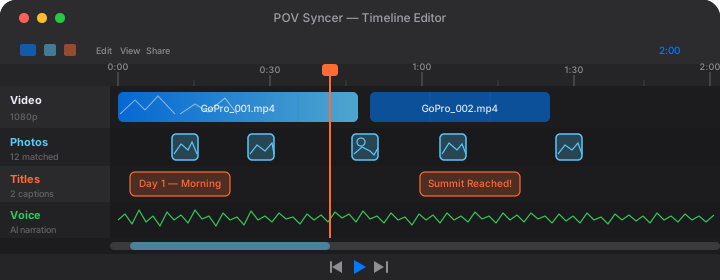
After matching, review each placement in the timeline. For a session where you took 40 photos in 90 minutes of footage, the review takes about 10 minutes — scrub to each photo, check that it falls at a visually appropriate moment, and drag it to adjust if needed.
Building a Following with Process Content
What Makes Street Photography Process Content Shareable
The accounts with genuine following in photography are almost never those that only post beautiful images. They are the accounts that give viewers a sense of how those images come to exist — the thought process, the technique, the repeated attempts before something works.
Behind-the-shot POV video does this better than any other format because it is genuinely first-person. You are not explaining your process abstractly — you are showing it from your exact perspective in real time. Viewers who are also street photographers immediately recognize specific experiences: the moment you slow down because you sense something about to happen, the stillness before you raise the camera, the slight change in your position to get the framing right.
This recognition creates engagement. People comment because they have been in exactly that situation. They ask about the focal length, the settings, the camera. They ask what you were thinking. The format generates the kind of conversation that static image posts rarely do.
Posting Strategy for Instagram Reels
For Instagram Reels, the optimal behind-the-shot format is 30 to 45 seconds. The hook is the first 3 seconds of footage — something needs to be visually happening immediately. The payoff photo appears between the 15 and 30 second mark, held for 3 to 5 seconds. The remaining time is either more footage or a brief text caption explaining what you saw.
Caption the Reel with the technical details that photographers want: camera, focal length, settings, film simulation or processing. This is searchable and serves viewers who are specifically looking for content about those cameras. "Ricoh GR III, 28mm, f/5.6, 1/500s, ISO 400, PDN-N film simulation" takes five seconds to write and serves the SEO as well as the audience.
Posting Strategy for YouTube Shorts
YouTube Shorts functions similarly to Reels but with a key difference: YouTube's discovery algorithm rewards retention rate. A 60-second Short where 80% of viewers watch to the end performs dramatically better than a 60-second Short where 40% drop off at the 30-second mark.
Keep behind-the-shot Shorts tight — the photo reveal is the natural endpoint of the video, so end there. Do not add unnecessary footage after the reveal. The viewer's instinct on seeing the payoff photo is to feel satisfied and either replay or scroll. End the video at that peak.
Use POV Syncer's AI narration for a 10-second voiceover that explains what you saw before you pressed the shutter. This narration should play during the approach section, not over the photo — let the photo speak for itself.
Camera Settings for Street Photography POV Video
Ray-Ban Meta Settings
- Video quality: 1080p (the only option — it is fine for Reels)
- Recording mode: Hands-free via button tap; record in 3 to 5 minute clips
- Capture photos simultaneously: Yes — the glasses can take photos, but the Ricoh GR III photos will be much better. Use the glasses for video only.
- Time sync: Automatic via connected iPhone — no action needed
GoPro Hero 13 Settings for Street Photography
- Resolution: 4K/60fps for smooth playback; 2.7K if storage is a concern
- Field of view: Wide (not Max — Max is too wide and distorts the scene)
- HyperSmooth: On (standard, not boost — boost can make walking look unnaturally floaty)
- GPS: On — enables the most accurate EXIF matching strategy in POV Syncer
- Protune: Off for most street shooting — the default color profile is fine
Ricoh GR III Settings for Behind-the-Shot Content
- File format: JPEG Fine (complete EXIF data, fast import)
- Image Effect: Positive Film or Monotone for a consistent look across a session
- Focus: Snap focus at 2.0m for unconscious street subjects; MF at hyperfocal distance for wide-open shooting
- ISO: Auto ISO 100–3200 in daylight; 100–6400 at dusk
- Shutter: 1/500s minimum to freeze movement; 1/1000s for fast-moving subjects
- UTC offset: Set in Camera Settings before every trip
- Shutter sound: On (the click provides an audio sync reference in POV footage)
The Complete Behind-the-Shot Workflow
- Pre-session: Confirm both cameras show the same local time. Set GR III UTC offset. Start GoPro or Ray-Ban Meta recording.
- Shoot: Walk and observe. Let the POV camera record continuously. Shoot with the GR III when something is worth a frame.
- Transfer: GoPro via card reader to iPhone; GR III JPEGs via SD card reader. Ray-Ban Meta clips export via the Meta View app.
- Import into POV Syncer: Create a new project. Add POV video. Add GR III JPEGs. Let the EXIF matching run.
- Select the best moments: Scroll the timeline and identify the 1 to 3 photo placements that make the best behind-the-shot story. Remove the rest, or save them for separate projects.
- Edit: Trim the footage to focus on the approach and reveal. Add a brief AI narration if needed. Choose a clean background style for the photo overlay.
- Export: 9:16 for Reels and Shorts. Export directly from POV Syncer.
- Post: Caption with camera settings and location. Pin the first comment with further context if you have more to say.
A Behind-the-Shot Video That Works
Here is what a strong street photography behind-the-shot Reel looks like in practice.
The GoPro footage opens mid-walk. A street market. It is mid-morning, light angled across the stalls. You can see in the footage that the photographer is slowing — something has caught their eye. A vendor arranging produce, the shadow of the stall awning falling across their hands at a particular angle.
At the 18-second mark, the footage shows the camera being raised. A fraction of a second later, the POV Syncer timeline places the Ricoh GR III photo: the vendor's hands and the shadow, stopped in time, the composition tight, the grain of the GR III's JPEG rendering adding texture. The photo holds for 4 seconds.
Brief AI narration over the approach: "I had been watching this stall for ten minutes waiting for the light to move. When it did, I had about three seconds."
No further explanation. The photo is the explanation.
That is 35 seconds. Complete, instructive, shareable. The comment section fills with photographers asking about the focal length and the light. Some ask how you set the EXIF sync. You tell them.
Create your first behind-the-shot video
POV Syncer is free to download. Bring your Ray-Ban Meta or GoPro footage and your GR III photos. The EXIF matching places every photo at the exact moment it was taken — automatically.
Download POV Syncer FreePro: $9.99/month or $99.99/year — AI narration, 15 fonts, unlimited projects