Switching from GoPro to Ray-Ban Meta for Street Photography POV
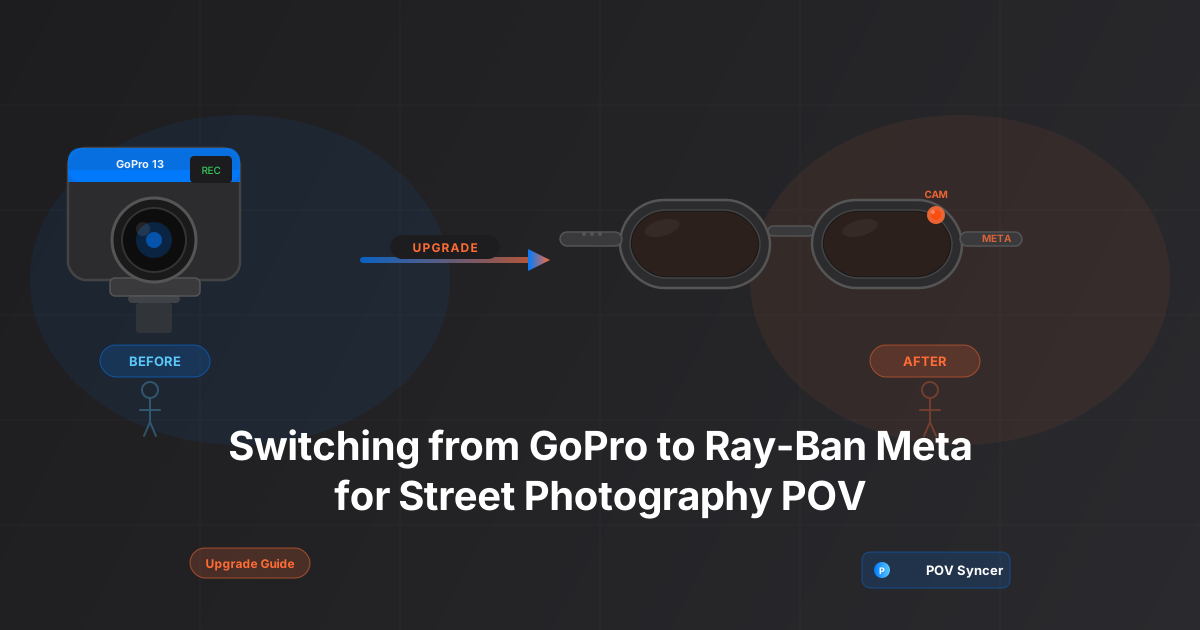
Picture the scene: you are deep in the old quarter of a city, Fujifilm X-T5 in hand, working the light in a narrow alley. On your chest — or worse, your head — there is a GoPro Hero 13. The blue plastic rectangle. The mounting hardware digging into your collar. The unmistakable silhouette of someone who is definitely filming something.
The subjects notice. The candid moments disappear. The whole thing feels like you are on a film set rather than walking the street.
A lot of street photographers arrive at this exact friction point and start wondering whether Ray-Ban Meta Gen 2 smart glasses might be the answer. Wear your camera on your face. Look like any other person wearing glasses. Walk freely. Record everything.
The honest answer is: it depends on what you actually need. This guide breaks down every dimension of the comparison so you can make the call with real information rather than hype.
Get the free POV Photography Cheat Sheet
Camera settings, mounting tips, and EXIF sync guides for Ray-Ban Meta, GoPro Hero 13, DJI Action 5 Pro, and Insta360 — all on one printable page. Join 1,000+ photographers getting weekly tips.
Free PDF, no spam. Unsubscribe anytime.
The Setup: What You Are Actually Comparing
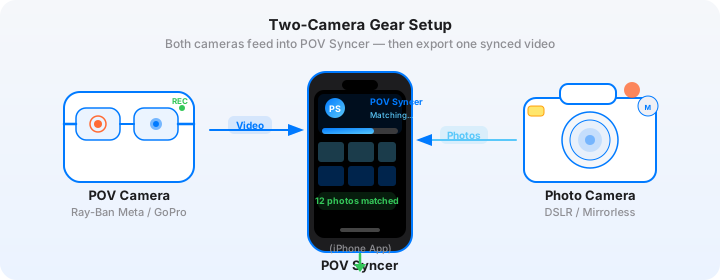
This is a comparison between the GoPro Hero 13 — mounted chest or head, the typical street photography POV rig — and the Ray-Ban Meta Gen 2 smart glasses. Both record first-person video of your session. Both pair with POV Syncer for automatic EXIF-based sync with your stills. The differences in every other dimension are significant.
GoPro Hero 13 Specs (POV Context)
- Resolution: Up to 5.3K at 60fps, 4K at 120fps, 1080p at 240fps
- Field of view: Ultra-wide (155 degrees), Wide, Linear, Narrow (with digital crop)
- Stabilisation: HyperSmooth 6.0 — class-leading electronic stabilisation
- Audio: Three-mic array with wind noise reduction
- Battery life: Approximately 70–90 minutes at 4K30fps
- Mounting: Chest harness, head strap, or third-party clips
- Price: Around $399 body only, plus mount hardware
- Form factor: Rectangular black/blue camera — clearly visible
Ray-Ban Meta Gen 2 Specs (POV Context)
- Resolution: 1080p at 30fps (3MP photos available)
- Field of view: Fixed wide (approximately 90 degrees horizontal)
- Stabilisation: None — optical only; stability depends on your walking gait
- Audio: Five-mic open-ear audio array with active noise reduction; excellent ambient capture
- Battery life: Approximately 60 minutes of continuous video; charging case extends to 36 hours total
- Mounting: Worn on your face — no hardware required
- Price: $299–$329 depending on lens/frame style
- Form factor: Standard sunglasses or clear-lens glasses — essentially invisible as a recording device
The Pain of Manual Editing — Before We Talk Cameras
Here is the thing nobody mentions when street photographers talk about switching POV cameras: neither camera solves the editing problem on its own. Before POV Syncer existed, a typical street session looked like this: you get home with 40 minutes of GoPro footage and 80 photos. You open Premiere Pro or Final Cut. You scrub through the footage looking for the moments where you raised the camera. You manually drag photos onto the timeline, eyeballing the placement. You add text. You adjust. Three hours later you have a 6-minute video.
That is the editing grind that kills most people's motivation to produce process content regularly. And it happens regardless of whether your POV camera is a GoPro or a pair of Ray-Ban glasses.
POV Syncer eliminates that step entirely. It reads the EXIF DateTimeOriginal timestamp on every photo you shot, matches it to the exact frame in your video, and places each photo on the timeline automatically — in under 60 seconds. That workflow works identically with GoPro footage and Ray-Ban Meta footage. So before we compare the cameras, know that the production friction after the session is the same for both, and the solution is the same too.
Now, with that out of the way — let's compare what matters on the street.
Discretion: The Decisive Factor for Street Photography
Street photography is fundamentally about access. Your ability to be in a scene without disturbing it determines the quality of what you can capture. On this dimension, the two cameras are not close.
GoPro on a Chest Mount
A GoPro on a chest harness is visible from twenty feet away. It signals "this person is recording video," and subjects — particularly in cities with high baseline awareness of surveillance and cameras — respond to that signal. They look at the lens. They step out of frame. Conversations stop. The candid moment that defined your composition evaporates.
Head-mounting is worse. A GoPro on your forehead looks like a strange technological helmet and draws even more attention. Some photographers try cap mounts, which are slightly less conspicuous, but the camera is still clearly there.
Ray-Ban Meta Gen 2
The glasses look like glasses. There is a small camera dot in the right lens housing and an LED indicator light that blinks when recording — Meta is legally required to include the indicator to inform bystanders — but in practice, on a busy street, most people do not notice it. You look like a person walking. The naturalness of the scenes you capture reflects that.
For documentary street photography — the genre where authentic human moments matter most — the discretion advantage of the Ray-Ban Meta is not minor. It changes the nature of the footage you can capture.
Video Quality: Where GoPro Has a Real Advantage
The Ray-Ban Meta Gen 2's camera records at 1080p30. The GoPro Hero 13 goes to 5.3K. That is not a marginal difference — it is a fundamental gap in image quality, dynamic range, low-light performance, and flexibility in post-production.
Resolution and Detail
At 4K or 5.3K, GoPro footage holds up beautifully on desktop screens and large-format displays. The Meta's 1080p footage is fine for Instagram Reels and TikTok — platforms optimised for phones — but it will look noticeably soft on a 4K monitor or in a YouTube video viewed on a TV. If your content primarily lives on social mobile platforms, this matters less. If you are producing long-form YouTube content or want to crop aggressively in post, GoPro wins clearly.
Dynamic Range and Low Light
The GoPro Hero 13 shoots in 10-bit color with HDR modes available. In high-contrast street scenes — a figure against a bright window, a backlit alley — GoPro retains shadow and highlight detail that the Ray-Ban Meta's smaller sensor cannot match. In low light, the story is the same: GoPro's larger sensor and aperture gather more light and produce cleaner footage at ISO equivalents above 800.
For golden-hour and blue-hour street work — some of the best light for street photography — GoPro footage will be noticeably better.
Stabilisation
GoPro's HyperSmooth 6.0 is extraordinary. Even running or moving quickly, the footage appears smooth and cinematic. The Ray-Ban Meta has no electronic stabilisation at all. Walking footage is acceptable; anything faster — rushing to get in position, moving through a crowd — shows significant shake. You can stabilise Meta footage in post (Premiere's Warp Stabilizer or similar), but it costs resolution and introduces occasional warping artefacts.
Audio Quality: Ray-Ban Meta's Surprise Strength
The Ray-Ban Meta Gen 2 uses a five-microphone open-ear audio array originally designed for calls and music. On a street, this translates into remarkably natural ambient audio — the texture of a city, footsteps on cobblestones, snippets of conversation, the soft mechanical click of a shutter. The glasses capture sound from all directions in a way that feels genuinely documentary.
The GoPro Hero 13's three-mic array is optimised for action footage: wind noise reduction, speaker voice pickup when you talk to the camera, clarity over ambience. For talking heads and commentary, it is better. For passive street audio capture, the Meta's system often sounds more authentic.
If you use POV Syncer's AI narration feature, ambient audio from either camera can sit underneath your narration track. But if you want the raw street atmosphere to be part of the final video — which is often the right creative call for street photography process content — the Meta's audio has an edge in character.
Download POV Syncer Free — Create Your First POV Video in 60 SecondsBattery Life: Closer Than You Think
The GoPro Hero 13 at 4K30fps delivers approximately 70–90 minutes of recording before the battery dies. With an Enduro battery (the cold-weather optimised version), you can push closer to 100 minutes. GoPro also sells a battery module that clips to the back of the camera and adds significant shooting time, though it increases bulk.
The Ray-Ban Meta Gen 2 gets approximately 60 minutes of continuous video at 1080p30. The glasses come with a charging case that provides around 36 hours of standby and multiple charge cycles — but that is a different thing from continuous recording time. If you are doing a three-hour street session and recording the whole time, neither camera is going to make it without an interruption, but you will hit the Meta's limit first.
The practical workaround for the Meta is the charging case. Slip the glasses into the case during a coffee stop, grab a quick 20-minute charge, and you are back to a full hour. GoPro users typically carry a spare battery or two.
Heat and Continuous Recording
GoPro Hero 13 can overheat during extended recording sessions in warm weather or when shooting high-frame-rate formats. If you are shooting in summer heat, you may hit a thermal cutoff before the battery dies. The Ray-Ban Meta glasses produce less heat overall, partly because they are recording at lower resolution and partly because the processing is distributed differently. This is a minor point but worth knowing if you shoot in hot climates.
Mounting and Physical Setup
This is where the practical reality of street photography makes its clearest argument. Setting up a GoPro for a street session means putting on a chest harness or clipping a mount to your clothing, calibrating the angle so the shot matches your eye level, ensuring the camera is turned on and recording, and managing the cable or external battery if you have one. It is a gear ritual that takes a few minutes and feels unambiguously like preparation for an event.
The Ray-Ban Meta setup is: put on your glasses. That is it. The camera is part of the frame. You turn it on with a tap or leave it running. There is nothing to adjust, nothing to mount, nothing to check before you leave the house.
For street photographers who want to shoot opportunistically — grabbing the camera when something interesting is happening rather than planning a deliberate session — the Meta's zero-setup profile is genuinely freeing. You are always ready.
Cost: The Real-World Calculation
The GoPro Hero 13 body costs approximately $399 at launch, plus $30–$60 for a quality chest or head mount. The Ray-Ban Meta Gen 2 runs $299–$329 depending on the frame and lens configuration. On pure cost, Meta wins.
But cost comparisons in camera gear are rarely straightforward. If you already own a GoPro Hero 12 or 11, the upgrade to Hero 13 for street POV is harder to justify than buying into Meta as a new platform. If you wear prescription glasses or need specific tints, the Meta's lens options add cost. And if the quality difference in video (4K vs 1080p) matters for your use case, GoPro's higher price may be the right investment.
One important framing: both cameras become significantly more valuable as street photography tools when paired with POV Syncer. The automatic EXIF sync is what turns raw footage into finished content — and that workflow is identical regardless of which camera you use. The investment in the workflow pays off either way.
Tips: Getting the Best from Each Camera on the Street
If You Are Staying with GoPro
Switch to a chest mount rather than a head mount. The chest perspective is closer to true eye level and produces footage that looks natural when viewed on a screen. Head-mounted footage tends to exaggerate every head movement and creates a nauseating final product. Set the field of view to Linear rather than Ultra-Wide — it removes the fisheye distortion that makes wide-angle GoPro footage look distinctly like GoPro footage rather than cinema. Shoot at 4K30fps for street documentation; save 60fps for scenes where you specifically want slow-motion capability. Turn on HyperSmooth 6.0 at all times.
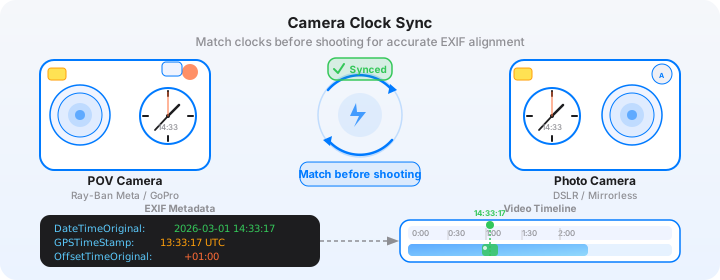
Clock sync is critical: GoPro's internal clock drifts, and you should manually synchronise it to your iPhone time before every session. In POV Syncer, use the manual offset slider if you notice your photos appearing a second or two off from where you actually fired the shutter — small adjustments here make the final video noticeably more polished.
If You Are Switching to Ray-Ban Meta
Set recording to 1080p30 via the Meta View app before going out — it is the highest quality available and the frame rate gives the footage a documentary quality that suits street photography. Wear the glasses slightly higher on your nose than feels natural; the camera sits at the top of the right lens, so raising the frame slightly angles the camera closer to true eye level.
The LED recording indicator is not as intrusive as you might expect — most people do not notice it at conversational distance in daylight — but be aware that it will be more visible in low-light environments. In dim alleys or evening sessions, subjects are more likely to notice you are recording.
Learn the tap gesture for starting and stopping recording quickly. The fastest way to miss a moment with Meta is fumbling for the button. Practice the tap on the temple until it is automatic — then you can start recording the instant something interesting happens in front of you, without breaking stride or raising a visible device.
Want settings cheat sheets for 20+ camera combos?
Join 1,000+ photographers getting weekly POV tips — optimal settings for Ray-Ban Meta, GoPro Hero 13, DJI Action 5 Pro, Insta360 GO 3S, and every major street camera pairing. One email, every week, nothing but useful.
Free, no spam. Unsubscribe anytime.
The POV Syncer Workflow: Identical for Both Cameras
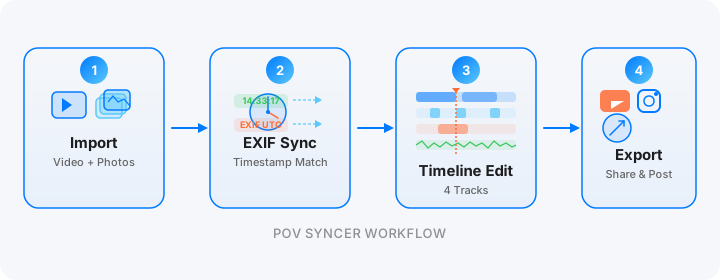
Here is the part that makes this comparison clean: once your session is over and the footage is on your iPhone, POV Syncer treats GoPro and Ray-Ban Meta video identically. You import the video clip, import the photos from your street camera — Fujifilm, Leica, Ricoh, Sony, whatever you shoot — and tap the sync button. Automatic EXIF matching reads the DateTimeOriginal timestamp from every photo and places each one on the video timeline at exactly the frame it was taken.
What took 2–4 hours of manual scrubbing in Premiere or Final Cut takes under 60 seconds. The photos appear in the right places. You trim, add title cards using any of the 15 premium fonts in POV Syncer Pro, drop in an AI narration track if you want one, and export. The whole production step — from raw footage to finished video — takes 15–20 minutes including export time.
That workflow efficiency is the same regardless of whether your POV footage came from a GoPro on your chest or Ray-Ban glasses on your face. The camera choice affects the character of the footage; POV Syncer handles the production regardless.
Internal links worth reading if this workflow is new to you: the full EXIF timestamps explainer covers how the sync system works technically, and the street photography POV guide walks through the full creative process from session planning to export. If you are specifically interested in the narrative editing step, the AI narration guide covers voice selection and scripting in detail.
Who Should Make the Switch — and Who Should Not
Switch to Ray-Ban Meta Gen 2 If:
- Discretion is your primary concern — authentic candid street footage matters more to you than technical image quality
- Your content lives primarily on Instagram Reels, TikTok, or other mobile-first platforms where 1080p is plenty
- You shoot in good daylight conditions and can avoid extended low-light sessions
- You want the simplest possible setup — glasses on, recording started, nothing else to manage
- You value the open-ear audio capture for ambient street atmosphere in your final videos
- You are new to POV recording and want a low-friction entry point before investing in more complex gear
Stick with GoPro (or Consider Switching to GoPro) If:
- You produce long-form YouTube content where 4K resolution and dynamic range are visible differences to your audience
- You shoot extensively in low light — golden hour, evening streets, interior venues
- You move quickly during sessions — the HyperSmooth stabilisation makes a real difference if you are constantly repositioning
- You need footage that holds up when cropped — GoPro's 5.3K gives you significant post-production flexibility
- You already own GoPro hardware and the switching cost is not justified by the discretion benefit for your specific shooting style
The Honest Middle Ground
Many serious street photographers end up owning both. Ray-Ban Meta for casual sessions, everyday walks, and situations where looking inconspicuous is essential. GoPro for longer outings, travel, and content specifically designed for YouTube or high-quality documentary use. POV Syncer works with both, and the EXIF sync workflow is portable between them. You are not locking yourself into one ecosystem.
The Finished Video: What to Expect from Each Setup
A finished POV video from a Ray-Ban Meta session has a specific quality: the footage feels intimate and personal. The slightly softer image, the natural walking movement, the open-ear ambient audio — it reads as genuine documentary rather than produced action content. Viewers feel like they are actually walking with you. That intimacy is a creative asset for street photography process content, where authenticity matters as much as technical quality.
A finished POV video from a GoPro session has a different quality: it is crisper, more visually impressive at full resolution, and the HyperSmooth footage has a cinematic glide that looks produced in a positive sense. For photographers building premium-positioning YouTube channels, the GoPro footage positions you as a serious creator. The tradeoff is the slight performance quality to the footage — it is less invisible.
With POV Syncer, either finished video takes 15–20 minutes to produce, not 3 hours. The automatic EXIF sync eliminates the editing grind entirely, leaving you with the actually creative decisions: which clips to keep, where to place the title cards, what tone the narration should take. Those are the decisions worth spending time on. Scrubbing through footage to manually find the frame where you pressed the shutter is not.
Conclusion: The Right Camera Is the One You Will Actually Wear
The best POV camera for street photography is the one you actually bring out and actually wear. A GoPro sitting in your bag because you did not want to put on the harness today produces zero footage. Ray-Ban Meta glasses that you simply put on with your keys and wallet produce footage every time. For many street photographers, that default-on quality is the decisive factor — and it is one that no spec sheet comparison fully captures.
Whichever camera you choose, the production step is no longer the bottleneck. POV Syncer matches your photos to the video automatically in seconds, not hours. Your creative process is the story. Now it takes under 20 minutes to tell it.
Create your first POV video in 60 seconds
Download POV Syncer free. Works with GoPro Hero 13, Ray-Ban Meta Gen 2, DJI Action 5 Pro, Insta360, and any camera with EXIF timestamps. No manual editing. No scrubbing. Just sync and export.
Download POV Syncer FreeOr get the free cheat sheet for 20+ camera combos:
Free PDF, no spam. Unsubscribe anytime.